

Introduction
Starting a blog or website is exciting, but once you begin attracting visitors, an important question often comes up: How can I make money from my website?
One of the most popular website monetization methods is Google AdSense. It allows website owners and publishers to earn money by displaying advertisements alongside their online content. Google matches ads to a site based on factors such as its content and visitors, while advertisers compete for available ad space. If you haven’t created your website yet, start with our guide on How to Start a Blog That Makes Money to learn how to choose a niche, build your blog, create content, and grow your audience.
For beginners, one of the biggest advantages of Google AdSense is that you don’t need to personally find companies willing to advertise on your website. Once your site is approved and properly connected to AdSense, Google handles much of the advertising process.
The basic idea looks like this:
Create a Website → Publish Valuable Content → Attract Visitors → Apply for AdSense → Get Approved → Display Ads → Earn Advertising Revenue
However, simply creating a website does not guarantee AdSense approval or significant income.
Google says publishers need original, high-quality content that complies with its program policies, and applicants generally need to be at least 18 years old. Google reviews sites before they can begin showing AdSense ads.
Your earnings can also vary considerably. AdSense may generate revenue from ad impressions, clicks, and other interactions depending on the ad type, and advertisers pay different amounts for different advertising opportunities.
That means AdSense should not be viewed as a get-rich-quick method. Building useful content and attracting a genuine audience remain important parts of creating a website that can generate advertising revenue.
In this Google AdSense for Beginners guide, you’ll learn what Google AdSense is, how it works, its basic requirements, how to prepare your website, how to apply, why applications may be rejected, how publishers earn money, and the common mistakes beginners should avoid.
By the end, you’ll have a clearer understanding of how to move from:
Website → Quality Content → Traffic → AdSense Approval → Ads → Revenue
Whether you’re starting your first blog or already have a growing website, this guide will help you understand the fundamentals before applying for Google AdSense.
What Is Google AdSense?
Google AdSense is an advertising program that allows website owners, bloggers, and other eligible publishers to earn money by displaying advertisements alongside their online content. Website owners interested in the program can learn more or create an account through the official Google AdSense website
Instead of contacting businesses individually and asking them to advertise on your website, AdSense connects your available advertising space with advertiser demand. Google says AdSense matches ads to websites based on factors such as the site’s content and visitors.
For example, imagine you run a website that publishes articles about technology, blogging, AI tools, and online business.
When someone visits one of your articles, AdSense may display advertisements relevant to the page or audience. The exact ads aren’t normally selected manually by the website owner; Google’s systems automatically determine which eligible ads can appear.
Who Is Involved in Google AdSense?
The AdSense system can be understood through three main participants:
1. Advertisers
These are businesses or organizations that pay to advertise their products and services.
2. Publishers
Publishers are website owners or content creators who make advertising space available through AdSense.
3. Website Visitors
These are the people who visit the publisher’s website and may see or interact with the advertisements.
The basic relationship looks like this:
Advertiser → Google AdSense → Publisher’s Website → Visitor
How Are Ads Selected?
AdSense uses an ad auction to determine which eligible advertisement appears in available ad space.
Advertisers compete for that advertising opportunity, and Google explains that the auction uses bids to select the winning ad. The amount publishers earn can therefore vary because advertisers may bid different amounts for different advertising opportunities.
In simple terms:
Advertisers Compete → AdSense Selects an Eligible Winning Ad → Ad Appears on Your Website → Publisher Can Earn Revenue
How Does a Publisher Make Money?
AdSense can generate publisher revenue through mechanisms including valid ad clicks or impressions, depending on the type of ad and bidding model. Google describes CPC ads as paying for valid clicks and CPM ads as paying for valid ad views per thousand impressions.
This means having advertisements on your website does not guarantee a fixed amount of money.
Your earnings can vary depending on factors such as advertiser demand, bids, ad performance, your audience, and the advertising opportunities available on your pages.
Is Google AdSense Free?
Yes. Google states that participation in AdSense is free of charge. Publishers do not pay Google simply to join the AdSense program.
However, you may still have normal expenses associated with operating your website, such as domain registration, hosting, premium tools, or content production.
A Simple Example
Suppose you publish an article titled:
“How to Start a Blog That Makes Money”
A reader finds the article through Google Search and visits your website.
If your website has been approved for AdSense and ads are properly configured, advertisements may appear alongside the article.
The process could look like:
Google Search → Visitor Opens Your Article → AdSense Ads Appear → Valid Ad Impression/Interaction → Potential Ad Revenue
The important thing to understand is that Google AdSense monetizes the attention your content attracts through advertising.
Your main responsibility remains creating useful content and building a genuine audience. AdSense provides the advertising system that can turn some of that traffic into revenue.
How Does Google AdSense Work?
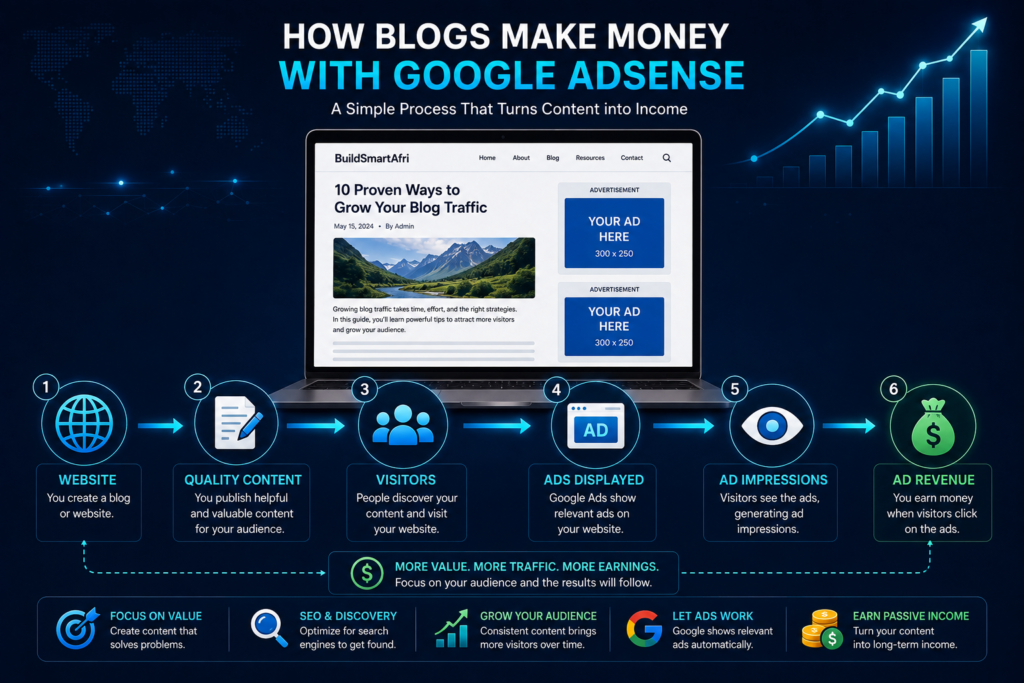
Google AdSense works by allowing publishers to make advertising space available on their websites. Advertisers then compete for those advertising opportunities, Google selects eligible ads, and the publisher can earn revenue when ads are displayed.
Google summarizes the process in three basic stages: publishers make ad space available, advertisers bid in a real-time auction, and Google handles advertiser billing and publisher payments.
The basic process looks like this:
Create Content → Attract Visitors → Connect Website to AdSense → Make Ad Space Available → Advertisers Bid → Ads Appear → Generate Ad Revenue
Let’s look at how each part works.
1. You Create a Website and Publish Content
Before advertising becomes useful, you need content that gives people a reason to visit your website.
This might include:
- Educational articles
- Tutorials
- How-to guides
- Product comparisons
- Reviews
- News or informational content
- Original research or resources
Google recommends having interesting and original content that attracts visitors when preparing to sign up for AdSense.
Your website therefore comes first.
Quality Website + Useful Content + Visitors → Monetization Opportunity
2. You Apply for Google AdSense
Once your website is ready, you can create an AdSense account and add your site.
Google then reviews your site to determine whether it complies with the AdSense Program policies. According to Google’s current documentation, site reviews usually take a few days, although some can take 2–4 weeks.
Approval isn’t automatic simply because you own a website.
3. You Connect Your Website to AdSense
During the setup process, you need to connect your website to AdSense.
Google currently provides verification methods including an AdSense code snippet, ads.txt code snippet, or meta tag. For the AdSense code method, the provided code is added between the <head> and </head> tags of your website.
For WordPress websites, this can be handled through an appropriate integration method rather than manually editing every individual article.
4. You Make Advertising Space Available
After approval and configuration, your website can make space available for advertisements.
You can use Google’s Auto ads, which automatically determine placements, or use more manual controls depending on how you want advertising integrated into your site. Google says Auto ads can automatically place and optimize ads for publishers.
Ads might appear in different areas of a website depending on the configuration and eligible formats.
5. Advertisers Compete for the Ad Space
When advertising space becomes available, advertisers can compete through an auction.
Google explains that advertisers bid to appear in available ad spaces and the system automatically selects eligible winning ads.
In simplified form:
Available Ad Space → Advertisers Bid → Ad Auction → Winning Eligible Ad → Advertisement Appears
You don’t normally need to contact each advertiser yourself.
6. Google Determines Which Ads Appear
Google can automatically target advertisements using different methods.
For example, contextual targeting analyzes a webpage to understand its subject, while other forms of targeting can take account of placements or audience-related information where applicable.
Therefore, two visitors reading the same website may not necessarily see exactly the same advertisement.
7. Visitors See the Advertisements
Once ads are active, people visiting your website can see advertisements alongside your content.
For example, imagine you publish:
“How to Start an Online Business with Little Money”
A visitor discovers the article through Google Search:
Google Search → Your Article → Visitor Reads Content → AdSense Ads Display
That visitor doesn’t need to purchase anything directly from you for advertising monetization to be possible.
8. You Generate Advertising Revenue
AdSense for Content has shifted to paying publishers primarily based on impressions, rather than the older model that was commonly described mainly around clicks. Google says this change was made to create a more consistent way of comparing publisher monetization technologies.
This is important for beginners because you should never encourage visitors to click advertisements or click your own ads.
Google specifically states that clicking your own ads for any reason is prohibited.
Your job is to create valuable content and attract legitimate visitors, not manipulate ad interactions.
9. Google Handles Advertiser Billing and Publisher Payments
Another advantage of AdSense is that you don’t need to collect advertising payments individually from advertisers.
Google handles the billing process and manages payments to eligible publishers.
That makes the overall system:
Advertiser Pays → Google Manages Advertising System → Ads Appear on Publisher Website → Publisher Earns Eligible Revenue
Simple Practical Example
Imagine a beginner creates a blog about technology and online business.
They publish 30 useful articles and gradually begin receiving visitors from Google Search, social media, and other sources.
After the website is accepted into AdSense, advertisements begin appearing alongside eligible content.
Suppose one article starts receiving regular traffic:
Google Search → 1,000 Article Views → Ad Impressions → Advertising Revenue
The exact amount earned isn’t fixed. Google notes that advertisers pay different prices for different ads, so publisher earnings vary.
This is why building traffic and useful content remains important.
The overall AdSense model is straightforward:
Create Valuable Content → Build Genuine Traffic → Display Ads → Generate Valid Ad Impressions → Earn Revenue → Continue Growing Your Website
The next important question for most beginners is therefore: How much money can you actually make with Google AdSense?
How Much Can You Earn With Google AdSense?
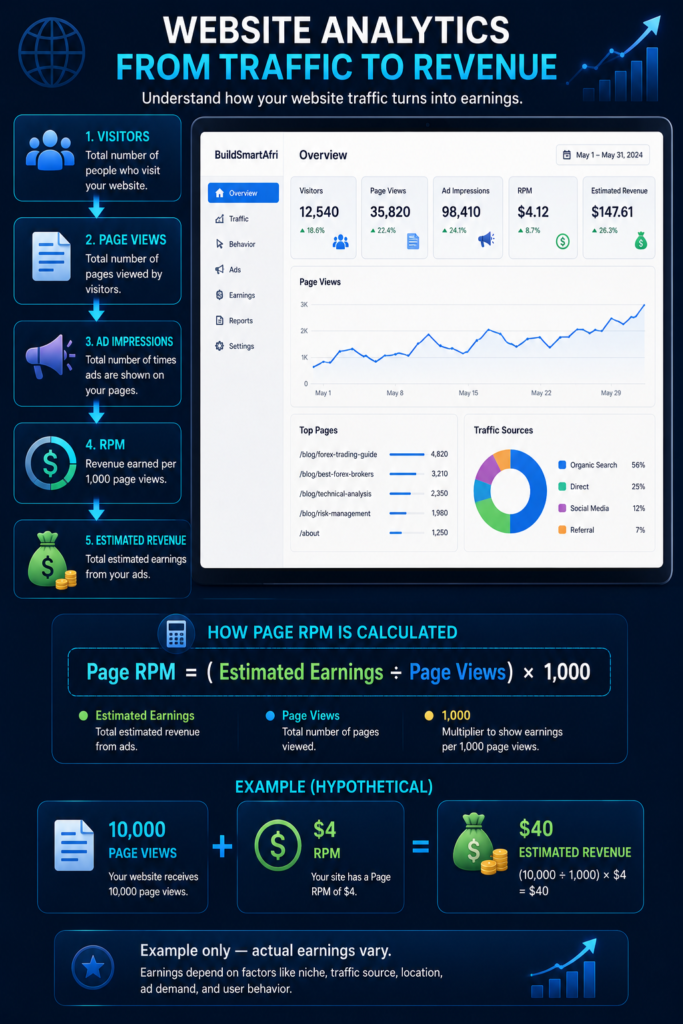
One of the first questions beginners ask is: “How much money can I make with Google AdSense?”
There is no fixed amount. Two websites receiving the same number of page views can earn very different amounts because advertising revenue depends on several factors.
Google uses metrics such as RPM (Revenue Per Thousand Impressions) to help publishers understand performance. Page RPM represents estimated earnings for every 1,000 page views and is calculated using:
Page RPM = (Estimated Earnings ÷ Page Views) × 1,000
A Simple AdSense Earnings Example
Suppose your website receives 10,000 page views in one month and, purely as an example, your page RPM is $4.
Your estimated revenue would be:
10,000 ÷ 1,000 × $4 = $40
If the same website had a page RPM of $8:
10,000 ÷ 1,000 × $8 = $80
These figures are only examples to explain the calculation. They are not guaranteed AdSense earnings.
What Affects Your AdSense Earnings?
Several factors can influence how much your website generates.
1. Website Traffic
Generally, more legitimate page views create more opportunities for advertisements to be displayed.
For example:
1,000 Page Views → Fewer Ad Impressions
50,000 Page Views → More Potential Ad Impressions
However, traffic alone doesn’t determine revenue.
2. Your Audience
The characteristics and location of your audience can affect advertiser demand. Advertisers may value different audiences differently depending on their campaigns.
This means websites with similar traffic levels can produce different advertising results.
3. Your Content and Niche
The topics you publish can also influence the advertising opportunities available on your website.
A website about technology, for example, may attract different advertisers from a website about food, travel, education, or entertainment.
You shouldn’t choose a niche solely because you think advertisers will pay more. Building useful content for a real audience should remain the priority.
4. Advertiser Demand
AdSense uses auctions in which eligible advertisers compete for advertising opportunities.
Because demand and advertiser bids can vary, your revenue can also change over time.
5. Number of Page Views
A visitor may read more than one page during a session.
For example:
1 Visitor → 3 Articles → 3 Page Views
Increasing engagement by creating useful internal links and related content can help visitors discover more of your website, although you should never manipulate users simply to generate additional ad impressions.
Understanding RPM
RPM is one of the most useful AdSense metrics for beginners.
Google explains that RPM is an estimated performance metric, not the exact amount you’ve actually earned. It can be used to compare revenue performance across different channels or periods.
For example:
Estimated Earnings: $20
Page Views: 5,000
Your page RPM would be:
($20 ÷ 5,000) × 1,000 = $4 RPM
Understanding RPM makes it easier to evaluate how your site is monetizing rather than looking only at your total earnings.
Don’t Focus Only on Earnings
When you’re starting a new website, checking AdSense revenue every few hours isn’t particularly useful.
Your early goals should be:
First 100 Visitors → First 1,000 Page Views → Consistent Search Traffic → Growing Content Library → Higher Engagement → Growing Revenue
Focus first on building the asset that generates the revenue: your website and its audience.
For example, publishing useful evergreen articles can potentially attract visitors for months or years, although search traffic is never guaranteed.
Estimated Earnings vs Finalized Earnings
Another important point is that the earnings displayed in your AdSense dashboard during the month are estimated.
Google explains that estimated earnings can later be adjusted, including adjustments related to invalid clicks or impressions. Finalized earnings are posted separately after the relevant processing.
So if your dashboard initially shows a particular amount, you shouldn’t automatically assume that exact figure will be your final payment.
Avoid Trying to Manipulate Your Earnings
Never click your own advertisements or encourage friends, family, readers, or followers to click ads simply to help you make money.
Trying to artificially increase advertising activity can result in invalid traffic and potentially create serious problems for your AdSense account.
Your strategy should instead be:
Publish Helpful Content → Attract Genuine Visitors → Improve User Experience → Grow Legitimate Traffic → Let AdSense Monetize Naturally
The Bigger Picture
A new blog with limited traffic may initially generate very little advertising revenue. That’s normal.
As your content library and genuine audience grow, the number of monetizable page views may also increase.
Instead of asking only:
“How much can I make from AdSense?”
A more useful question is:
“How can I build a website that consistently attracts and helps the right audience?”
AdSense monetization becomes much more meaningful when it’s built on top of quality content, genuine traffic, and a growing audience.
Google AdSense Requirements for Beginners
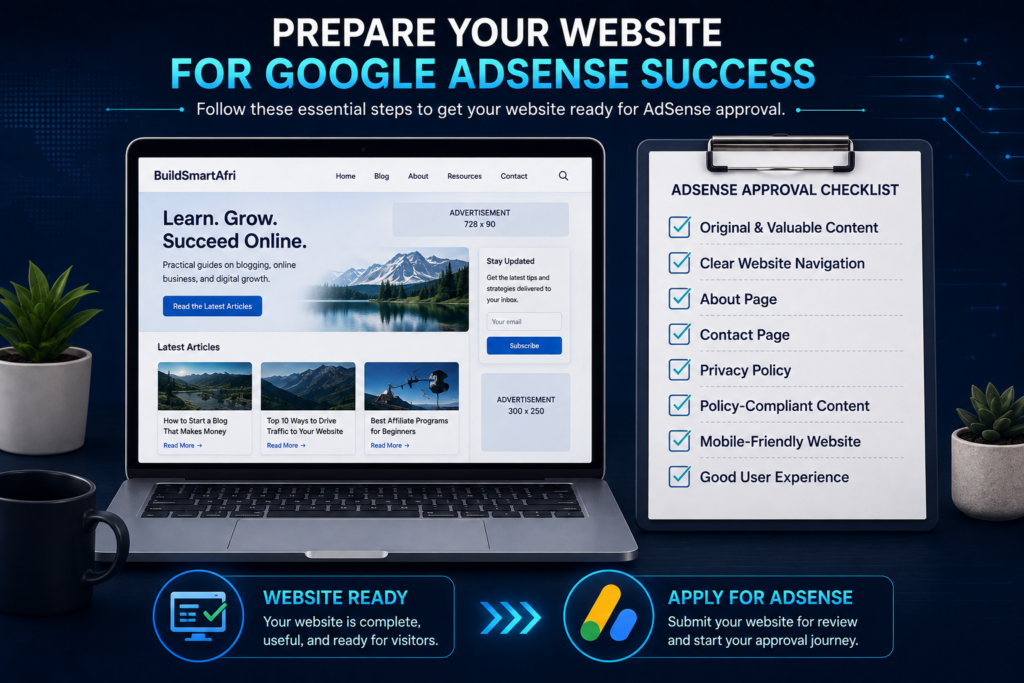
Before applying for Google AdSense, you should make sure your website is ready for review. Having a website alone does not automatically qualify you for the program. Google reviews participating sites for compliance with its policies and other eligibility requirements. Before applying, review Google’s official AdSense eligibility requirements to understand requirements concerning content, site control, age, and policy compliance.
The good news is that beginners do not need to wait until their website becomes extremely popular before considering an application. What matters is building a legitimate site with useful content and following Google’s requirements.
1. Create Original and Valuable Content
One of the most important requirements is having content that provides genuine value to visitors.
Google advises prospective AdSense publishers to have their own interesting and original content. Your website should give visitors a reason to stay, read, and return.
Avoid building a website primarily from:
- Copied articles
- Automatically generated pages with little added value
- Very thin articles
- Duplicate content
- Pages created mainly to display advertisements
- Content taken from other websites without meaningful original contribution
If you use AI tools to assist with writing, research, outlines, or editing, review the finished content carefully. Make sure it is accurate, useful, original, and genuinely created for readers.
2. Make Sure You Own or Control the Website
You need sufficient control over the website you want to use with AdSense.
Google explains that publishers need access to the site’s HTML source code to place AdSense code where required.
If you own a WordPress website with your own domain and hosting, you normally have the level of control needed to connect the site to AdSense.
3. You Must Meet the Age Requirement
Google requires AdSense participants to be at least 18 years old.
If someone is under 18, Google states that a parent or guardian can sign up using their own Google Account, and payments would be made to the adult responsible for the site.
4. Follow AdSense Program Policies
Your website must comply with Google’s publisher policies.
These policies cover areas such as prohibited content, deceptive practices, invalid traffic, ad behavior, and other requirements.
For example, publishers must never:
- Click their own ads
- Ask visitors to click advertisements
- Generate artificial impressions or clicks
- Use misleading methods to encourage ad interaction
Following the rules remains important even after your website has been approved.
5. Have Clear Website Navigation
Visitors should be able to move around your website easily.
A professional website should have a clear menu that helps readers find important sections and content.
For example:
Home | Technology | Online Business | AI | About | Contact
Avoid confusing navigation, broken links, misleading buttons, or pages that are difficult to access.
A clean website structure improves the experience for both visitors and search engines.
6. Create Important Website Pages
Before applying, it is sensible to have essential pages that establish who operates the website and explain important policies.
These commonly include:
About Us — explains who you are and what the website provides.
Contact Us — gives visitors a way to contact you.
Privacy Policy — explains how your website handles information, cookies, advertising technologies, and related privacy matters.
Disclaimer — explains limitations and relevant disclosures concerning your site’s information.
If you use affiliate links, you should also provide clear affiliate disclosures where appropriate.
These pages help make your website more transparent and professional.
7. Have a Privacy Policy
A privacy policy is particularly important for an advertising-supported website.
Google’s AdSense program policies require publishers to maintain a privacy policy that clearly discloses data collection, sharing, and usage resulting from Google products used on the site, including technologies such as cookies.
Your privacy policy therefore shouldn’t simply exist as an empty page—it needs to accurately describe relevant practices on your website.
8. Make Your Website Easy to Use
User experience matters.
Before applying, check your website on both desktop and mobile devices.
Ask yourself:
Does the site load properly?
Can visitors read articles comfortably?
Does the menu work?
Are images displayed correctly?
Are there annoying pop-ups covering the content?
Are important pages accessible?
A clean, usable website creates a stronger foundation for monetization.
9. Don’t Wait for a Mythical Traffic Number
A common claim online is that you must reach a specific number such as 1,000, 5,000, or 10,000 monthly visitors before applying for AdSense.
Google’s published eligibility guidance does not specify a universal minimum traffic threshold for joining AdSense. Its guidance instead emphasizes factors such as original content, policy compliance, control of the site, and age eligibility.
This doesn’t mean traffic is unimportant.
More genuine traffic generally creates more opportunities to generate advertising revenue. But beginners shouldn’t confuse earning potential with basic eligibility.
10. Your Website Should Look Complete
Don’t rush to submit a website that still looks unfinished.
Before applying, check for:
- Empty categories
- Placeholder text
- Broken pages
- Missing images
- Unfinished articles
- Duplicate pages
- Broken navigation
- Excessive advertisements from other sources
- Poor mobile layouts
Your website should feel like a real publication built for visitors not a temporary site created only to get AdSense approval.
Simple AdSense Readiness Checklist
Before applying, your website should ideally have:
Original Content
Useful Articles
Clear Navigation
About Page
Contact Page
Privacy Policy
Policy-Compliant Content
Mobile-Friendly Design
Working Website
Genuine Visitors
You don’t need a perfect website or enormous traffic before applying. The better objective is to build a complete, useful, trustworthy, and policy-compliant website.
Once these foundations are in place, you can move to the next step: preparing your website specifically for the AdSense review process.
How to Prepare Your Website for Google AdSense
Before submitting your website to Google AdSense, take some time to review the entire site as if you were a first-time visitor. Your goal should not be to build a website merely for AdSense approval. Instead, create a useful, complete, and trustworthy website that provides a good experience for readers. Building a professional website doesn’t necessarily require a large starting budget. Our guide on How to Start an Online Business with Little Money covers practical ways beginners can get started while keeping costs manageable. Before submitting your website, carefully review the official Google Publisher Policies to make sure your content and monetization practices comply with Google’s requirements.
Here are the most important areas to check.
1. Review Your Existing Articles
Go through your published content and make sure each article provides genuine value.
Look for articles that are:
- Extremely short without a clear reason
- Incomplete
- Repetitive
- Outdated
- Poorly formatted
- Duplicated
- Filled with unnecessary keywords
- Missing important information
Don’t assume that publishing hundreds of articles automatically makes your website stronger. A smaller collection of genuinely useful articles can provide a better experience than a large number of low-value pages.
Where necessary, update older articles by adding practical examples, clearer explanations, useful images, internal links, and current information.
2. Organize Your Content Into Clear Categories
Visitors should quickly understand what your website is about.
For example, a digital-skills website might organize its content into categories such as:
Technology | Artificial Intelligence | Online Business | Digital Skills
Then individual articles should naturally fit within those categories.
A clear structure helps visitors discover related information instead of reading one article and immediately leaving.
3. Improve Your Main Navigation
Your website menu should be simple and functional.
Avoid adding dozens of unnecessary links to the header.
A straightforward navigation structure might look like:
Home | Technology | AI | Online Business | Digital Skills | About | Contact
Important legal and policy pages can also appear in the footer.
Before applying, test every menu item on both desktop and mobile devices.
4. Complete Your Essential Pages
Make sure important pages are published and contain meaningful information.
These commonly include:
About Us
Explain what your website is about, the type of information you publish, and who the content is intended to help.
Contact Us
Provide visitors with a reasonable way to contact the website owner or editorial team.
Privacy Policy
Your privacy policy should accurately explain relevant privacy practices, including the use of cookies and advertising technologies where applicable.
Disclaimer
If your website publishes educational information about areas such as finance, online business, technology, or other topics where readers could interpret information as professional advice, an appropriate disclaimer can clarify the purpose and limitations of the content.
Affiliate Disclosure
If you use affiliate links, clearly disclose that you may receive compensation from qualifying purchases or actions.
5. Remove Duplicate and Unfinished Pages
Before submitting your site, clean up unnecessary pages.
For example, you might have created several test versions while designing your website:
Blog
Blog 2
New Blog
Test Page
Elementor Draft
Visitors should not encounter these unfinished or duplicate pages.
Delete unnecessary drafts where appropriate, redirect obsolete URLs when necessary, and make sure only the intended public pages are accessible.
6. Improve Mobile Responsiveness
A large portion of internet traffic comes from mobile devices, so your website should work properly on smaller screens.
Check:
- Font size
- Menu functionality
- Image scaling
- Buttons
- Tables
- Pop-ups
- Forms
- Article width
- Footer layout
Readers shouldn’t need to constantly zoom in or scroll horizontally just to read an article.
7. Improve Website Speed
A slow website can create a frustrating experience.
Large images, unnecessary plugins, poorly optimized scripts, excessive animations, and heavy page designs can contribute to slower loading. You can use Google’s free PageSpeed Insights tool to analyze your website’s performance on mobile and desktop and identify potential improvements.
Some practical improvements include:
Compress images
Use appropriately sized images and efficient formats where suitable.
Remove unnecessary plugins
Keep plugins that serve a genuine purpose.
Use caching appropriately
Caching can help reduce repeated loading work.
Choose reliable hosting
Hosting performance can influence how quickly your website responds.
Google’s PageSpeed Insights can also help identify performance issues:
Don’t become obsessed with achieving a perfect score. Focus on creating a fast and comfortable experience for real visitors.
8. Check for Broken Links
Go through important pages and articles and make sure links still work.
This includes:
Internal links — links pointing to other pages on your website.
External links — links pointing to other websites.
Affiliate links — links connected to affiliate programs.
If you’ve deleted or renamed pages, make sure old internal links aren’t sending visitors to 404 errors.
9. Make Your Articles Easy to Read
Even detailed articles shouldn’t look like giant walls of text.
Improve readability with:
- Clear headings
- Short paragraphs
- Relevant images
- Lists where useful
- Tables when they genuinely improve comparison
- Examples
- Internal links
- Descriptive subheadings
Avoid excessive banners, animations, pop-ups, or design elements that distract readers from the main content.
10. Make Your Website Look Trustworthy
Visitors should be able to understand who operates the website and why the content exists.
Useful trust signals can include:
Clear website branding
About information
Author information where appropriate
Contact details or contact form
Publication and update information
Sources for factual claims
Transparent affiliate disclosures
Professional design
Don’t create fake testimonials, fake author credentials, or false claims of expertise simply to make the website appear more authoritative.
11. Check Your Content Against Google’s Publisher Policies
Before applying, review Google’s current publisher policies and make sure your content complies.
This is especially important if your website covers topics where advertising restrictions may apply.
Don’t wait until your application is rejected before reviewing the policies.
12. Check Your Website as a Visitor
Finally, open your website in a private/incognito browser window and explore it without logging into WordPress.
Ask yourself:
Can I immediately understand what this website is about?
Can I easily find useful articles?
Does the menu work?
Can I access About, Contact, and Privacy information?
Do the pages load correctly?
Does the site look good on mobile?
Are there any unfinished sections?
Would I trust this website enough to continue reading it?
If the answer is yes, your website is much closer to being ready for AdSense review.
Final Pre-Application Check
Your preparation journey should look like:
Review Content → Fix Site Structure → Complete Essential Pages → Remove Duplicates → Improve Mobile Experience → Check Speed → Fix Broken Links → Review Policies → Apply for AdSense
Don’t rush the application simply because you want advertisements immediately.
Spending additional time improving your website before submitting can also benefit your readers, search visibility, affiliate marketing efforts, and long-term growth not just your AdSense application.
Once your website is ready, the next step is applying for Google AdSense and connecting your website for review.
How to Apply for Google AdSense Step by Step
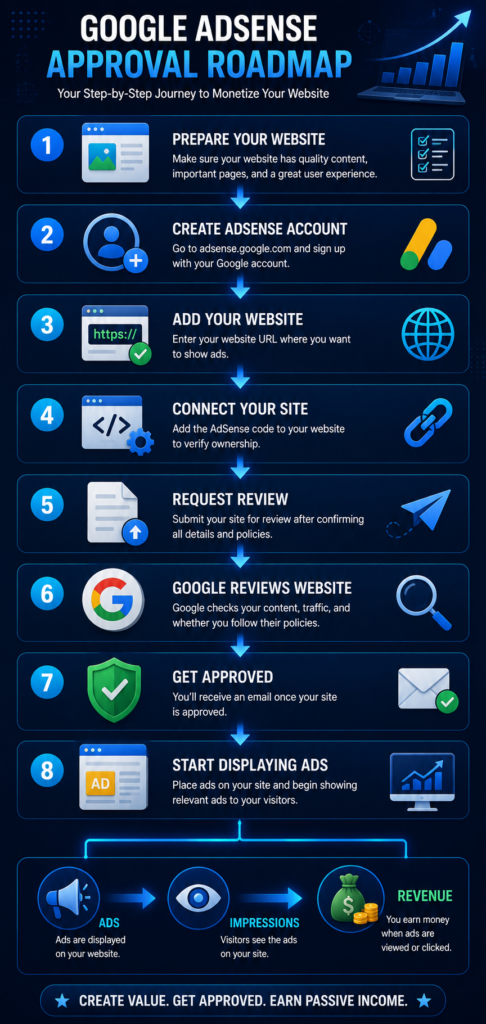
Once your website contains useful original content, works properly, and complies with Google’s policies, you can move on to the application process. If you’re ready to begin, Google’s official AdSense signup guide explains how to create an account, enter your website information, choose your payment country or territory, and accept the AdSense terms.
Applying for Google AdSense is free, but approval is not automatic. Google reviews your payment information and your site before the account is fully set up.
Here is the process beginners can follow.
Step 1: Create Your Google AdSense Account
Visit the official Google AdSense website:
Click Get started and sign in with your Google Account.
If you already use services such as Gmail, you already have a Google Account that can be used to begin the process.
Step 2: Enter Your Website
Google will ask for the URL of the website where you want to display advertisements.
For example:
BuildSmartAfri | Learn Forex Trading, AI, Technology & Digital Skills
Make sure you enter your correct domain.
Google also allows you to create an AdSense account before your website is completely ready and add the site later, although your site will still need to be ready before approval.
Step 3: Select Your Payment Country or Territory
During account creation, choose the country or territory where you currently live and where you can receive mail.
Be especially careful with this step.
Google states that you cannot change the payment country or territory later in AdSense.
Therefore, don’t choose another country simply because you believe it will produce higher advertising revenue.
Step 4: Accept the AdSense Terms and Conditions
Read Google’s AdSense Terms and Conditions before continuing.
After reviewing them, accept the terms and select Start using AdSense.
This takes you into your AdSense dashboard, where you’ll see the remaining setup tasks.
Step 5: Enter Your Payment Information
Google requires payment information before your account setup can be completed.
You’ll need to choose whether your account is an:
Individual account
or
Organization account
For an individual account, Google instructs publishers to enter their full name exactly as it appears on their banking information. You’ll also need to provide your postal address and, where required, a valid phone number.
Accuracy is important because this information will later be connected with getting paid.
Step 6: Add Your Website to AdSense
From your AdSense account, add the website you want Google to review.
The general process is:
AdSense Dashboard → Sites → + New Site → Enter Website URL → Save
A newly added site that hasn’t yet been reviewed can appear with a Requires review status.
Step 7: Connect Your Website to AdSense
Google needs to verify that you control the website.
At present, Google provides several verification methods, including:
- AdSense code snippet
- ads.txt code snippet
- Meta tag
For the AdSense code method, Google provides a code snippet that is placed inside the <head> section of your website.
If you’re using WordPress, you don’t necessarily need to manually edit every article. Use a reliable method that places the required code correctly across your website.
Be careful when editing theme files directly, especially if you’re unfamiliar with HTML or WordPress development.
Step 8: Verify the Connection
After adding the required verification method, return to AdSense.
Confirm that you’ve completed the setup and select Verify.
Google will attempt to verify your site. If verification fails, check that the site is live, the correct code has been published, the site isn’t password-protected, and Google’s AdSense crawlers aren’t being blocked.
Step 9: Request a Site Review
Once your website has been successfully connected, select:
Request review
Google will then review your site for compliance with its AdSense Program policies and Google Publisher policies.
This is why you should complete your website preparation before requesting the review.
Step 10: Wait for Google’s Decision
You don’t normally receive approval immediately.
Google says site reviews usually take a few days, although in some cases they can take 2–4 weeks.
While waiting, continue improving your website.
You can:
- Publish useful content
- Improve existing articles
- Fix broken links
- Improve mobile usability
- Work on SEO
- Review your privacy setup
- Continue attracting genuine visitors
Avoid making major changes that leave the site broken or inaccessible while it is under review.
Step 11: Check Your Site Status
You can monitor your website from:
AdSense → Sites
Google currently uses statuses such as:
Requires review — the site hasn’t yet completed review.
Getting ready — Google is running checks.
Needs attention — issues need to be addressed.
Ready — the site has completed the necessary checks and can show ads.
If Google identifies a problem, don’t panic. Read the reason carefully, correct the issue, improve the website where necessary, and follow the available process to request another review.
Step 12: Start Showing Ads After Approval
Once your account and website are approved, you can begin displaying advertisements.
If you enabled Auto ads during setup, Google says ads can begin appearing once your account is fully activated.
You can also preview how Auto ads may appear on your website before activation. This preview step is optional and isn’t required for account approval.
The Complete AdSense Application Process
For beginners, the journey can be summarized as:
Prepare Website → Create AdSense Account → Add Payment Information → Add Website → Connect Website → Verify → Request Review → Wait for Approval → Configure Ads → Start Earning Eligible Revenue
Most importantly, don’t try to trick the approval system.
A stronger strategy is to build a website you would be comfortable showing to a real reader: original content, clear navigation, transparent policies, good usability, and genuine value.
Getting approved should be viewed as the beginning of AdSense monetization, not the final goal. After approval, you’ll still need to grow your content and audience while following Google’s policies.
How AdSense Ads Appear on Your Website
After your website is approved for Google AdSense, the next step is deciding how advertisements will appear alongside your content. Google provides different approaches, including Auto ads and manually created ad units, giving publishers different levels of control over placement.
The goal should be to monetize your website without making advertisements interfere with the experience of reading your content.
1. Auto Ads
Auto ads are one of the easiest options for beginners.
With Auto ads, you place the AdSense code on your website and Google automatically determines potential ad placements. Google says Auto ads analyze your pages and find potential locations based on your layout, content, and existing Google ads.
This can reduce the amount of manual work required.
The process is essentially:
Add AdSense Code → Enable Auto Ads → Google Analyzes Pages → Ads Appear in Eligible Locations
For beginners who don’t want to manually manage every advertisement, Auto ads can be a convenient starting point.
2. Manual Ad Units
Publishers who want more control can also create individual ad units.
Instead of allowing Google to determine most placements automatically, you decide where specific ad units should appear.
For example, you might choose appropriate positions within your website layout while ensuring advertisements don’t interfere with navigation or make the content difficult to read.
Manual placement requires more attention to your site’s design and user experience.
3. In-Page Ads
In-page ads can appear within the main content or layout of your pages.
For example, imagine you publish a long tutorial:
Introduction
Advertisement
Step 1
Step 2
Advertisement
Step 3
The exact layout will depend on your configuration and Google’s systems.
The important point is that ads should complement the page rather than overwhelm the article.
4. Anchor Ads
Anchor ads remain attached to the edge of the user’s screen as the visitor browses a webpage.
Google describes anchor ads as advertisements that stick to the edge of the user’s screen and can be dismissed.
They can appear on supported screen sizes depending on your Auto ads settings.
Because they remain visible while someone browses, publishers should pay attention to how they affect the reading experience.
5. Vignette Ads
Vignette ads are full-screen advertisements that can appear between page loads.
For example:
Visitor Reads Article A → Opens Article B → Vignette May Appear → Article B Loads
Google describes vignette ads as full-screen ads that appear between page loads and can be skipped by users.
These ads can create additional monetization opportunities, but again, user experience should remain a priority.
6. Multiplex Ads
Multiplex ads are native-style ad units that display multiple advertisements together in a grid-like arrangement.
Google describes Multiplex ads as a type of native ad format that serves multiple ads within an ad unit.
Depending on your site’s design, these can sometimes fit naturally around the end of articles or other suitable areas.
7. Responsive Ads
People visit websites using different devices, including:
- Desktop computers
- Laptops
- Tablets
- Smartphones
AdSense supports responsive ad units that automatically adjust their size based on the available space.
This is particularly useful for modern websites because an advertisement that fits properly on a desktop screen may not fit the same way on a smartphone.
Auto Ads vs Manual Ads
Beginners often wonder which approach they should use.
Auto Ads
Best for publishers who want easier setup and automated placement.
Manual Ad Units
Better suited to publishers who want more direct control over where specific advertisements appear.
You don’t necessarily have to think of them as completely separate strategies. AdSense provides controls that allow publishers to customize how ads are used across their sites.
Don’t Put Too Many Ads on Your Website
More advertisements do not automatically mean a better website or better long-term monetization.
Imagine opening an article and immediately seeing:
Ad → Pop-up → Content → Ad → Ad → Content → Full-Screen Ad
Even if the configuration complies with technical requirements, an overloaded experience may frustrate readers.
Your main content should remain easy to find and consume.
A healthier balance looks more like:
Useful Content + Appropriate Advertising + Good User Experience
rather than:
Advertisements + Advertisements + Small Amount of Content
Monitor Your Website After Ads Go Live
Once AdSense advertisements begin appearing, check your website yourself—but never click your own ads.
Instead, inspect:
- Desktop appearance
- Mobile appearance
- Page speed
- Article readability
- Navigation
- Ad frequency
- Layout shifts
- Whether ads cover important content
You can then adjust your AdSense settings if the advertising experience feels excessive.
Content Should Remain the Priority
Remember why visitors came to your website in the first place.
They probably arrived because they wanted:
An Answer → A Tutorial → A Guide → Information → A Solution
They didn’t primarily visit your website to see advertisements.
Your content therefore remains the product attracting the audience, while AdSense provides a way to monetize some of that attention.
A good long-term approach is:
Create Valuable Content → Attract Visitors → Display Ads Responsibly → Protect User Experience → Analyze Performance → Improve
Finding the right balance between content, advertising, and user experience can help you build a website that generates revenue without driving readers away.
Common Google AdSense Mistakes Beginners Should Avoid
Getting approved for Google AdSense is only the beginning. Publishers must continue following Google’s policies after approval while creating a good experience for visitors. Publishers should also understand Google’s invalid traffic guidance because artificially generated clicks or impressions can create serious problems for an AdSense account. Never click your own advertisements or encourage friends, family members, or visitors to click ads simply to increase your earnings.
Here are some of the most important mistakes beginners should avoid.
1. Clicking Your Own Ads
Never click advertisements displayed on your own website to increase earnings.
Google prohibits publishers from clicking their own ads and from artificially inflating impressions or clicks. Invalid traffic can result in adjustments, restrictions, or account enforcement.
2. Asking Other People to Click Ads
Don’t tell friends, family members, followers, or readers to click advertisements to support your website.
Visitors should interact with ads only when they are genuinely interested.
Your strategy should be:
Create Useful Content → Generate Genuine Traffic → Let Advertising Revenue Occur Naturally
3. Creating Content Mainly for Ads
Your website should exist primarily to help its audience—not simply to create pages where advertisements can appear.
Avoid publishing large numbers of thin, repetitive, copied, or low-value pages simply to increase ad impressions.
Focus on content that genuinely answers questions, teaches skills, or solves problems.
4. Using Misleading Ad Placements
Advertisements shouldn’t be positioned in ways that intentionally confuse visitors into thinking they are navigation buttons, download links, menus, or other website elements.
Keep your content and advertising experience clear.
5. Overloading Pages With Ads
Too many advertisements can make an otherwise useful website frustrating to browse.
Finding the right balance is important:
Helpful Content + Appropriate Ads + Good User Experience
Readers should always be able to find and consume the main content comfortably.
6. Ignoring Mobile Visitors
Your advertisements may look fine on a desktop but create problems on smaller screens.
After ads are enabled, regularly check important pages using a smartphone. Make sure advertisements aren’t interfering with navigation, text, buttons, or other important content.
7. Ignoring AdSense Policy Updates
Google can update its advertising policies and product features.
Don’t assume that something allowed several years ago still works exactly the same way today.
Publishers should periodically review the official Google Publisher Policies.
Google AdSense vs Affiliate Marketing
Beginners sometimes wonder whether they should use Google AdSense or affiliate marketing. If you’re interested in earning commissions by recommending relevant products and services, read our complete guide on How to Start Affiliate Marketing for Beginners, to understand how affiliate links, programs, content, traffic, and commissions work.
The two monetization methods work differently.
Google AdSense monetizes website traffic through advertising.
Affiliate marketing involves recommending relevant third-party products or services and potentially earning a commission when someone completes a qualifying action through your affiliate link.
The journeys look like:
AdSense:
Content → Visitors → Ad Impressions → Advertising Revenue
Affiliate Marketing:
Content → Visitors → Recommendation → Affiliate Link → Qualifying Conversion → Commission
You don’t necessarily have to choose only one.
A website may use both AdSense and affiliate marketing, provided its implementation complies with applicable policies and doesn’t create a poor user experience.
The priority should always remain:
Help the Reader First → Monetize Responsibly Second
Frequently Asked Questions About Google AdSense
Is Google AdSense Free?
Yes. Google does not charge publishers a fee simply to participate in AdSense.
However, running your website may still involve costs such as domain registration, hosting, content creation, and website tools. Creating useful content consistently can take time. Explore our guide to the Best AI Tools for Content Creators to discover tools that can support research, writing, planning, and content production.
Do I Need a Certain Number of Visitors Before Applying?
Google’s published basic eligibility guidance does not specify a universal minimum number of monthly visitors required to apply.
Traffic is still important for earning meaningful advertising revenue, but don’t confuse traffic volume with basic AdSense eligibility.
How Long Does AdSense Approval Take?
Google says site reviews usually take a few days, although some reviews may take 2–4 weeks.
Review times can vary, so continue improving your website while waiting rather than repeatedly changing your application.
Can a New Blog Apply for AdSense?
A relatively new website can apply if it meets the applicable requirements and is ready for review.
Instead of focusing only on the site’s age, make sure it has useful original content, clear navigation, essential information, and a complete user experience.
Can I Use AdSense and Affiliate Marketing Together?
Potentially, yes.
You can have advertisements and appropriately disclosed affiliate recommendations on the same website, provided you follow the relevant policies and maintain a good user experience.
Avoid filling articles with so many ads and affiliate links that the actual information becomes difficult to find.
Can I Click My Own AdSense Ads?
No.
Even if you’re genuinely curious about an advertisement displayed on your site, Google instructs publishers not to click their own ads.
Does AdSense Guarantee Income?
No.
AdSense does not guarantee a particular income level.
Your revenue can vary according to your traffic, page views, audience, advertiser demand, ad performance, content, and other factors.
A new website with limited traffic may earn very little initially.
Final Thoughts
Google AdSense can provide bloggers and website owners with a relatively straightforward way to monetize useful online content through advertising. AdSense and affiliate marketing are only two ways to monetize an online presence. Explore our Best Online Business Ideas for Beginners to discover other digital business models you can consider.
But the correct order matters.
Don’t approach blogging like this:
Create Website → Apply for AdSense → Expect Money
A stronger approach is:
Choose a Useful Topic → Build a Professional Website → Publish Valuable Content → Grow Genuine Traffic → Prepare for AdSense → Apply → Display Ads Responsibly → Continue Growing
For beginners, getting approved should not be the ultimate goal.
Your real goal should be building a website people actually want to visit.
When your articles answer questions, solve problems, and provide useful information, you create the foundation for traffic. As that audience grows, monetization opportunities such as Google AdSense, affiliate marketing, sponsored content, digital products, and services can become more meaningful.
Think of AdSense as one monetization tool within a larger online-business strategy.
Most importantly, don’t attempt shortcuts such as clicking your own advertisements, buying fake traffic, copying other websites, or publishing hundreds of low-value pages.
Focus instead on:
Quality Content → Genuine Traffic → Good User Experience → Policy Compliance → Responsible Monetization → Long-Term Growth
That approach gives you a much stronger foundation for building a sustainable content website.
Ready to Start With Google AdSense?
If you already have a website, begin by reviewing your content, navigation, mobile experience, privacy information, and Google Publisher Policy compliance.
Once your website is ready, you can visit the official Google AdSense website to begin the application process.
Don’t worry if your site is still small. Continue publishing useful content, improving existing articles, learning SEO, and building genuine traffic.
Build the audience first. Monetization follows the value you create.
Disclaimer
This article is provided for educational and informational purposes only. It does not guarantee Google AdSense approval or earnings. Google determines AdSense eligibility and may update its policies, features, review procedures, advertising formats, and payment requirements over time.
Always consult the current official Google AdSense and Google Publisher Policy documentation before applying or making monetization decisions.