Introduction
Creating high-quality content consistently is one of the biggest challenges for bloggers, YouTubers, social media influencers, marketers, and business owners. From brainstorming ideas and writing scripts to designing graphics, editing videos, and scheduling posts, content creation can quickly become time-consuming and overwhelming. You can explore more of our articles: What Is Artificial Intelligence (AI)? A Beginner’s Guide
Watch the Video Version
Prefer watching instead of reading? Watch the complete tutorial below, then continue reading for more detailed explanations and additional tips.
Fortunately, Artificial Intelligence (AI) is transforming the way creators work. Today’s AI-powered tools can help generate content ideas, write blog posts, create eye-catching images, edit videos, produce realistic voiceovers, optimize content for search engines, and even automate repetitive tasks. Rather than replacing creativity, these tools help creators work faster, stay consistent, and focus on producing more valuable content. Dive deep into OpenAI
Whether you’re building a YouTube channel, growing a blog, managing social media accounts, launching a podcast, or running an online business, the right AI tools can significantly improve your productivity and content quality. Many of these tools also offer free plans or affordable pricing, making them accessible to both beginners and experienced creators.
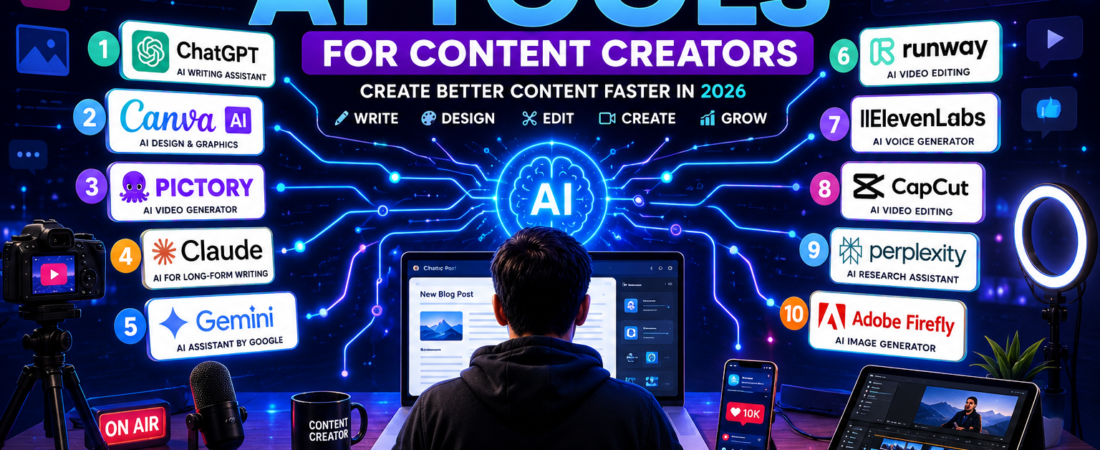
In this guide, you’ll discover the 10 best AI tools for content creators in 2026. We’ll explore what each tool does, its key features, best use cases, advantages, limitations, and how it can help you create better content in less time. By the end of this article, you’ll know which AI tools are worth adding to your content creation workflow to grow your audience and achieve your creative goals.
Why Content Creators Should Use AI Tools
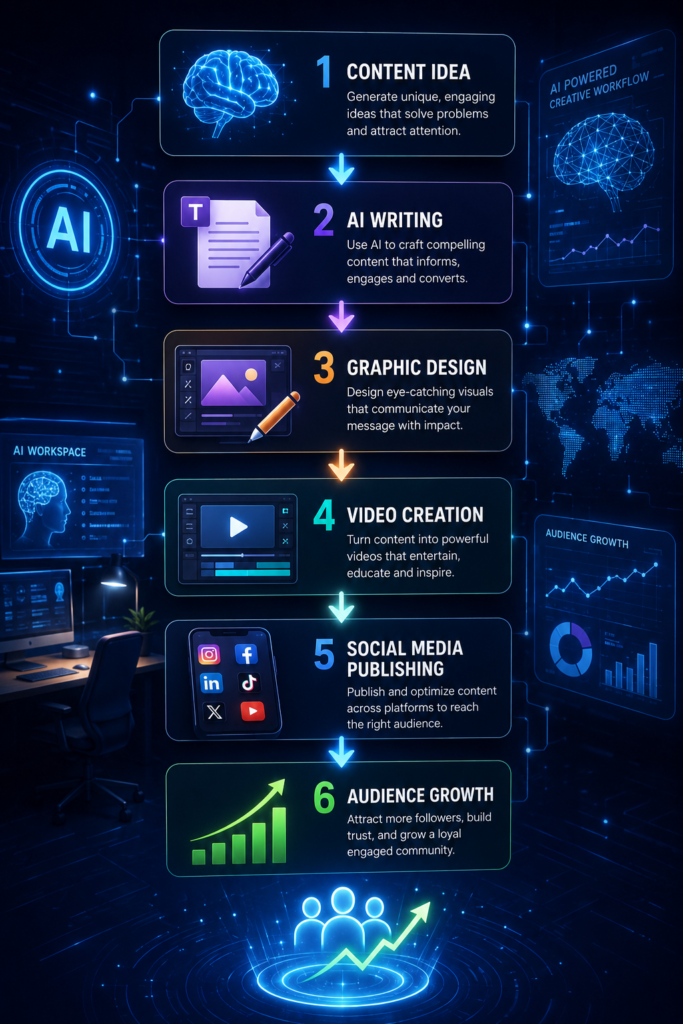
Creating content consistently requires more than just creativity. Content creators spend hours researching topics, writing scripts, designing graphics, editing videos, creating thumbnails, managing social media, and optimizing content for search engines. As your audience grows, these tasks become even more demanding. Explore more about UNESCO’s AI and Education
AI tools help simplify this workflow by automating repetitive tasks and improving productivity. Instead of spending hours on every stage of content creation, you can use AI to work faster while maintaining high-quality results.
Here are some of the biggest benefits of using AI tools as a content creator.
Save Time
AI can generate ideas, write first drafts, edit videos, and create graphics in minutes, allowing you to publish content more consistently.
Boost Creativity
When you’re out of ideas, AI can help brainstorm blog topics, video concepts, social media captions, and content calendars to keep your creativity flowing.
Improve Content Quality
Many AI tools help improve grammar, readability, visuals, and video production, making your content more professional and engaging.
Increase Productivity
Instead of using multiple apps for writing, design, editing, and research, AI tools streamline your workflow so you can focus on creating valuable content.
Repurpose Content Easily
A single blog post can be transformed into a YouTube video, Instagram carousel, TikTok clip, podcast script, or X (Twitter) thread with the help of AI, helping you reach more people across different platforms.
Stay Consistent
Consistency is one of the keys to growing an audience. AI helps creators maintain a regular publishing schedule by reducing the time needed to produce high-quality content.
Important: AI should enhance your creativity, not replace it. The best content comes from combining AI with your own knowledge, experience, and unique perspective. Always review AI-generated content, verify facts, and add your personal touch before publishing.
Whether you’re a blogger, YouTuber, freelancer, marketer, or business owner, AI tools can help you create better content, save time, and grow your online presence more efficiently.
How We Selected These AI Tools
With hundreds of AI tools available today, choosing the right one can be overwhelming. Some tools specialize in writing, while others focus on video editing, graphic design, voice generation, or research. To help you find the most valuable options, we’ve selected AI tools that are reliable, easy to use, and capable of improving the content creation process. To learn more about how to select the best AI tools, click here: 👉AI terminology
Here are the criteria we used to compile this list.
1. High-Quality Output
Each tool consistently produces professional-quality content, whether it’s blog posts, videos, images, voiceovers, or social media graphics.
2. Easy to Use
We prioritized tools with beginner-friendly interfaces so creators can start producing content without a steep learning curve.
3. Time-Saving Features
The best AI tools automate repetitive tasks such as writing, editing, designing, and research, allowing creators to focus on creativity and audience engagement.
4. Suitable for Multiple Platforms
These tools help create content for YouTube, blogs, TikTok, Instagram, Facebook, LinkedIn, X (Twitter), and other popular platforms.
5. Affordable or Free Plans
Most of the tools on this list offer free plans or affordable pricing, making them accessible to beginners, freelancers, and professional creators alike.
6. Trusted by Creators
We selected tools that are widely used by content creators, marketers, businesses, and creative professionals around the world.
7. Supports Different Content Types
This guide includes AI tools for:
- Blog writing
- YouTube scripts
- Video creation and editing
- Graphic design
- AI voiceovers
- Research
- Social media content
- Productivity and planning
By evaluating each tool based on these criteria, we’ve compiled a list of the best AI tools for content creators that can help you create high-quality content faster, work more efficiently, and grow your audience across multiple platforms. In the next section, we’ll explore each tool in detail, starting with one of the most versatile AI assistants available today.
1. ChatGPT

Best for: Content writing, brainstorming, YouTube scripts, SEO, social media posts, coding, and productivity.
ChatGPT, developed by OpenAI, is one of the most versatile AI tools available for content creators. Whether you’re a blogger, YouTuber, digital marketer, freelancer, or business owner, ChatGPT can help you create high-quality content in a fraction of the time it would normally take. You can click here to learn more about ChatGPT
From generating blog post ideas and writing long-form articles to creating YouTube video scripts, email newsletters, product descriptions, and engaging social media captions, ChatGPT supports nearly every stage of the content creation process. It can also summarize lengthy documents, rewrite content for different audiences, suggest SEO-friendly titles, and help overcome writer’s block when inspiration runs dry.
One of ChatGPT’s greatest strengths is its conversational interface. Instead of starting with a blank page, you can simply describe what you want, and the AI generates content that you can refine to match your tone and style. It also supports brainstorming, allowing creators to explore multiple ideas quickly before deciding on the best direction.
For creators who manage websites or online businesses, ChatGPT is also valuable for generating website copy, FAQs, marketing campaigns, ad copy, and customer support responses. Developers can even use it to write, debug, and explain code, making it useful beyond traditional content creation.
Key Features
- Generates blog posts and articles
- Writes YouTube video scripts
- Creates social media captions
- Brainstorms content ideas
- Generates SEO titles and meta descriptions
- Summarizes and rewrites content
- Assists with coding and technical tasks
- Supports multiple languages
Best For
- Bloggers
- YouTubers
- Social media creators
- Digital marketers
- Freelancers
- Small business owners
- Students and educators
Pros
- Extremely versatile and easy to use
- Produces high-quality content quickly
- Saves hours of writing and research time
- Supports a wide variety of creative and professional tasks
- Offers both free and premium plans
Limitations
- AI-generated content should always be reviewed for accuracy.
- The quality of the output depends on the clarity of your prompts.
- Free-tier features may be more limited than paid plans.
Verdict
If you only choose one AI tool for content creation, ChatGPT is an excellent starting point. Its ability to assist with writing, research, brainstorming, SEO, coding, and productivity makes it an all-in-one AI assistant for creators. Whether you’re publishing blog posts, producing YouTube videos, or managing social media, ChatGPT can help you create better content faster and more efficiently.
2. Canva AI
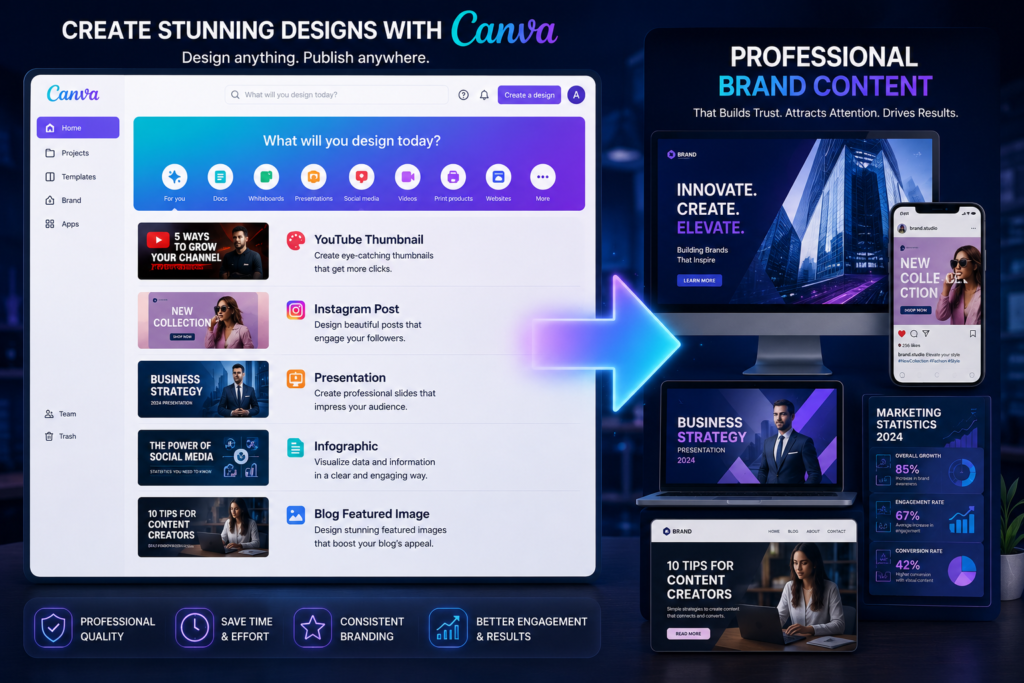
Best for: Graphic design, social media content, presentations, thumbnails, marketing materials, and brand visuals.
Canva AI has become one of the most popular design platforms for content creators, making it easy to create professional-looking graphics without advanced design skills. Its AI-powered features help users generate images, write text, remove backgrounds, resize designs, and create complete presentations in just a few clicks. Learn more about Canva AI
Whether you’re designing YouTube thumbnails, Instagram posts, Facebook banners, TikTok graphics, blog featured images, or business presentations, Canva AI provides thousands of customizable templates that speed up the creative process. Instead of starting from scratch, creators can simply describe what they want or select a template and let AI assist with the design.
One of Canva AI’s standout features is Magic Design, which automatically generates polished designs based on your content or prompts. Other tools like Magic Write help create headlines, captions, and marketing copy, while Magic Edit and Magic Eraser make it easy to enhance images without needing advanced photo editing software.
For teams and businesses, Canva AI also simplifies collaboration by allowing multiple users to edit designs, leave comments, and maintain consistent branding using shared templates and brand kits.
Key Features
- AI-powered graphic design
- Magic Design for instant layouts
- Magic Write for AI-generated text
- AI image generation
- Background remover
- Magic Edit and Magic Eraser
- One-click design resizing
- Thousands of customizable templates
- Team collaboration and Brand Kit
Best For
- YouTubers
- Bloggers
- Social media creators
- Digital marketers
- Small businesses
- Freelancers
- Students and educators
Pros
- Beginner-friendly and easy to learn
- Huge library of templates, icons, and stock assets
- Saves hours of graphic design work
- Excellent for creating consistent branding
- Free plan available with powerful features
Limitations
- Some premium templates and AI features require a Canva Pro subscription.
- Advanced designers may find it less flexible than professional software like Adobe Photoshop or Illustrator.
- AI-generated images may occasionally require manual adjustments for the best results.
Verdict
Canva AI is one of the best all-in-one design tools for content creators. Whether you’re creating thumbnails, social media posts, presentations, infographics, or marketing materials, it combines powerful AI features with an intuitive interface that helps you produce professional-quality visuals quickly. For creators looking to improve their visual content without a steep learning curve, Canva AI is an essential addition to their toolkit.
3. Pictory AI
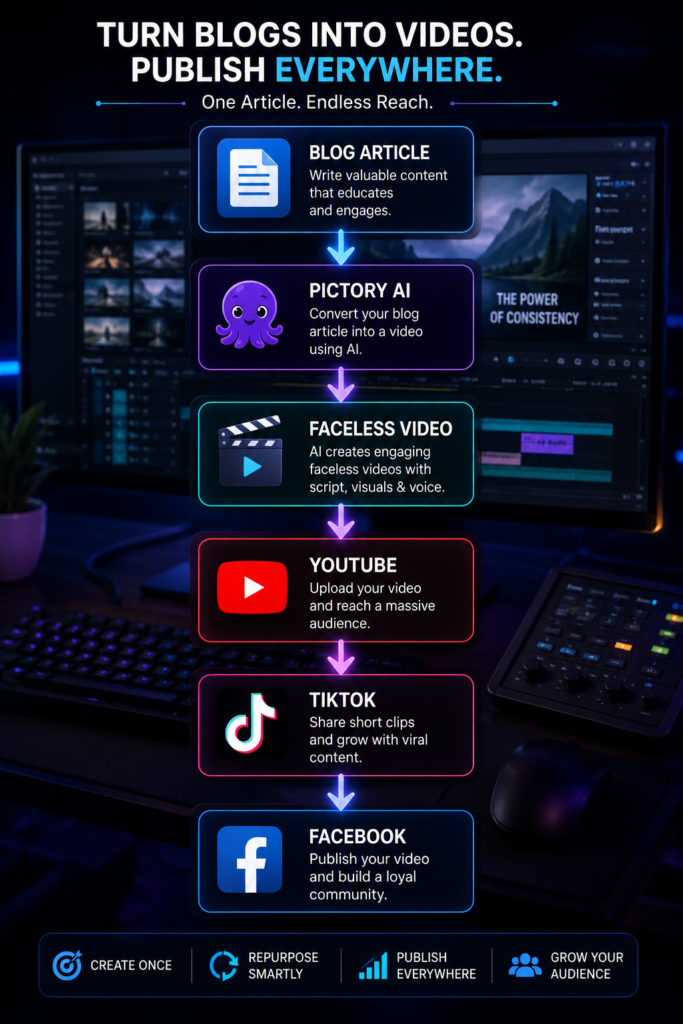
Best for: Turning blog posts into videos, creating faceless YouTube videos, social media videos, and marketing content.
Pictory AI is a powerful AI video creation platform designed to help content creators produce professional-quality videos without requiring advanced video editing skills. It is especially popular among bloggers, YouTubers, digital marketers, and businesses that want to repurpose written content into engaging videos quickly. Learn more about Pictory AI
One of Pictory AI’s standout features is its ability to transform blog posts, articles, or scripts into complete videos. The AI automatically breaks the content into scenes, selects relevant stock footage, adds captions, inserts transitions, and generates a polished video ready for publishing. This makes it an excellent tool for creators who want to maximize the value of their written content across multiple platforms.
Pictory AI also includes realistic AI voiceovers, automatic subtitles, background music, and branding options, making it easier to create professional-looking videos for YouTube, Facebook, Instagram, LinkedIn, TikTok, and other social media platforms. Since no on-camera appearance is required, it’s an ideal solution for creators who prefer producing faceless videos.
For businesses and marketers, Pictory AI can also convert webinars, Zoom recordings, podcasts, and long-form videos into shorter clips suitable for social media, helping increase engagement and reach with minimal effort.
Key Features
- Converts blog posts into videos
- Creates videos from scripts
- Automatic scene selection
- AI-generated voiceovers
- Auto-generated captions and subtitles
- Large royalty-free stock media library
- Brand customization with logos and colors
- Converts long videos into short clips for social media
Best For
- YouTubers
- Bloggers
- Content marketers
- Social media creators
- Small businesses
- Online educators
- Faceless YouTube channel owners
Pros
- Extremely easy to use, even for beginners
- Saves hours of video editing time
- Excellent for repurposing existing content
- Professional-looking videos without editing experience
- Supports multiple social media platforms
Limitations
- Some advanced customization options are limited compared to professional video editing software.
- Premium plans are required to unlock the full range of AI features and export options.
- AI-selected visuals may occasionally need manual adjustments to better match your content.
Verdict
Pictory AI is one of the best AI video creation tools for content creators who want to turn written content into engaging videos quickly. Its ability to convert articles and scripts into professional videos makes it particularly valuable for bloggers, marketers, and YouTubers looking to grow their audience with faceless video content. If video is a key part of your content strategy, Pictory AI can significantly speed up your workflow while maintaining high production quality.
4. Claude
Best for: Long-form writing, editing, research, brainstorming, and document analysis.
Claude, developed by Anthropic, is one of the most capable AI writing assistants for content creators who produce detailed, high-quality content. It’s particularly known for generating natural, well-structured writing and handling long documents with ease, making it a favorite among bloggers, copywriters, researchers, and marketers.
Whether you’re writing in-depth blog posts, YouTube scripts, newsletters, eBooks, or business reports, Claude can help you organize ideas, improve clarity, and maintain a consistent tone throughout your content. It also excels at rewriting text, summarizing lengthy documents, and providing constructive feedback to enhance readability.
One of Claude’s biggest strengths is its ability to understand context across large amounts of text. This makes it ideal for reviewing research papers, analyzing reports, or refining long-form articles without losing important details. It can also help generate content outlines, answer questions about uploaded documents, and assist with brainstorming fresh content ideas.
For creators who value accuracy, clear writing, and thoughtful responses, Claude offers a reliable AI assistant that complements the creative process rather than replacing it.
Key Features
- Generates long-form articles and blog posts
- Writes YouTube scripts and marketing copy
- Summarizes lengthy documents
- Rewrites and edits content for clarity
- Brainstorms content ideas and outlines
- Analyzes large documents and reports
- Supports natural, conversational writing
- Handles complex prompts effectively
Best For
- Bloggers
- Copywriters
- Content marketers
- Researchers
- Business professionals
- Freelancers
- Students and educators
Pros
- Produces high-quality, natural-sounding writing
- Excellent for long-form content
- Strong document analysis capabilities
- Easy-to-read and well-organized responses
- Helpful for editing and refining existing content
Limitations
- Some advanced features may require a paid subscription.
- Like all AI tools, outputs should be fact-checked before publishing.
- It is less focused on image or video generation than specialized creative tools.
Verdict
Claude is an outstanding AI writing assistant for creators who produce detailed articles, reports, newsletters, or scripts. Its ability to understand long documents, generate polished content, and improve writing quality makes it one of the best AI tools for bloggers, marketers, and professionals who want to create informative, engaging content with greater efficiency.
5. Google Gemini
Best for: Research, brainstorming, Google Workspace integration, and content planning.
Google Gemini is Google’s advanced AI assistant that helps content creators research topics, generate ideas, write content, and improve productivity. Its seamless integration with Google services such as Gmail, Google Docs, Google Drive, and Google Search makes it an excellent choice for creators who already work within the Google ecosystem. Click here to learn more about 👉 AI tools for students
Gemini can assist with writing blog posts, YouTube scripts, email newsletters, social media captions, and marketing copy. It also excels at researching current topics, summarizing information, organizing notes, and generating creative ideas for new content. Because it can access Google’s ecosystem, it helps creators streamline their workflow without constantly switching between different applications.
One of Gemini’s biggest strengths is collaboration. Whether you’re drafting an article in Google Docs, analyzing information stored in Google Drive, or organizing projects, Gemini can provide intelligent suggestions that improve both efficiency and creativity.
For creators who need a combination of AI writing, research, and productivity tools in one place, Gemini is a reliable and powerful solution.
Key Features
- AI-powered writing assistance
- Generates blog posts and video scripts
- Research and information summarization
- Brainstorms content ideas
- Integrates with Google Docs, Gmail, and Drive
- Supports multilingual content creation
- Assists with planning and productivity
- Generates marketing and social media copy
Best For
- Bloggers
- YouTubers
- Digital marketers
- Business owners
- Students
- Freelancers
- Google Workspace users
Pros
- Excellent integration with Google services
- Strong research and information gathering capabilities
- Beginner-friendly interface
- Speeds up writing and planning tasks
- Free version available with useful features
Limitations
- Some advanced capabilities require a Google AI subscription.
- AI-generated content should still be reviewed for accuracy and originality.
- Certain features may vary depending on your region and Google account.
Verdict
Google Gemini is an excellent AI assistant for creators who rely on Google Workspace for their daily tasks. Its combination of research, writing, brainstorming, and productivity features makes it a valuable tool for producing high-quality content more efficiently. If your workflow revolves around Google’s ecosystem, Gemini is one of the best AI tools you can add to your content creation toolkit.
6. Runway
Best for: AI video editing, visual effects, background removal, and cinematic content creation.
Runway is one of the most advanced AI-powered video editing platforms available today. It enables content creators to edit videos faster by using artificial intelligence to automate complex editing tasks that would normally require professional software and advanced skills.
Whether you’re producing YouTube videos, short films, advertisements, social media reels, or promotional content, Runway offers powerful AI features that simplify the editing process. From removing backgrounds without a green screen to generating realistic visual effects and enhancing video quality, the platform helps creators produce polished videos in significantly less time.
One of Runway’s standout capabilities is its generative AI technology, which allows users to create or modify videos using simple text prompts. Creators can remove unwanted objects, replace backgrounds, generate new scenes, and apply cinematic effects with just a few clicks. These features make Runway especially valuable for creators who want professional-quality videos without spending hours on manual editing.
Runway also supports team collaboration, making it an excellent choice for agencies, marketing teams, and professional creators working on larger video projects.
Key Features
- AI-powered video editing
- Background removal without a green screen
- AI object removal
- Text-to-video generation
- AI-powered visual effects
- Video enhancement and upscaling
- Motion tracking
- Cloud-based editing and collaboration
Best For
- YouTubers
- Filmmakers
- Social media creators
- Video editors
- Digital marketers
- Creative agencies
- Businesses producing promotional videos
Pros
- Professional-grade AI video editing tools
- Saves hours of manual editing
- Powerful visual effects without complex software
- Beginner-friendly interface with advanced capabilities
- Cloud-based workflow accessible from anywhere
Limitations
- Some advanced AI features are available only on paid plans.
- Rendering complex projects may take longer depending on video length.
- New users may need some time to explore all the available tools.
Verdict
Runway is one of the best AI video editing platforms for content creators who want to produce professional-quality videos quickly. Its powerful AI features, including background removal, object editing, and text-to-video generation, make it an excellent choice for YouTubers, filmmakers, marketers, and anyone looking to elevate their video content with minimal effort.
8. CapCut AI
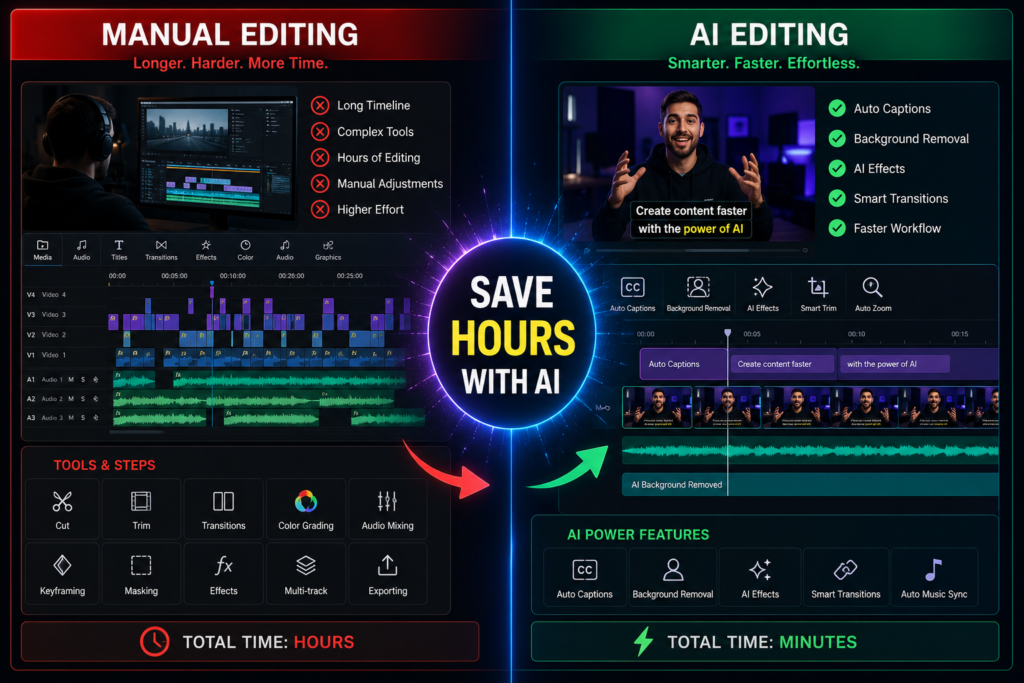
Best for: Short-form video editing, TikTok, Instagram Reels, YouTube Shorts, and social media content.
CapCut AI is one of the most popular AI-powered video editing tools for creators who produce short-form content. Developed by ByteDance, the company behind TikTok, CapCut combines powerful editing features with AI automation, making it easy to create professional-looking videos directly from your computer or mobile device.
With CapCut AI, creators can automatically generate captions, remove backgrounds, enhance video quality, eliminate background noise, and add transitions, effects, and music with minimal effort. Its AI-powered editing tools significantly reduce the time required to edit videos while maintaining a polished, engaging look.
One of CapCut AI’s biggest advantages is its optimization for social media platforms. Whether you’re creating TikTok videos, Instagram Reels, Facebook videos, or YouTube Shorts, the platform offers templates and editing tools designed specifically for vertical video content. It also includes AI script generation, text-to-speech, and automatic video resizing, helping creators publish content across multiple platforms more efficiently.
For beginners and experienced editors alike, CapCut AI provides a balance of simplicity and advanced features, making it one of the best video editing tools available today.
Key Features
- AI-powered video editing
- Automatic captions and subtitles
- AI background removal
- Text-to-speech and AI voice generation
- Auto video enhancement
- AI script generation
- Ready-made templates for social media
- One-click video resizing for multiple platforms
- Music, transitions, and visual effects
Best For
- TikTok creators
- YouTubers
- Instagram creators
- Facebook content creators
- Social media managers
- Digital marketers
- Small business owners
Pros
- Beginner-friendly interface
- Excellent for short-form video creation
- Powerful AI editing features
- Supports desktop and mobile devices
- Free version includes many useful tools
Limitations
- Some premium AI features require a paid subscription.
- Advanced editors may prefer more specialized software for complex projects.
- Certain templates and effects may include branding on the free plan.
Verdict
CapCut AI is one of the best AI video editing tools for creators focused on social media. Its automatic captions, AI editing features, and easy-to-use interface make it ideal for producing engaging TikTok videos, Instagram Reels, and YouTube Shorts. If short-form video is part of your content strategy, CapCut AI is a must-have tool that can help you create high-quality content in less time.
9. Perplexity AI
Best for: Research, fact-checking, content planning, and finding reliable sources.
Perplexity AI is an AI-powered research assistant that helps content creators find accurate, up-to-date information quickly. Unlike traditional AI chatbots that rely mainly on pre-trained knowledge, Perplexity searches the web in real time and provides answers with links to its sources, making it an excellent tool for researching topics before creating content.
Whether you’re writing a blog post, producing a YouTube video, recording a podcast, or creating social media content, Perplexity AI can help you gather reliable information, discover trending topics, and verify facts. This not only improves the quality of your content but also builds trust with your audience.
One of Perplexity AI’s biggest strengths is its transparency. It cites the websites and sources used to generate its responses, allowing creators to explore the original information and confirm its accuracy. This is especially useful when writing educational, technical, financial, or news-related content where credibility matters.
Instead of spending hours browsing multiple websites, creators can use Perplexity AI to summarize complex topics, compare information from different sources, and quickly identify the key points needed for their content.
Key Features
- Real-time web research
- Source citations and references
- Fact-checking assistance
- Content idea generation
- Topic summarization
- Follow-up questions for deeper research
- Research across multiple industries
- Fast and easy-to-use interface
Best For
- Bloggers
- YouTubers
- Journalists
- Researchers
- Digital marketers
- Students
- Business owners
Pros
- Provides real-time information from the web
- Includes source citations for greater credibility
- Saves hours of research time
- Excellent for fact-checking and topic exploration
- Simple and intuitive interface
Limitations
- Some advanced features are available only with a paid subscription.
- Source quality can vary, so it’s still important to review references carefully.
- It focuses on research rather than advanced graphic or video creation.
Verdict
Perplexity AI is one of the best AI research tools for content creators. Its ability to provide real-time information with cited sources makes it invaluable for creating accurate, trustworthy, and well-researched content. If research is an important part of your workflow, Perplexity AI is a tool you’ll want to keep open while planning and writing your next piece of content.
10. Adobe Firefly
Best for: AI image generation, graphic design, marketing visuals, and commercial creative projects.
Adobe Firefly is Adobe’s generative AI platform designed to help content creators produce high-quality images, illustrations, text effects, and design assets using simple text prompts. Built into popular Adobe applications like Photoshop and Illustrator, Firefly enables creators to generate professional visuals quickly while maintaining creative control.
Whether you’re designing YouTube thumbnails, blog featured images, social media graphics, advertisements, product mockups, or promotional materials, Adobe Firefly simplifies the design process with powerful AI features. You can create entirely new images, expand existing ones, remove unwanted objects, change backgrounds, or generate eye-catching text effects without starting from scratch.
One of Firefly’s biggest advantages is its commercial-friendly approach. Adobe has trained the model on licensed and public domain content, giving creators greater confidence when using AI-generated assets for business and marketing purposes. This makes it an attractive option for freelancers, agencies, and businesses that need high-quality visuals for commercial projects.
For creators already using Adobe Creative Cloud, Firefly integrates seamlessly into existing workflows, making it easy to move from AI-generated concepts to polished final designs.
Key Features
- AI image generation from text prompts
- Generative Fill for editing images
- AI-powered background replacement
- Text Effects for creative typography
- Image expansion and enhancement
- Integration with Photoshop and Illustrator
- Commercial-friendly AI-generated assets
- Fast design iteration and customization
Best For
- Graphic designers
- Bloggers
- YouTubers
- Digital marketers
- Social media creators
- Small businesses
- Creative agencies
Pros
- Produces high-quality AI-generated visuals
- Seamless integration with Adobe Creative Cloud
- Commercial-friendly image generation
- Powerful editing tools for existing images
- Beginner-friendly while offering professional capabilities
Limitations
- Many advanced features require an Adobe Creative Cloud subscription.
- Beginners unfamiliar with Adobe products may need time to learn the workflow.
- AI-generated images may still benefit from manual editing for the best results.
Verdict
Adobe Firefly is one of the best AI design tools for content creators who need professional-quality visuals. Its powerful image generation, editing capabilities, and integration with Adobe’s creative ecosystem make it an excellent choice for designing thumbnails, blog graphics, advertisements, and social media content. If visual storytelling is an important part of your content strategy, Adobe Firefly is a valuable tool to have in your creative arsenal.
How to Choose the Right AI Tool for Content Creation
With so many AI tools available, it’s important to choose the ones that match your content creation goals. No single tool can do everything perfectly. The best approach is to build a workflow that combines different AI tools for writing, research, design, video editing, and productivity.
Here are some factors to consider when selecting the right AI tool.
1. Identify Your Content Type
Start by determining the type of content you create most often.
- Bloggers may benefit from tools like ChatGPT, Claude, and Perplexity AI.
- YouTubers can use Pictory AI, ElevenLabs, and Runway.
- Social media creators may prefer Canva AI and CapCut AI.
- Designers can create stunning visuals with Adobe Firefly.
Choosing tools that align with your primary content format will help you work more efficiently.
2. Consider Your Budget
Many AI tools offer free plans with useful features, while premium plans unlock advanced capabilities. If you’re just starting out, explore the free versions before deciding whether a paid subscription is worth the investment.
3. Look for Ease of Use
The best AI tool is one that fits naturally into your workflow. Choose tools with intuitive interfaces, helpful tutorials, and features that save time rather than adding unnecessary complexity.
4. Check Integration with Your Workflow
If you already use platforms like Google Workspace, Adobe Creative Cloud, or Canva, consider AI tools that integrate seamlessly with them. This reduces the need to switch between multiple applications and improves productivity.
5. Prioritize Quality Over Quantity
Rather than subscribing to many AI tools, focus on a few that consistently deliver high-quality results. A well-chosen toolkit is often more effective than using several overlapping tools.
Recommended AI Toolkit for Most Content Creators
If you’re looking for a balanced AI workflow, here’s a combination that covers nearly every aspect of content creation:
| Task | Recommended Tool |
|---|---|
| Content Writing | ChatGPT |
| Research & Fact-Checking | Perplexity AI |
| Graphic Design | Canva AI |
| Video Creation | Pictory AI |
| Video Editing | CapCut AI or Runway |
| AI Voiceovers | ElevenLabs |
| Image Generation | Adobe Firefly |
| Productivity & Planning | Google Gemini |
| Long-Form Writing | Claude |
By combining these tools, you can streamline your workflow, create higher-quality content, and publish more consistently across blogs, YouTube, TikTok, Instagram, Facebook, LinkedIn, and other digital platforms.
Remember, AI is most effective when it complements your creativity—not replaces it. Use these tools to automate repetitive tasks, generate fresh ideas, and improve efficiency, while adding your own expertise, personality, and unique perspective to every piece of content you create.
Frequently Asked Questions (FAQs)
1. What is the best AI tool for content creators?
The best AI tool depends on your needs, but ChatGPT is one of the most versatile options. It can help with content writing, brainstorming, script creation, SEO, and productivity. If you also create videos and graphics, combining ChatGPT with tools like Canva AI, Pictory AI, and ElevenLabs can significantly improve your workflow.
2. Are AI content creation tools free?
Many AI tools offer free plans with limited features. Tools like ChatGPT, Google Gemini, Canva AI, CapCut AI, and Perplexity AI provide free versions that are suitable for beginners. Premium subscriptions unlock advanced features, higher usage limits, and better performance.
3. Can AI replace content creators?
No. AI is designed to assist content creators, not replace them. While AI can automate repetitive tasks such as writing drafts, editing videos, or generating graphics, human creativity, storytelling, experience, and originality remain essential for producing engaging and trustworthy content.
4. Which AI tool is best for YouTube creators?
For YouTube creators, a combination of tools often works best:
- ChatGPT for video scripts
- Pictory AI for faceless videos
- CapCut AI or Runway for video editing
- ElevenLabs for realistic AI voiceovers
- Canva AI for thumbnails
Together, these tools can streamline the entire video production process.
5. Can AI-generated content rank on Google?
Yes. AI-assisted content can rank well on search engines if it is accurate, original, valuable, and written for people rather than search engines. Always review, fact-check, and enhance AI-generated content with your own insights and expertise to ensure it provides real value to readers.
Final Thoughts
Artificial Intelligence has transformed content creation, making it easier than ever to produce high-quality blogs, videos, graphics, podcasts, and social media posts. Instead of spending countless hours on repetitive tasks, creators can use AI to research topics, generate ideas, edit content, and streamline their workflow.
The tools featured in this guide each serve a unique purpose. ChatGPT excels at writing and brainstorming, Canva AI simplifies graphic design, Pictory AI helps turn articles into videos, Claude improves long-form writing, Google Gemini enhances productivity, Runway powers advanced video editing, ElevenLabs creates realistic voiceovers, CapCut AI speeds up short-form video editing, Perplexity AI strengthens research, and Adobe Firefly generates stunning visuals.
Rather than relying on a single platform, consider building an AI toolkit that matches your content creation goals. The right combination of tools can help you save time, improve quality, maintain consistency, and focus on what matters most—creating valuable content that connects with your audience.
As AI technology continues to evolve, creators who embrace these tools responsibly will be better positioned to grow their personal brands, expand their businesses, and stay competitive in the digital landscape.
Ready to Create Better Content with AI?
Don’t let repetitive tasks slow down your creativity. Start by choosing one or two AI tools from this list and incorporate them into your daily workflow. As you become more comfortable, expand your toolkit to handle writing, design, video editing, research, and voiceovers more efficiently.
At BuildSmartAfri, we’re committed to helping you master AI, technology, and digital skills through practical, beginner-friendly guides.
Explore more AI resources on BuildSmartAfri to learn:
- What Is Artificial Intelligence (AI)? A Beginner’s Guide
- Top 24 AI Terms Every Beginner Should Know
- Best Free AI Tools for Students
Whether you’re a blogger, YouTuber, freelancer, marketer, or entrepreneur, the right AI tools can help you create smarter, publish faster, and grow your audience with confidence.
Disclaimer
This article is intended for educational and informational purposes only. The AI tools featured are based on their capabilities, popularity, and relevance at the time of writing. Features, pricing, and availability may change over time.
BuildSmartAfri is not affiliated with or endorsed by the companies mentioned unless explicitly stated. Before subscribing to any AI tool, visit its official website to review the latest features, pricing, and terms of service. Always review, fact-check, and personalize AI-generated content to ensure it is accurate, ethical, and aligned with your brand voice.