Introduction:
Creating professional-quality images once required advanced design skills, expensive software, or hiring a graphic designer. Today, Artificial Intelligence (AI) has changed that completely. With AI image generators, anyone can transform a simple text description into stunning digital artwork, realistic photographs, illustrations, marketing graphics, and social media visuals within seconds.
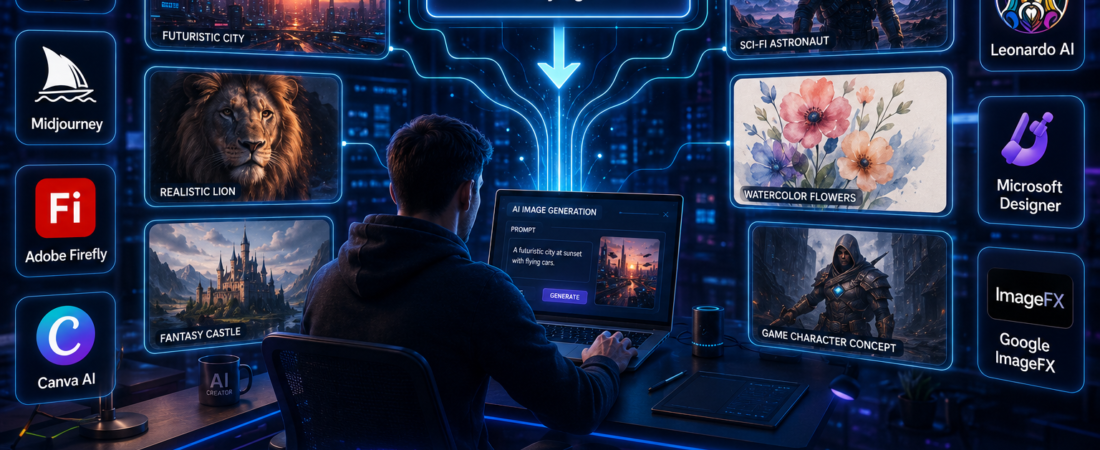
AI image generators use advanced machine learning models to understand written prompts and convert them into unique images. Simply describe what you want for example, “a futuristic city at sunset with flying cars and neon lights” and the AI will generate an image based on your instructions. The more detailed your prompt, the more accurate and visually appealing the final result is likely to be.
These tools have become increasingly popular among content creators, bloggers, YouTubers, marketers, entrepreneurs, graphic designers, and students. They are used to create blog featured images, YouTube thumbnails, product mockups, advertisements, presentation graphics, book covers, concept art, and social media posts without needing years of design experience.
With so many AI image generators available, choosing the right one can be challenging. Some platforms specialize in realistic photography, while others excel at digital art, commercial design, or marketing visuals. Understanding the strengths of each tool can help you select the best option for your creative projects.
In this beginner-friendly guide, you’ll discover the best AI image generators available in 2026, learn what makes each one unique, and understand their key features, advantages, and ideal use cases. You’ll also find practical tips for writing effective AI prompts so you can create high-quality images that match your vision. Whether you’re designing content for your business, building a personal brand, or simply exploring the possibilities of AI, this guide will help you get started with confidence.
What Is an AI Image Generator?
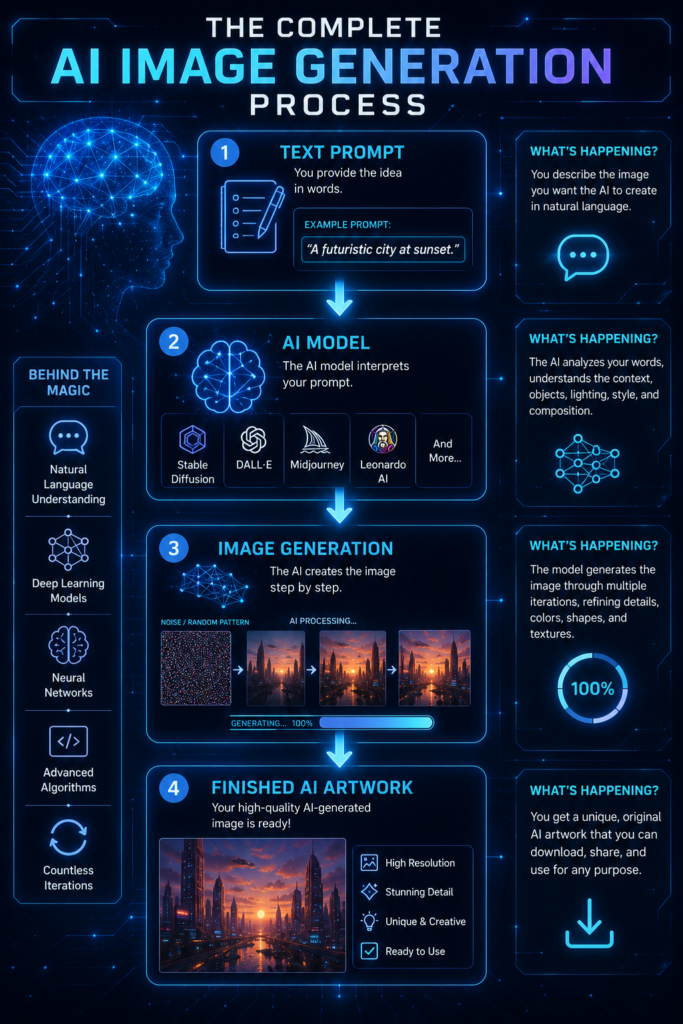
An AI image generator is a software application that uses artificial intelligence to create images from written descriptions, commonly known as text prompts. Instead of drawing or editing an image manually, you simply describe what you want, and the AI generates an original image based on your instructions. Top 24 AI Terms Every Beginner Should Know.
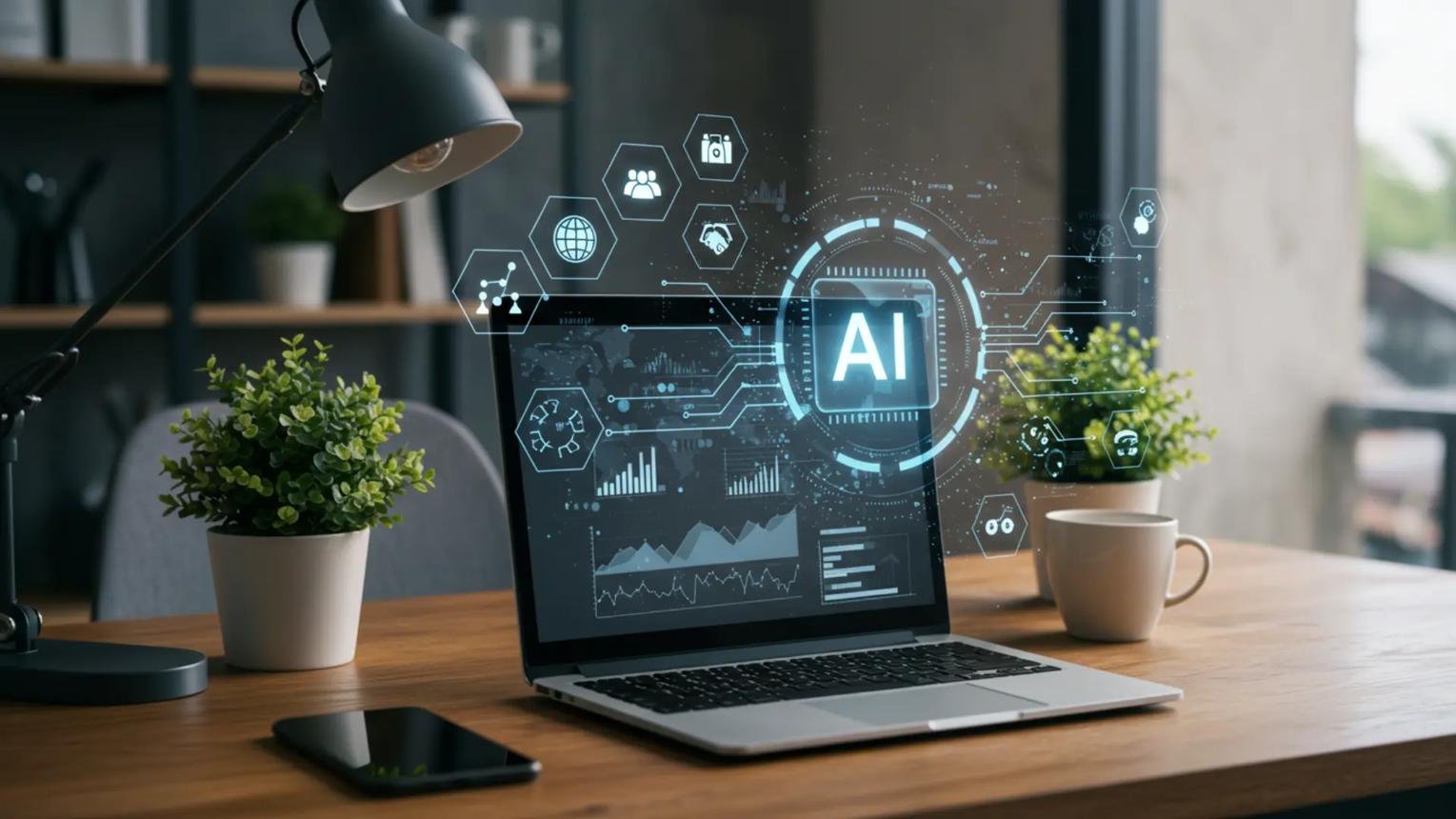
These tools are powered by advanced machine learning models that have been trained on millions of images and their corresponding text descriptions. During training, the AI learns to recognize objects, colors, lighting, artistic styles, textures, and compositions. As a result, it can understand your prompt and combine these elements to create a completely new image.
For example, if you type:
“A futuristic smart city at sunset with flying cars, neon lights, and a cyberpunk style.”
An AI image generator analyzes the keywords in your prompt, such as futuristic, sunset, flying cars, neon lights, and cyberpunk and produces an image that matches your description. Within seconds, you’ll have a unique visual that can be refined by adjusting the prompt or generating additional variations.
AI image generators can create a wide range of visuals, including:
- Realistic photographs
- Digital paintings
- Illustrations
- Concept art
- Product mockups
- Logos and icons
- Marketing graphics
- Social media images
- Book covers
- Fantasy and science fiction artwork
The quality of the final image largely depends on the quality of your prompt. A short prompt like “cat” may produce a simple image, while a detailed prompt such as “A fluffy white cat wearing a blue scarf, sitting on a wooden fence during autumn, golden-hour lighting, ultra-realistic, 8K” gives the AI more information to generate a richer and more accurate result.
As AI technology continues to improve, image generators are becoming valuable tools for designers, marketers, educators, entrepreneurs, and content creators. They make it possible to produce professional-quality visuals quickly, reduce design costs, and bring creative ideas to life even without prior graphic design experience.
Benefits of AI Image Generators
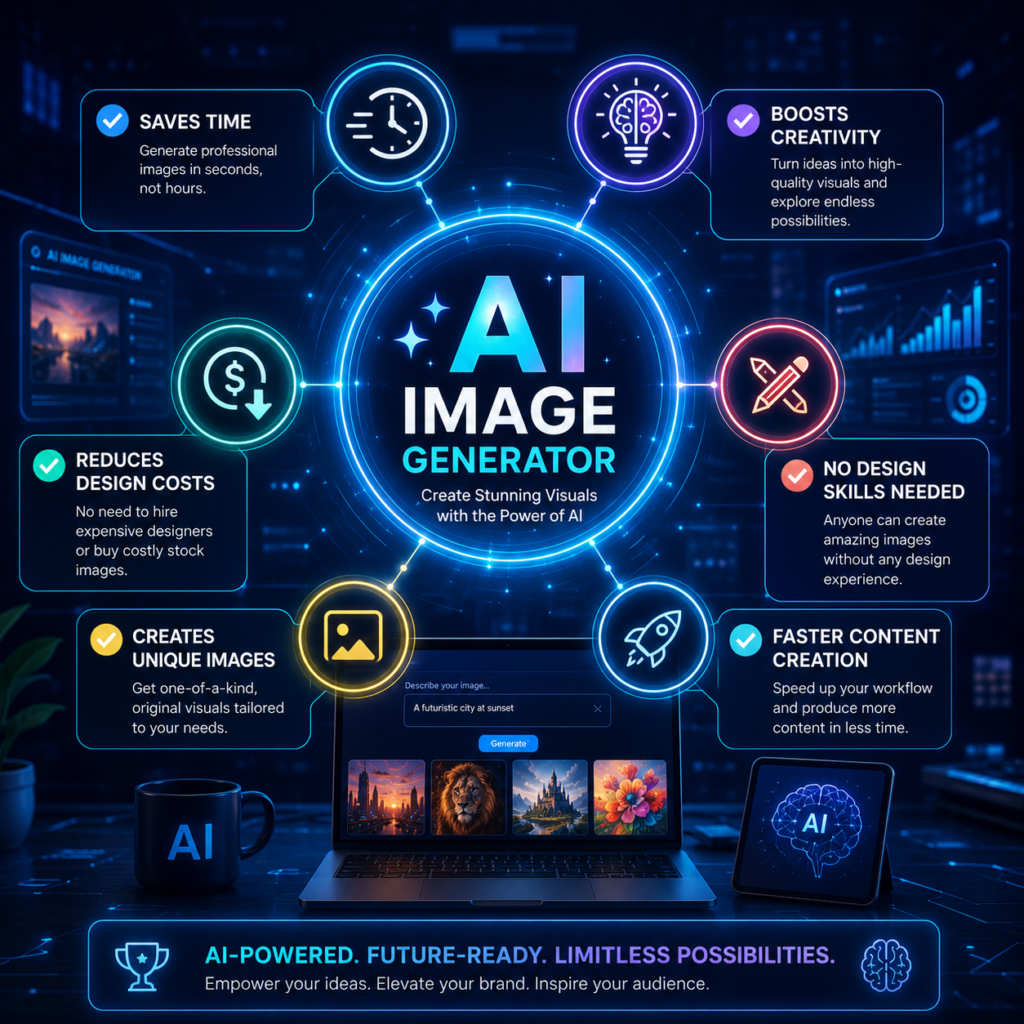
AI image generators have transformed the way people create visual content. What once required professional design skills, expensive software, and hours of editing can now be accomplished in just a few minutes. Whether you’re a content creator, marketer, business owner, educator, or hobbyist, AI image generators offer a faster and more accessible way to bring creative ideas to life. Students can also combine AI image generators with other productivity tools featured in our article on 15 Best Free AI Tools for Students.
Here are some of the biggest benefits of using AI image generators.
1. Save Time
Creating illustrations or marketing graphics from scratch can take hours. AI image generators can produce high-quality visuals in seconds, allowing you to focus more on creativity and less on manual design work.
2. No Design Experience Required
You don’t need to be a professional graphic designer to create impressive images. Simply describe what you want using a text prompt, and the AI generates artwork that matches your description. This makes AI image generation accessible to beginners and experienced creators alike.
3. Boost Creativity
AI image generators can help you explore new ideas and artistic styles that you may not have considered before. By experimenting with different prompts, colors, and compositions, you can discover fresh inspiration for your projects.
4. Reduce Design Costs
Hiring designers or purchasing premium stock images can be expensive, especially for small businesses and independent creators. AI image generators provide an affordable alternative by enabling users to create custom visuals whenever they need them.
5. Create Unique Visual Content
Unlike downloading stock photos that many others may use, AI image generators produce original images based on your prompts. This allows you to create distinctive visuals that better reflect your brand, story, or creative vision.
6. Support Multiple Creative Projects
AI-generated images can be used for a wide variety of purposes, including:
- Blog featured images
- YouTube thumbnails
- Social media posts
- Website banners
- Marketing advertisements
- Business presentations
- Product mockups
- Book covers
- Digital artwork
- Educational materials
7. Improve Content Marketing
Visual content attracts more attention than text alone. High-quality images can increase engagement on websites and social media platforms, making your articles, videos, and marketing campaigns more appealing to your audience.
While AI image generators are incredibly powerful, they work best when combined with human creativity. The AI provides the visual foundation, but your imagination, prompt writing, and editing skills determine how effective the final image will be. By learning how to use these tools effectively, you can create eye-catching visuals that enhance your content and communicate your ideas more effectively.
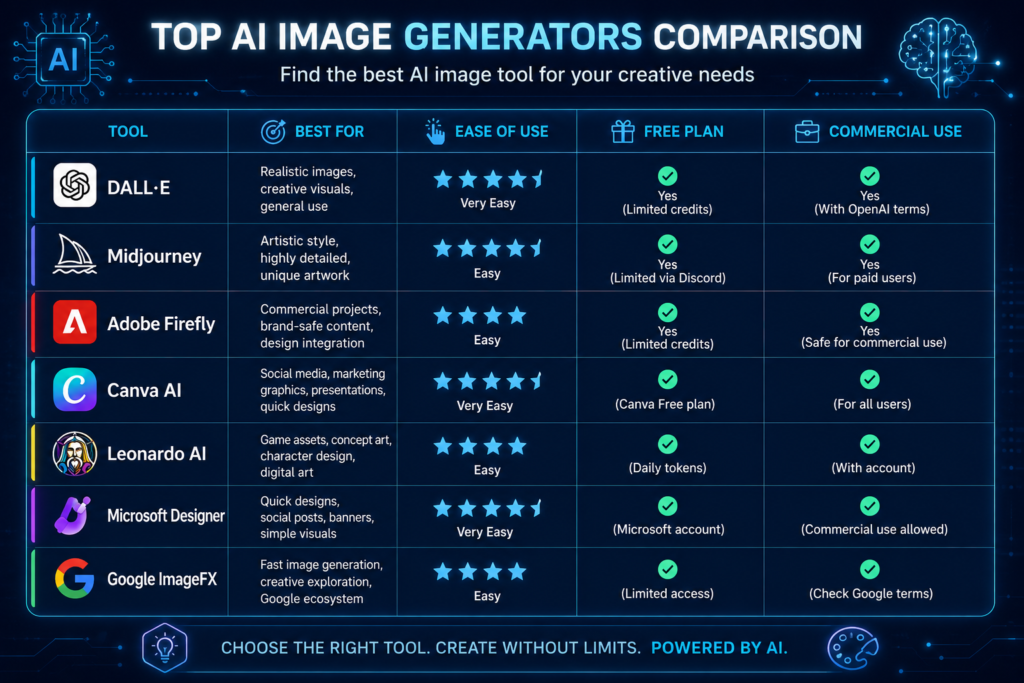
1. DALL·E
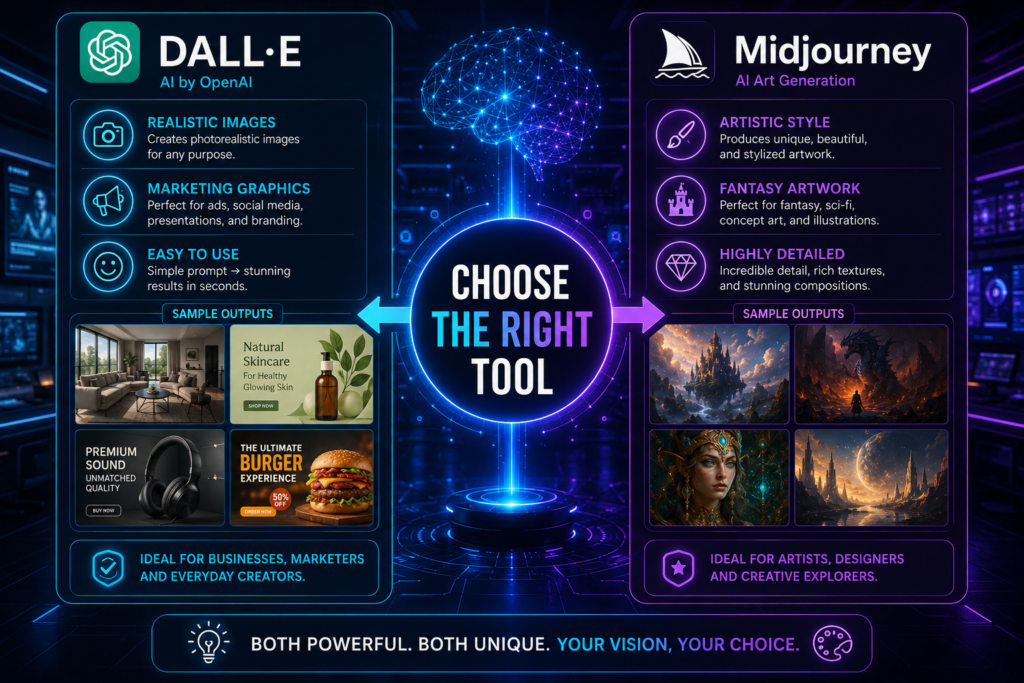
Best for: Creating realistic images, illustrations, marketing graphics, and general-purpose AI artwork. OpenAI DALL·E
DALL·E, developed by OpenAI, is one of the most popular AI image generators available today. It allows users to create high-quality images simply by describing what they want in natural language. Whether you’re designing a blog featured image, YouTube thumbnail, product mockup, social media graphic, or digital artwork, DALL·E can turn your ideas into visually impressive results within seconds. DALL·E is one of the essential platforms featured in our guide to the Best AI Tools for Content Creators, where we compare the top AI tools for writing, design, and video production.
One of DALL·E’s greatest strengths is its ability to understand detailed prompts. The more specific your description, the better the generated image. It can produce a wide variety of styles, including realistic photography, digital paintings, illustrations, 3D renders, watercolor art, anime, and fantasy scenes. Users can also edit existing images by adding, removing, or replacing elements, making it useful for refining creative projects.
For content creators and marketers, DALL·E offers a quick way to produce unique visuals without relying on stock photos or advanced graphic design software. Its user-friendly interface also makes it suitable for beginners who are new to AI image generation.
Key Features
- Generates images from text prompts
- Creates realistic and artistic visuals
- Supports multiple artistic styles
- Image editing and inpainting
- High-quality image generation
- Easy-to-use interface
Pros
- Produces detailed, high-quality images
- Excellent understanding of natural language prompts
- Suitable for beginners and professionals
- Saves time when creating custom visuals
Limitations
- Some advanced features may require a paid subscription.
- Complex prompts may require several attempts to achieve the desired result.
- Commercial use should follow the platform’s licensing and usage policies.
2. Midjourney
Best for: Digital art, concept art, fantasy illustrations, and highly artistic image creation.
Midjourney is widely recognized for producing some of the most visually stunning AI-generated artwork available. It is especially popular among digital artists, designers, game developers, and creative professionals who want cinematic, imaginative, and highly detailed visuals.
Unlike many AI image generators that focus on realism, Midjourney excels at artistic expression. It can create breathtaking fantasy landscapes, futuristic cities, character concepts, fashion designs, architectural concepts, and surreal artwork with exceptional detail and style. Many of the AI-generated images seen on social media and digital art communities are created using Midjourney.
Midjourney encourages experimentation by allowing users to refine prompts, upscale images, and generate multiple variations from a single concept. This makes it an excellent choice for creators looking to explore different artistic directions before selecting a final design.
Key Features
- High-quality artistic image generation
- Cinematic and realistic artwork
- Multiple image variations
- Image upscaling
- Detailed lighting and textures
- Supports creative prompt refinement
Pros
- Outstanding artistic quality
- Excellent for concept art and creative projects
- Produces highly detailed images
- Strong community and inspiration gallery
Limitations
- Requires practice to master prompt writing.
- Paid subscription is needed for full access.
- Less suitable for users seeking simple marketing graphics compared to some alternatives.
3. Adobe Firefly
Best for: Commercial designs, branding, marketing materials, and professional creative projects.
Adobe Firefly is Adobe’s AI-powered image generation tool, designed to help creators produce high-quality visuals for both personal and commercial use. As part of the Adobe Creative Cloud ecosystem, Firefly integrates seamlessly with popular applications such as Photoshop, Illustrator, and Adobe Express, making it an excellent choice for designers who already use Adobe products.
One of Firefly’s biggest advantages is its focus on commercially safe content. Adobe states that Firefly is trained on licensed content and public domain material, giving businesses and marketers greater confidence when using AI-generated images in advertisements, websites, presentations, and branding materials.
Beyond generating images from text prompts, Adobe Firefly can also create text effects, generate backgrounds, recolor vector graphics, and assist with photo editing tasks. These features make it a versatile tool for professionals looking to speed up their creative workflow without sacrificing quality.
Whether you’re designing promotional graphics, website banners, product advertisements, or presentation visuals, Adobe Firefly provides an easy way to create polished, professional-looking images with minimal effort.
Key Features
- Text-to-image generation
- Commercial-friendly AI models
- AI text effects
- Generative Fill and image editing
- Integration with Photoshop and Illustrator
- High-resolution image creation
Pros
- Excellent for business and commercial projects
- Easy integration with Adobe Creative Cloud
- High-quality and professional results
- Beginner-friendly interface
Limitations
- Some advanced features require an Adobe subscription.
- Works best within the Adobe ecosystem.
- Free usage includes limited monthly AI credits.
4. Canva AI
Best for: Social media graphics, presentations, marketing materials, and everyday content creation.
Canva AI combines the simplicity of Canva’s drag-and-drop design platform with powerful AI image generation capabilities. It is ideal for beginners, small business owners, educators, marketers, and content creators who want to produce professional-looking graphics quickly without needing advanced design skills. Canva AI is particularly useful for bloggers, YouTubers, and marketers looking to streamline their workflow using the Best AI Tools for Content Creators.
Using Canva AI, you can generate custom images from text prompts and instantly incorporate them into posters, Instagram posts, Facebook graphics, YouTube thumbnails, presentations, flyers, business cards, and other design templates. Since everything happens within the Canva editor, there’s no need to switch between multiple applications.
Another advantage of Canva AI is its extensive library of templates, icons, fonts, and stock assets. Users can combine AI-generated images with these resources to create polished designs in just a few minutes. This makes Canva AI particularly useful for creators who regularly publish content across multiple platforms.
For anyone looking for an all-in-one design solution that includes AI image generation, Canva AI offers an excellent balance of simplicity, speed, and versatility.
Key Features
- AI text-to-image generator
- Thousands of customizable templates
- Drag-and-drop editor
- Built-in photo editing tools
- Team collaboration features
- One-click resizing for different platforms
Pros
- Very easy for beginners to use
- Perfect for social media and marketing content
- All-in-one design platform
- Large collection of templates and design assets
Limitations
- Image generation options are less advanced than specialized AI art tools.
- Some premium features require a Canva Pro subscription.
- Highly artistic or complex images may require additional editing.
5. Leonardo AI
Best for: Game assets, concept art, character design, and highly customizable AI-generated images.
Leonardo AI has quickly become one of the most popular AI image generators among digital artists, game developers, designers, and creative professionals. It is designed to produce high-quality visuals with a strong focus on customization, making it an excellent choice for users who want greater control over the final image.
Unlike many AI image generators that simply create an image from a prompt, Leonardo AI offers advanced features that allow users to fine-tune styles, adjust image quality, train custom AI models, and generate multiple variations. This flexibility makes it ideal for creating consistent artwork for games, books, animations, branding, and other creative projects.
Leonardo AI supports a wide range of artistic styles, including realistic portraits, fantasy landscapes, science fiction scenes, anime, architecture, product concepts, and digital illustrations. Whether you’re designing a fictional character, creating concept art for a game, or producing visuals for a marketing campaign, Leonardo AI provides professional-quality results with impressive detail.
The platform also includes collaborative features and an active creative community where users can explore prompts, discover new styles, and learn from other creators.
Key Features
- High-quality text-to-image generation
- Custom AI model training
- Multiple artistic styles
- Image upscaling and refinement
- Prompt enhancement tools
- Community prompt sharing and inspiration
Pros
- Excellent image quality with detailed outputs
- Highly customizable for creative projects
- Great for concept art, gaming, and digital illustrations
- Supports consistent image generation through custom models
Limitations
- Advanced settings may feel overwhelming for beginners.
- Some premium features require a paid subscription.
- High-quality image generation may consume usage credits.
6. Microsoft Designer
Best for: Marketing graphics, social media posts, presentations, and quick business designs.
Microsoft Designer is an AI-powered graphic design tool that helps users create professional-looking visuals with minimal effort. Powered by Microsoft’s AI technology, it combines text-to-image generation with smart design suggestions, making it an excellent option for entrepreneurs, marketers, students, and small business owners.
Instead of starting with a blank canvas, users simply describe the type of image or design they need. Microsoft Designer then generates AI-created visuals along with ready-made layouts that can be customized using text, icons, colors, and branding elements. This makes it easy to produce polished graphics for Facebook, Instagram, LinkedIn, YouTube, websites, and presentations.
One of Microsoft Designer’s biggest advantages is its simplicity. The platform is designed for users with little or no graphic design experience, allowing them to create attractive marketing materials in just a few minutes. It also integrates well with other Microsoft services, making it convenient for users already working within the Microsoft ecosystem.
Key Features
- AI text-to-image generation
- Ready-made design templates
- Automatic layout suggestions
- Social media and marketing graphics
- Background removal tools
- Easy customization with text and branding
Pros
- Very beginner-friendly
- Creates professional marketing materials quickly
- Saves time on graphic design
- Integrates well with Microsoft services
Limitations
- Offers fewer advanced artistic controls than specialized AI image generators.
- Some features may require a Microsoft account or subscription.
- Better suited for marketing and business graphics than highly detailed digital artwork.
7. Google ImageFX
Best for: Realistic AI images, creative experimentation, and beginner-friendly image generation.
Google ImageFX is Google’s AI-powered image generator that transforms text prompts into high-quality visuals using advanced generative AI technology. Designed with simplicity in mind, ImageFX enables users to create realistic photographs, illustrations, concept art, and imaginative scenes without requiring any graphic design experience.
One of ImageFX’s standout features is its intuitive interface. Users simply enter a descriptive prompt, and the AI generates multiple image variations in just a few seconds. Google also includes an innovative prompt enhancement feature that suggests alternative words and phrases, making it easier to refine prompts and achieve better results.
ImageFX excels at producing photorealistic images with accurate lighting, textures, and composition. It is suitable for creating blog featured images, social media graphics, concept visuals, marketing content, educational materials, and creative artwork. Because of its ease of use, it’s an excellent choice for beginners who want to explore AI image generation without a steep learning curve.
As with any AI tool, users should review the platform’s usage policies and licensing terms before using generated images for commercial purposes.
Key Features
- Text-to-image generation
- Photorealistic image creation
- Prompt enhancement suggestions
- Multiple image variations
- Fast image generation
- Beginner-friendly interface
Pros
- Produces high-quality, realistic images
- Easy for beginners to use
- Quick generation of multiple image options
- Helpful prompt suggestions improve results
Limitations
- Availability may vary by region.
- Fewer advanced editing features compared to some competitors.
- Commercial usage should follow Google’s current licensing and policy guidelines.
Tips for Writing Better AI Image Prompts
The quality of an AI-generated image depends largely on the quality of the prompt you provide. A prompt is the text description that tells the AI what you want to create. The more specific and detailed your instructions are, the better the AI can understand your vision and generate an image that closely matches your expectations.
If you’re new to AI image generation, these tips will help you write more effective prompts and produce higher-quality results.
1. Be Specific
Avoid using vague descriptions. Instead of writing a single word like “car,” provide more details about the type of car, the environment, and the mood.
Basic Prompt:
Car
Better Prompt:
A red sports car driving along a coastal highway during sunset, cinematic lighting, ultra-realistic.
The extra details help the AI generate a more accurate and visually appealing image.
2. Describe the Main Subject Clearly
Tell the AI exactly what should be the focus of the image. Mention important details such as appearance, clothing, age, size, or any unique characteristics.
For example:
A young woman reading a book under a cherry blossom tree in spring.
This gives the AI a clear understanding of the scene you want to create.
3. Mention an Art Style
If you want a specific artistic look, include it in your prompt. Popular styles include:
- Photorealistic
- Watercolor painting
- Oil painting
- Anime
- Cartoon
- Digital illustration
- 3D render
- Pixel art
- Cyberpunk
- Minimalist
For example:
A futuristic city at night, cyberpunk style, neon lights, ultra-detailed.
4. Include Lighting and Colors
Lighting has a major impact on the mood and quality of an image. Consider adding descriptions such as:
- Golden hour
- Soft natural light
- Dramatic lighting
- Neon lighting
- Studio lighting
- Moonlight
- Sunset
- Warm colors
- Cool blue tones
These details make your images look more realistic and visually striking.
5. Specify the Camera Angle or Perspective
For realistic images, mentioning the perspective can improve composition. Examples include:
- Close-up
- Wide-angle shot
- Aerial view
- Bird’s-eye view
- Portrait
- Macro photography
- Side profile
This helps the AI position the subject more effectively.
6. Add Image Quality Keywords
Many AI image generators respond well to quality-related terms such as:
- Ultra-realistic
- Highly detailed
- 4K
- 8K
- Sharp focus
- Professional photography
- High resolution
These keywords often result in cleaner and more detailed images.
Example of a Strong Prompt
Instead of writing:
Dog
Try:
A golden retriever sitting beside a peaceful lake during sunset, wearing a blue bandana, cinematic lighting, ultra-realistic, 8K, shallow depth of field, professional photography.
This prompt provides enough detail for the AI to create a richer, more accurate image.
Writing effective prompts is a skill that improves with practice. Don’t be afraid to experiment with different descriptions, styles, lighting, and perspectives. Small changes to your prompt can produce dramatically different results, allowing you to refine your images until they match your creative vision.
Frequently Asked Questions (FAQs)
1. What is the best AI image generator?
The best AI image generator depends on your specific needs. If you’re looking for realistic images and general-purpose creativity, DALL·E is an excellent choice. Midjourney is ideal for artistic and cinematic artwork, while Adobe Firefly is well suited for commercial and business projects. Canva AI is perfect for beginners who want to create social media graphics and marketing materials quickly.
2. Are AI image generators free to use?
Many AI image generators offer free plans or free credits that allow users to create a limited number of images. However, premium subscriptions often unlock higher image quality, faster generation, advanced editing tools, and additional features. Before choosing a platform, compare its free and paid options to find one that fits your budget.
3. Can I use AI-generated images for commercial purposes?
In many cases, yes. However, commercial usage depends on the licensing terms of the platform you use. Some AI image generators allow commercial use under certain conditions, while others may have restrictions. Always review the platform’s latest terms of service and licensing policies before using AI-generated images for business, advertising, or client projects.
4. Do I need graphic design experience to use AI image generators?
No. Most AI image generators are designed for users of all skill levels. If you can describe your idea in a clear text prompt, the AI can generate an image based on your description. This makes these tools accessible to beginners, students, entrepreneurs, marketers, and experienced designers alike.
5. Can AI image generators create realistic photographs?
Yes. Modern AI image generators can produce highly realistic images that closely resemble professional photography. By writing detailed prompts that include the subject, lighting, background, colors, and style, you can create photorealistic visuals suitable for blogs, presentations, websites, and marketing materials.
6. How can I get better results from AI image generators?
The key to creating better AI-generated images is writing detailed and specific prompts. Include information about the subject, environment, lighting, colors, artistic style, camera angle, and image quality. Don’t hesitate to experiment with different prompts and generate multiple variations until you achieve the desired result.
Final Thoughts
AI image generators have made professional-quality visual content more accessible than ever before. Whether you’re designing social media posts, blog graphics, marketing materials, concept art, or digital illustrations, these tools can help you transform simple ideas into impressive images within minutes.
The best AI image generator ultimately depends on your goals. DALL·E is a strong all-around option, Midjourney excels at artistic creations, Adobe Firefly is ideal for commercial projects, Canva AI simplifies everyday design tasks, Leonardo AI offers advanced creative control, Microsoft Designer streamlines marketing content, and Google ImageFX provides an easy way to experiment with AI-generated visuals.
As AI technology continues to evolve, these tools will become even more powerful and accessible. By learning how to write effective prompts and selecting the right platform for your needs, you’ll be able to create eye-catching visuals that enhance your content and bring your creative ideas to life.
Ready to Create Better Content with AI?
Ready to start creating stunning AI-generated images? Choose one of the AI image generators featured in this guide and begin experimenting with your own prompts today. If you want to learn more about artificial intelligence, digital tools, and practical technology guides, explore the latest articles on BuildSmartAfri and continue building your AI skills.
- What Is Artificial Intelligence (AI)? A Beginner’s Guide
- Top 24 AI Terms Every Beginner Should Know
- 15 Best Free AI Tools for Students
- 10 Best AI Tools for Content Creators in 2026
Disclaimer
This article is for educational and informational purposes only. The features, pricing, availability, and licensing policies of AI image generators may change over time. Always visit the official website of each platform to review its latest terms of service, pricing, and commercial usage guidelines before using AI-generated images for personal or business purposes.