Introduction:
Artificial Intelligence (AI) is transforming the way students learn, research, write, and stay organized. Tasks that once took hours, such as summarizing lengthy articles, brainstorming essay ideas, creating presentations, taking notes, or solving complex problems, can now be completed much faster with AI-powered tools. Whether you’re in high school, college, or university, these tools can help you study more efficiently and make better use of your time.
The best part is that you don’t need an expensive subscription to benefit from AI. Many leading AI tools offer generous free plans packed with features that are more than enough for everyday academic tasks. From writing assistants and research companions to presentation creators and note-taking apps, students now have access to powerful technology that can boost productivity without breaking the bank. AI glossary article
However, not all AI tools are created equal. Some excel at answering questions and explaining difficult concepts, while others are designed to improve grammar, organize notes, generate presentations, or help you find trustworthy academic sources. Choosing the right tool for the right task can make a significant difference in your learning experience.
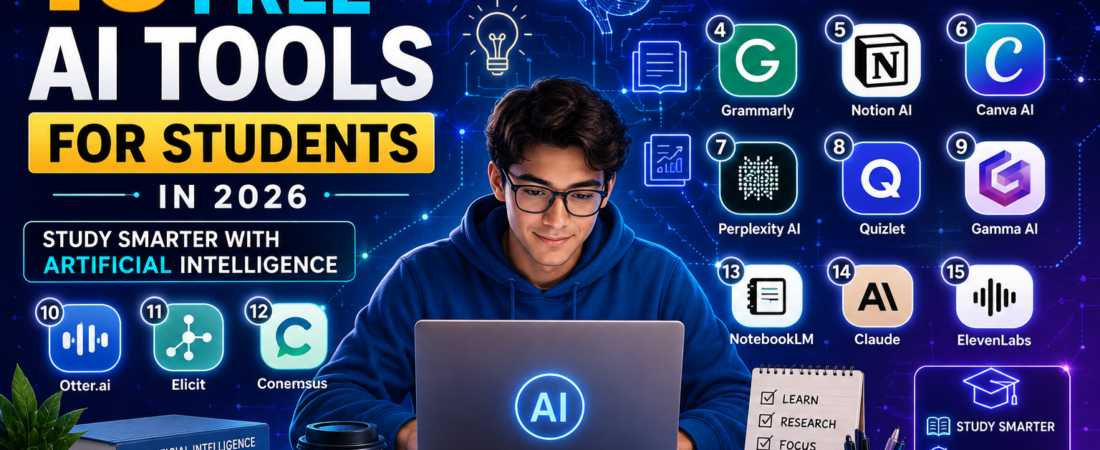
In this guide, you’ll discover the 15 best free AI tools for students in 2026. We’ll explore what each tool does, its standout features, its free plan, the types of students it suits best, and its advantages and limitations. You’ll also learn how to use AI responsibly to enhance your learning while maintaining academic integrity.
Whether you’re preparing for exams, writing research papers, completing assignments, or simply looking for ways to study smarter, these AI tools can help you save time, improve your work, and become a more productive learner.
Let’s explore the best free AI tools every student should know about.
Why Students Should Use AI Tools

Artificial Intelligence is no longer just a technology used by researchers and large companies—it has become an everyday learning companion for millions of students worldwide. Whether you’re attending high school, college, or university, AI tools can help you complete tasks more efficiently, improve your understanding of difficult subjects, and free up more time for meaningful learning.
Instead of replacing students, AI works best as a personal study assistant. It can explain complex concepts in simple language, generate practice questions, summarize lengthy notes, provide instant feedback on writing, and even help organize your study schedule. When used responsibly, AI enhances learning rather than replacing the effort required to succeed academically.
Here are some of the biggest benefits of using AI tools as a student.
Save Time on Research
Research assignments often require reading multiple sources before finding the information you need. AI-powered research tools can quickly summarize articles, explain unfamiliar topics, and point you toward reliable resources, helping you spend less time searching and more time learning.
Improve Writing Skills
Writing essays, reports, and assignments can be challenging, especially when you’re trying to improve grammar, clarity, and structure. AI writing assistants can suggest better wording, identify grammar mistakes, improve sentence flow, and help you communicate your ideas more effectively. They can also help overcome writer’s block by generating outlines and brainstorming ideas.
Study More Effectively
Many AI tools can create summaries, flashcards, quizzes, and practice questions from your notes or textbooks. These features make revision more interactive and can help you retain information better when preparing for exams.
Learn Difficult Topics Faster
Subjects such as mathematics, science, programming, and economics often contain concepts that can be difficult to understand from textbooks alone. AI assistants can provide step-by-step explanations, simplify complex ideas, and answer follow-up questions until you fully understand the topic.
Stay Organized
Managing multiple classes, assignments, deadlines, and projects can be overwhelming. AI-powered productivity tools help students organize notes, create study plans, track assignments, and manage their time more efficiently, reducing stress and improving productivity.
Create Better Presentations and Projects
Whether you’re preparing a classroom presentation, designing an infographic, or creating visual content for a project, AI design tools can help generate professional-looking slides, graphics, and layouts in minutes, even if you have little design experience.
Prepare for Exams with Confidence
AI can generate personalized quizzes, explain incorrect answers, and identify areas where you need more practice. This allows students to focus their revision on weak topics rather than reviewing everything equally.
Learn Anytime, Anywhere
Unlike traditional tutoring, AI tools are available 24 hours a day. Whether you’re studying late at night, reviewing before an exam, or working on an assignment over the weekend, AI can provide instant assistance whenever you need it.
Important: AI should be used to support your learning, not to complete assignments dishonestly. Always verify AI-generated information, think critically about the responses you receive, and follow your school’s academic integrity policies. The most successful students use AI as a learning aid while developing their own knowledge and skills.
By choosing the right AI tools and using them responsibly, you can study more efficiently, improve your academic performance, and develop valuable digital skills that will continue to benefit you long after graduation.
How We Selected These AI Tools
With hundreds of AI-powered apps available today, choosing the right one can be overwhelming. While many tools promise to improve productivity and learning, not all of them are suitable for students. Some are designed specifically for businesses, others require expensive subscriptions, and a few offer limited value on their free plans.
To help you find the most useful options, we’ve carefully selected AI tools that are practical, reliable, and accessible for students. Each recommendation in this guide meets one or more of the following criteria.
1. Free or Generous Free Plan
Every tool on this list offers a free version or a free tier that students can use without paying. While some tools have premium features, their free plans provide enough functionality for everyday academic tasks such as writing, researching, studying, note-taking, and creating presentations.
2. Easy to Use
Students shouldn’t have to spend hours learning complicated software. We selected AI tools with intuitive interfaces that are easy to navigate, even if you’re completely new to Artificial Intelligence.
3. Helps Improve Learning
The best AI tools don’t just save time; they help you understand concepts better. Whether it’s explaining difficult topics, generating practice questions, organizing notes, or improving your writing, each tool should contribute to your learning rather than simply completing work for you.
4. Trusted and Popular
We focused on AI tools developed by reputable companies and widely used by students, educators, and professionals around the world. Popular tools are more likely to receive regular updates, improved features, and ongoing support.
5. Supports Different Academic Tasks
Students have different needs depending on their subjects and learning styles. This list includes AI tools for a variety of purposes, including:
- Research and information gathering
- Writing and grammar improvement
- Note-taking and organization
- Presentation creation
- Studying and exam preparation
- Brainstorming ideas
- Academic search
- Productivity and time management
6. Works Across Multiple Devices
Many students switch between laptops, tablets, and smartphones throughout the day. We prioritized AI tools that work across multiple platforms or offer web-based access, allowing you to continue studying wherever you are.
7. Encourages Responsible AI Use
AI should enhance learning, not replace it. The tools in this guide are most effective when used to understand concepts, improve your work, and boost productivity. We encourage students to verify AI-generated information, think critically, and always follow their school’s academic integrity policies.
By evaluating each tool based on these factors, we’ve created a balanced list of the best free AI tools for students that can genuinely help you study smarter, stay organized, and improve your academic performance. In the next section, we’ll explore each tool in detail, starting with one of the most popular AI assistants available today.
1. ChatGPT
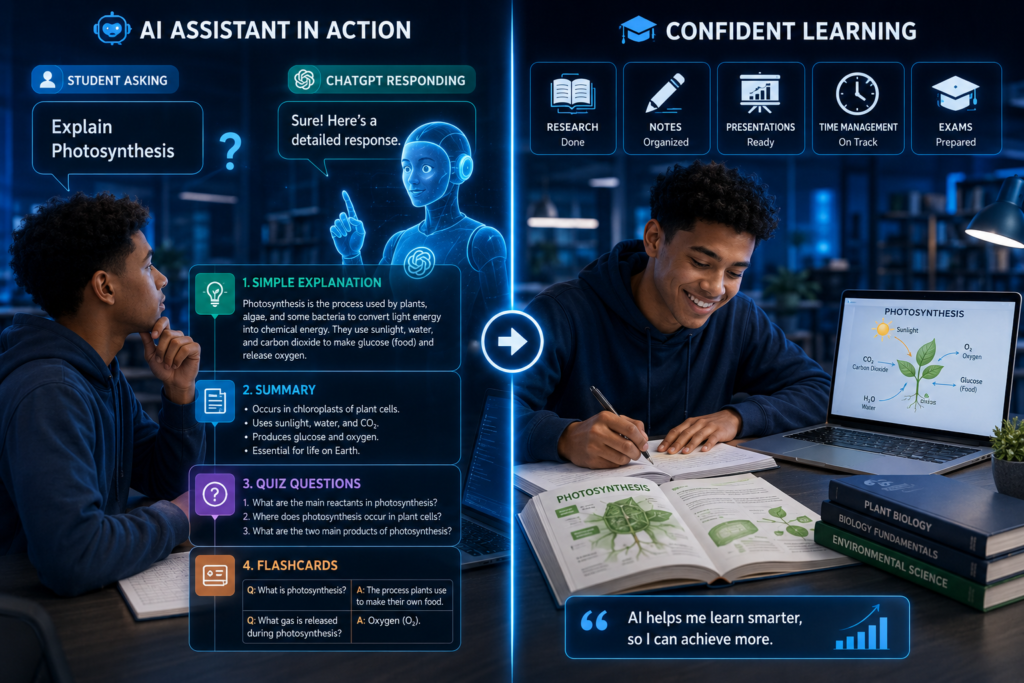
ChatGPT is one of the most popular AI tools for students and is often the first choice for learning, writing, brainstorming, coding, and problem-solving. Developed by OpenAI, it uses a Large Language Model (LLM) to understand questions and generate human-like responses. Whether you’re writing an essay, preparing for an exam, learning a new concept, or practicing programming, ChatGPT can serve as a reliable study companion. Learn more about ChatGPT
Unlike a traditional search engine that provides a list of websites, ChatGPT delivers direct, conversational answers. It can explain complex topics in simple language, generate summaries, create study plans, solve practice problems, and even help improve your writing.
Best Features
- Explains difficult concepts in simple language
- Summarizes long articles, notes, and textbooks
- Assists with essay writing and brainstorming
- Solves coding problems with step-by-step explanations
- Generates quizzes and practice questions
- Creates study schedules and revision plans
- Supports multiple languages
- Assists with mathematics, science, business, history, and many other subjects
Free Plan Highlights
The free version of ChatGPT gives students access to powerful AI capabilities for everyday academic tasks. While advanced models and premium features are available through a paid subscription, the free plan is more than sufficient for researching topics, generating ideas, improving writing, learning concepts, and getting homework assistance.
Best For
- Homework assistance
- Essay planning and writing
- Exam preparation
- Programming assignments
- Learning new subjects
- Brainstorming ideas
- Research support
- Language learning
Pros
- Easy to use with a simple chat interface
- Saves time on research and studying
- Produces clear explanations for beginners
- Supports a wide range of academic subjects
- Available on desktop and mobile devices
- Continuously updated with new capabilities
Limitations
- Can occasionally generate inaccurate or outdated information
- May not always cite reliable academic sources
- Responses should be verified before using them in assignments
- Some advanced features require a paid subscription
Tips for Students
To get the best results, ask clear and specific questions instead of broad ones. For example, instead of asking:
“Explain biology.”
Try asking:
“Explain photosynthesis in simple terms with a real-life example suitable for a first-year university student.”
You can also ask ChatGPT to:
- Simplify difficult textbook chapters
- Create flashcards for revision
- Generate multiple-choice practice questions
- Check grammar and improve essays
- Explain mathematical solutions step by step
- Help debug programming code
- Create presentation outlines
- Develop personalized study plans
The more specific your prompt, the more accurate and useful the response is likely to be.
Verdict
ChatGPT is one of the best free AI tools for students because of its versatility. Whether you’re researching, writing, coding, revising for exams, or learning an entirely new subject, it provides fast, personalized assistance that can make studying more efficient. Used responsibly alongside your own critical thinking and reliable academic sources, ChatGPT can become an invaluable learning partner throughout your educational journey.
2. Google Gemini
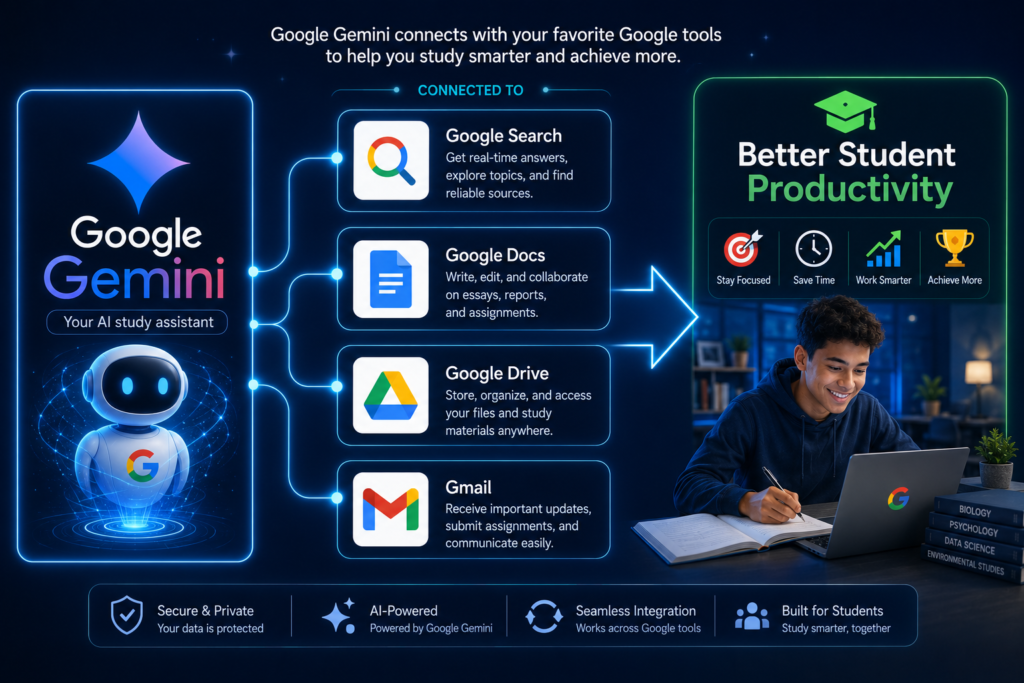
Google Gemini is Google’s advanced AI assistant designed to help users research information, write content, solve problems, and boost productivity. Because it integrates with Google’s ecosystem, it’s particularly useful for students who regularly use Google Search, Google Docs, Gmail, Drive, and other Google Workspace apps. Explore Google’s AI assistant
One of Gemini’s biggest strengths is its ability to explain complex topics, summarize information, generate ideas, and answer follow-up questions in a conversational way. Whether you’re working on a research project, preparing for an exam, or brainstorming ideas for an assignment, Gemini can help you work more efficiently.
Best Features
- Explains complex subjects in simple language
- Summarizes long documents and articles
- Assists with essay writing and editing
- Generates study notes and revision materials
- Helps solve coding and mathematics problems
- Supports brainstorming and project planning
- Integrates with Google Workspace apps
- Supports text, images, and other multimodal inputs
Free Plan Highlights
Google Gemini offers a free version that provides access to many powerful AI features for studying, writing, researching, and learning. Students can use it to ask questions, generate ideas, summarize content, and receive detailed explanations without paying for a subscription.
Best For
- Academic research
- Homework assistance
- Essay writing
- Brainstorming ideas
- Coding support
- Google Workspace users
- Learning difficult subjects
- Project planning
Pros
- Fast and easy to use
- Excellent integration with Google’s services
- Provides detailed explanations across many subjects
- Supports multiple languages
- Helpful for research and productivity
- Regularly updated with new AI capabilities
Limitations
- Some advanced features are only available through paid plans
- AI responses may occasionally contain inaccuracies
- Important academic information should always be verified using reliable sources
- Not every answer includes references or citations
Tips for Students
To get the most out of Google Gemini, use detailed prompts that clearly explain what you need. Instead of asking a general question like:
“Tell me about climate change.”
Try asking:
“Explain the causes and effects of climate change for a university environmental science assignment, using simple language and real-world examples.”
You can also use Gemini to:
- Summarize lecture notes
- Create study guides
- Generate revision questions
- Improve essays and reports
- Brainstorm presentation topics
- Explain difficult formulas and concepts
- Create project timelines
- Organize research ideas
Combining Gemini with Google Docs and Google Drive can make it easier to organize assignments, collaborate with classmates, and manage academic projects.
Verdict
Google Gemini is one of the best free AI tools for students thanks to its powerful research capabilities and seamless integration with Google’s ecosystem. For students who already rely on Google services for studying, writing, and collaboration, Gemini is an excellent AI assistant that can improve productivity and simplify everyday academic tasks. When paired with critical thinking and trusted academic sources, it becomes a valuable companion for learning and success.
3. Microsoft Copilot
Microsoft Copilot is an AI-powered assistant developed by Microsoft that helps students research information, write assignments, summarize content, generate ideas, and solve problems more efficiently. Built on advanced AI technology, Copilot integrates seamlessly with Microsoft products such as Word, Excel, PowerPoint, and Edge, making it an excellent choice for students who frequently use Microsoft Office. Learn about Microsoft Copilot
Whether you’re writing a report in Microsoft Word, creating a presentation in PowerPoint, or organizing data in Excel, Copilot can provide intelligent suggestions that save time and improve productivity.
Best Features
- Generates and improves written content
- Summarizes lengthy articles and documents
- Helps create presentations and reports
- Explains complex concepts in simple language
- Assists with coding and programming tasks
- Brainstorms project and assignment ideas
- Supports research across multiple subjects
- Integrates with Microsoft Office applications
Free Plan Highlights
Microsoft Copilot offers a free version that allows students to chat with AI, ask questions, generate content, summarize information, and receive learning support. Many of its core features are available without a subscription, making it a valuable study companion.
Best For
- Essay writing
- Academic research
- Microsoft Word users
- PowerPoint presentations
- Study planning
- Coding assistance
- Homework support
- Productivity improvement
Pros
- Clean and beginner-friendly interface
- Works well with Microsoft Office apps
- Produces detailed explanations
- Helps improve writing quality
- Saves time when creating presentations and reports
- Available on desktop, web, and mobile devices
Limitations
- Some advanced Microsoft 365 integrations require a paid subscription
- AI-generated responses should always be fact-checked
- May occasionally misunderstand complex prompts
- Not every response includes academic references
Tips for Students
To get the best results, provide Copilot with enough context about your assignment or question. For example, instead of asking:
“Help me with history.”
Try asking:
“Summarize the causes and effects of World War II for a university history assignment in simple language.”
You can also use Microsoft Copilot to:
- Draft essay outlines
- Rewrite paragraphs for better clarity
- Generate presentation slides
- Create revision notes
- Explain mathematical concepts
- Solve programming problems
- Organize project timelines
- Summarize research articles
If you already use Microsoft Word, PowerPoint, Excel, or OneNote for your coursework, Copilot can significantly improve your workflow by reducing repetitive tasks and helping you focus on learning.
Verdict
Microsoft Copilot is one of the best free AI tools for students because it combines a powerful AI assistant with the productivity tools many students already use every day. From writing assignments and creating presentations to researching topics and organizing coursework, Copilot helps students work smarter, stay organized, and complete academic tasks more efficiently. When used responsibly alongside reliable academic sources, it can become an essential part of a student’s study routine.
4. Grammarly
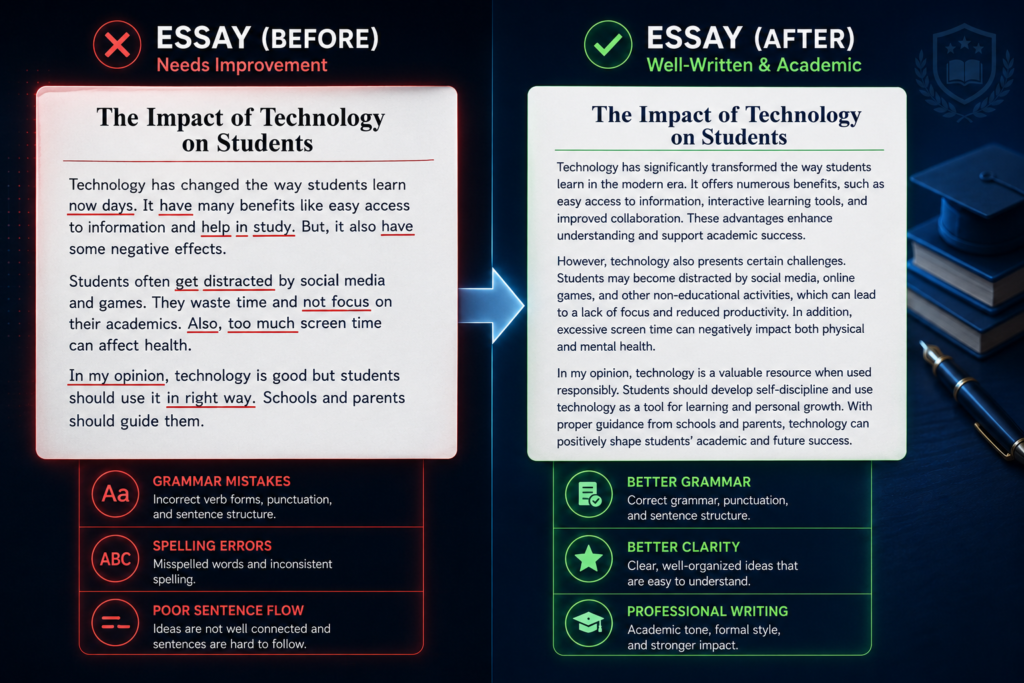
Grammarly is one of the most popular AI-powered writing assistants for students. It helps improve grammar, spelling, punctuation, clarity, and tone while you write. Whether you’re working on an essay, research paper, email, or class assignment, Grammarly provides real-time suggestions that make your writing more professional and easier to understand. Improve writing and grammar
Unlike a traditional spell checker, Grammarly uses Artificial Intelligence to analyze the context of your writing. It not only identifies mistakes but also recommends better word choices, clearer sentence structures, and a more appropriate tone for your audience.
Best Features
- Detects grammar and spelling mistakes instantly
- Improves sentence clarity and readability
- Suggests better vocabulary and word choices
- Checks punctuation and sentence structure
- Identifies writing tone and style
- Helps reduce repetitive words and awkward phrasing
- Works with web browsers, Microsoft Word, Google Docs, and mobile devices
- Offers AI-powered writing assistance for brainstorming and drafting
Free Plan Highlights
Grammarly’s free plan includes essential writing support, such as grammar, spelling, punctuation, and clarity suggestions. These features are more than enough for most students who want to improve essays, reports, emails, and assignments before submitting them.
Best For
- Essay writing
- Research papers
- Assignments
- Emails
- Scholarship applications
- Personal statements
- Reports
- Everyday academic writing
Pros
- Very easy to use
- Provides real-time writing suggestions
- Improves writing confidence and accuracy
- Saves time during proofreading
- Works across multiple platforms and devices
- Helps students become better writers over time
Limitations
- Advanced writing suggestions require a premium subscription
- Some recommendations may not fit every academic writing style
- AI-generated suggestions should always be reviewed before accepting
- It does not replace careful proofreading or critical thinking
Tips for Students
Don’t accept every suggestion automatically. Instead, read Grammarly’s explanations to understand why a change is recommended. This helps you improve your writing skills rather than simply correcting mistakes.
You can also use Grammarly to:
- Proofread essays before submission
- Improve the clarity of research papers
- Write professional emails to lecturers
- Strengthen scholarship and internship applications
- Check group project reports
- Enhance resumes and cover letters
For academic writing, combine Grammarly with your university’s required citation style (such as APA, MLA, or Harvard) and always review your work to ensure it reflects your own ideas and meets your instructor’s expectations.
Verdict
Grammarly is one of the best free AI tools for students because it helps you write with greater accuracy, clarity, and confidence. From correcting grammar mistakes to improving sentence flow, it makes academic writing easier and more polished. While it shouldn’t replace your own editing skills, Grammarly is an excellent tool for producing high-quality assignments and developing stronger writing habits over time.
5. Notion AI
Notion AI is an intelligent productivity assistant built into Notion, one of the most popular note-taking and workspace applications. It helps students organize class notes, manage assignments, summarize information, brainstorm ideas, and create study materials all from a single platform. AI-powered note-taking
Instead of switching between multiple apps for notes, task management, and writing, students can use Notion AI to keep everything organized in one digital workspace. Whether you’re planning a semester, preparing for exams, or collaborating on a group project, Notion AI can simplify your workflow and boost productivity.
Best Features
- Summarizes lecture notes and lengthy documents
- Generates study guides and revision notes
- Brainstorms ideas for essays and projects
- Creates task lists and study schedules
- Organizes coursework in a structured workspace
- Helps draft essays, reports, and meeting notes
- Supports collaborative group projects
- Integrates notes, calendars, databases, and task management in one place
Free Plan Highlights
Notion offers a generous free plan that includes powerful note-taking and organization features for individual students. AI capabilities may have usage limits on the free plan, but students can still benefit from intelligent writing assistance, content summarization, and brainstorming without needing a paid subscription for basic academic use.
Best For
- Note-taking
- Study planning
- Assignment management
- Project organization
- Revision notes
- Group projects
- Research organization
- Personal productivity
Pros
- Keeps all study materials in one place
- Highly customizable for different learning styles
- Excellent for organizing large academic projects
- Supports collaboration with classmates
- Clean, modern, and user-friendly interface
- Accessible on desktop, web, and mobile devices
Limitations
- New users may need time to learn how to organize their workspace effectively
- Some advanced AI features require a paid subscription
- AI-generated content should still be reviewed for accuracy
- Can feel overwhelming if too many pages and databases are created without a clear structure
Tips for Students
Create separate workspaces for each course or subject to keep your materials organized. Within each workspace, you can include lecture notes, assignment deadlines, revision checklists, reading lists, and project plans.
You can also use Notion AI to:
- Summarize class notes after lectures
- Generate flashcards for exam preparation
- Create weekly study schedules
- Organize research materials
- Brainstorm essay topics
- Build project timelines
- Track assignment deadlines
- Maintain a digital study journal
Using templates for class notes and assignments can make your workspace more consistent and save time throughout the semester.
Verdict
Notion AI is one of the best free AI tools for students because it combines notetaking, organization, project management, and AI-powered assistance into a single platform. Students who want to stay organized while improving their productivity will find Notion AI especially valuable. When used consistently, it can help reduce stress, improve time management, and make studying more efficient throughout the academic year.
6. Canva AI
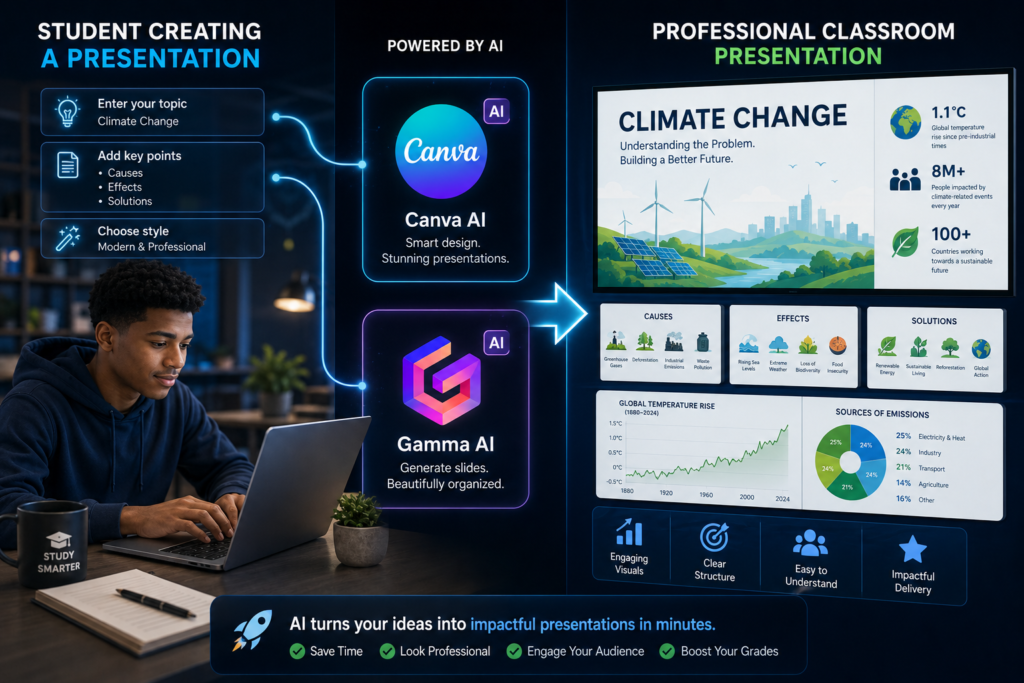
Canva AI is an excellent tool for students who need to create professional-looking presentations, posters, infographics, reports, and social media graphics. Its AI-powered features help generate designs, images, presentations, and written content, making creative projects much faster and easier. AI design and presentation tools.
Best Features
- Creates presentations in minutes
- AI-powered design suggestions
- Generates images from text prompts
- Ready-made templates for school projects
- Easy drag-and-drop editor
- Team collaboration features
Free Plan Highlights
Canva’s free plan includes thousands of templates, design elements, and basic AI features, making it ideal for most student projects.
Best For
- Class presentations
- Posters and flyers
- Infographics
- Group projects
- Visual assignments
Pros
- Beginner-friendly interface
- Huge template library
- Saves time on design work
- Cloud-based and accessible anywhere
- Great collaboration tools
Limitations
- Some premium templates and AI tools require Canva Pro.
- AI-generated content should always be reviewed before submission.
Tips for Students
Use Canva AI to create visually engaging presentations instead of plain text slides. You can also design resumes, study notes, flashcards, mind maps, and project reports with professional layouts.
Verdict
Canva AI is one of the best free AI tools for students who want to create attractive academic projects without needing graphic design experience. It helps students communicate ideas more effectively while saving valuable time.
7. Perplexity AI
Perplexity AI is an AI-powered search and research assistant that helps students find accurate information quickly. Unlike traditional AI chatbots, it provides answers with citations, making it easier to verify information and explore sources for assignments and research projects. AI-powered research assistant
Best Features
- Answers questions with source citations
- Summarizes articles and research papers
- Supports follow-up questions
- Fast and easy-to-understand responses
- Web-based with no complicated setup
Free Plan Highlights
The free version offers powerful AI search capabilities, allowing students to research topics, summarize information, and access cited sources without paying.
Best For
- Academic research
- Literature reviews
- Fact-checking
- Assignment preparation
- Learning new topics
Pros
- Provides source citations
- Saves time during research
- Easy to use
- Produces clear summaries
- Great for verifying information
Limitations
- Some advanced AI models require a paid subscription.
- Always evaluate the credibility of cited sources before using them in academic work.
Tips for Students
Use Perplexity AI as a starting point for research. Follow the cited sources to gather reliable information and reference authoritative materials in your assignments instead of relying solely on AI-generated summaries.
Verdict
Perplexity AI is one of the best free AI tools for students because it combines AI-powered answers with source citations. It’s an excellent choice for researching assignments, fact-checking information, and discovering trustworthy resources more efficiently.
8. Quizlet AI
Quizlet AI is a smart study tool that helps students learn faster through flashcards, quizzes, and personalized practice tests. It uses AI to turn notes into interactive study materials, making exam preparation more effective. AI-powered flashcards and studying
Best Features
- AI-generated flashcards
- Practice quizzes and tests
- Learn mode for active revision
- Progress tracking
Best For
- Exam preparation
- Memorizing key concepts
- Language learning
- Quick revision
Pros
- Makes studying interactive
- Easy to use
- Improves information retention
Limitations
- Some advanced study features require a premium subscription.
- AI-generated flashcards should be reviewed for accuracy.
Verdict
Quizlet AI is one of the best free AI tools for students who want to study smarter. Its AI-powered flashcards and quizzes make learning more engaging and help students prepare confidently for exams.
9. Gamma AI
Gamma AI is an AI-powered presentation tool that helps students create professional slides, documents, and reports in minutes. Simply enter a topic, and Gamma generates a well-structured presentation complete with text, images, and layouts. AI presentation creator
Best Features
- AI-generated presentations
- Professional templates
- Easy editing and customization
- Quick export and sharing
Best For
- Class presentations
- Project reports
- Group assignments
- Visual storytelling
Pros
- Saves hours of presentation design
- Beginner-friendly
- Produces clean, modern slides
Limitations
- Some premium templates and features require a paid plan.
- Review AI-generated content for accuracy before presenting.
Verdict
Gamma AI is one of the best free AI tools for students who want to create impressive presentations quickly. It simplifies slide creation, allowing students to focus more on delivering great content than designing slides.
10. Otter.ai
Otter.ai is an AI-powered note-taking tool that records, transcribes, and summarizes lectures, meetings, and discussions in real time. It’s especially useful for students who want to focus on listening instead of taking detailed notes during class. AI transcription and note-taking
Best Features
- Real-time speech-to-text transcription
- AI-generated lecture summaries
- Searchable notes
- Speaker identification
Best For
- Lecture notes
- Online classes
- Group meetings
- Interview recordings
Pros
- Saves time on note-taking
- Accurate transcriptions
- Easy to review and search notes
Limitations
- The free plan has monthly transcription limits.
- Transcription accuracy may vary depending on audio quality and accents.
Verdict
Otter.ai is one of the best free AI tools for students who attend lectures or online classes. It helps capture important information, making it easier to review lessons and prepare for exams without worrying about missing key details.
11. Elicit
Elicit is an AI research assistant designed to help students find, summarize, and analyze academic papers. It searches scholarly literature and extracts key insights, making it easier to conduct literature reviews and support research projects. AI academic research assistant
Best Features
- Searches academic papers
- Summarizes research articles
- Extracts key findings
- Speeds up literature reviews
Best For
- Research projects
- Literature reviews
- Academic writing
- Thesis preparation
Pros
- Saves research time
- Focuses on scholarly sources
- Easy to use
Limitations
- Some advanced features require a paid plan.
- Always read the original papers before citing them.
Verdict
Elicit is one of the best free AI tools for students conducting academic research. It simplifies finding and understanding scholarly papers, making it a valuable companion for essays, research projects, and dissertations.
12. Consensus
Consensus is an AI-powered academic search engine that helps students find evidence-based answers from peer-reviewed research. Instead of searching the general web, it focuses on scientific studies, making it an excellent tool for assignments and research. AI-powered academic search
Best Features
- Searches peer-reviewed research
- Summarizes scientific studies
- Provides evidence-based answers
- Easy-to-use search interface
Best For
- Academic research
- Science projects
- Essays
- Fact-checking
Pros
- Uses credible research sources
- Saves time finding academic evidence
- Simple and beginner-friendly
Limitations
- Some advanced features require a paid subscription.
- Not all subjects have extensive research coverage.
Verdict
Consensus is one of the best free AI tools for students who need reliable academic information. It helps students find trustworthy research quickly, making it ideal for writing evidence-based assignments and projects.
13. NotebookLM
NotebookLM is Google’s AI-powered research and note-taking assistant that helps students study using their own materials. You can upload lecture notes, PDFs, and documents, then ask questions and receive answers based on those sources. Google’s AI research notebook
Best Features
- Answers questions from your uploaded notes
- Summarizes PDFs and documents
- Generates study guides and FAQs
- Creates personalized learning materials
Best For
- Exam revision
- Lecture notes
- Research papers
- Study organization
Pros
- Uses your own study materials
- Easy to understand summaries
- Saves time reviewing notes
Limitations
- Some features may vary by region or account.
- Always double-check AI-generated summaries for accuracy.
Verdict
NotebookLM is one of the best free AI tools for students who want to study more efficiently. By using your own notes and documents as its knowledge source, it delivers personalized study assistance and makes exam preparation much easier.
14. Claude
Claude is an AI assistant developed by Anthropic that excels at writing, summarizing, explaining complex topics, and analyzing long documents. It’s a great choice for students who need help understanding difficult concepts or improving their academic writing. Anthropic’s AI assistant
Best Features
- Summarizes long documents
- Explains complex topics clearly
- Assists with writing and editing
- Supports coding and problem-solving
Best For
- Essay writing
- Research
- Study guides
- Programming assignments
Pros
- Clear and natural responses
- Excellent for long documents
- Easy to use
Limitations
- Free plan includes usage limits.
- Always verify AI-generated information before using it in assignments.
Verdict
Claude is one of the best free AI tools for students who need help with writing, research, and learning complex subjects. Its ability to explain ideas clearly makes it a valuable AI study companion.
15. ElevenLabs
ElevenLabs is an AI-powered text-to-speech platform that converts written text into natural-sounding voice recordings. It’s useful for students who prefer listening to study materials, practicing presentations, or creating educational audio content. AI text-to-speech platform
Best Features
- Realistic AI voice generation
- Multiple voice options
- Converts text into speech
- Supports multiple languages
Best For
- Listening to study notes
- Presentation practice
- Language learning
- Accessibility support
Pros
- High-quality, natural voices
- Easy to use
- Helps auditory learners study more effectively
Limitations
- The free plan has monthly usage limits.
- Some premium voices and features require a paid subscription.
Verdict
ElevenLabs is one of the best free AI tools for students who prefer learning by listening. It makes study materials more accessible and helps students review notes, practice presentations, and improve learning efficiency through realistic AI-generated audio.
How to Choose the Right AI Tool for Your Needs
With so many AI tools available, the best choice depends on what you need to accomplish. Instead of using one tool for everything, consider combining a few tools that complement each other.
| Task | Recommended AI Tool |
|---|---|
| Writing & brainstorming | ChatGPT, Claude |
| Research | Perplexity AI, Elicit, Consensus |
| Grammar & editing | Grammarly |
| Note-taking | NotebookLM, Otter.ai |
| Presentations | Canva AI, Gamma AI |
| Study & revision | Quizlet AI |
| Productivity | Notion AI |
| Listening to notes | ElevenLabs |
Using the right tool for the right task can save time, improve productivity, and make studying more enjoyable.
Frequently Asked Questions (FAQs)
Are AI tools free for students?
Yes. Most AI tools offer free plans with enough features for everyday studying, writing, research, and note-taking. Premium plans unlock additional capabilities but are not required for most students.
Can AI replace studying?
No. AI should support your learning, not replace it. You still need to understand concepts, practice regularly, and complete your own work.
Which AI tool is best for research?
Perplexity AI, Elicit, and Consensus are excellent choices because they help students find reliable information and academic sources quickly.
Which AI tool is best for writing essays?
ChatGPT, Claude, and Grammarly work well together. ChatGPT and Claude can help generate ideas and outlines, while Grammarly improves grammar, clarity, and readability.
Is it okay to use AI for school assignments?
Yes, if your school allows it. Use AI for brainstorming, learning, proofreading, and research, but always follow your institution’s academic integrity guidelines and submit original work.
Final Thoughts
Artificial Intelligence is changing the way students learn, research, and complete academic tasks. The right AI tools can help you write better, study smarter, stay organized, and save valuable time. Whether you need help with research, note-taking, presentations, or exam preparation, there’s an AI tool designed to make learning more efficient.
Start with a few free tools, discover what works best for your learning style, and remember that AI is most powerful when used as a learning assistant, not a replacement for your own thinking and creativity.
Ready to Supercharge Your Studies with AI?
You don’t need to use every AI tool on this list to become a more productive student. Start by choosing one or two tools that match your needs, whether it’s ChatGPT for learning, Grammarly for writing, Perplexity AI for research, or Quizlet AI for exam preparation. As you become more comfortable, you can explore additional tools to build a smarter and more efficient study routine.
Remember, AI is most effective when it helps you learn, think, and create, not when it does the work for you. By combining these tools with critical thinking, consistent practice, and good study habits, you’ll be better prepared to succeed in school and develop valuable digital skills for the future.
If you found this guide helpful, be sure to explore more AI tutorials, tool reviews, and beginner-friendly resources on BuildSmartAfri. We’re committed to helping you master Artificial Intelligence, technology, online business, and other digital skills through practical, easy-to-follow content.
Start learning smarter today, one AI tool at a time!
Disclaimer
This article is for educational and informational purposes only. Features, pricing, and free plans for AI tools may change over time. Always visit each tool’s official website for the latest information. When using AI for academic work, verify important information, cite your sources properly, and follow your school’s academic integrity and plagiarism policies.