
Introduction
AI Automation for Beginners: How to Automate Everyday Tasks With AI. Artificial intelligence is changing not only how people create content and find information, but also how everyday tasks can be automated. If you’re completely new to AI, start with our guide on What Is Artificial Intelligence (AI)? to understand how AI works and where it is already being used.

Many people spend hours every week performing repetitive activities such as responding to similar emails, organizing customer inquiries, updating spreadsheets, creating reports, managing leads, summarizing documents, and moving information between different applications.
AI automation can help reduce some of this repetitive work.
Imagine a small business receives a new customer inquiry through its website. Instead of manually copying the customer’s information into a spreadsheet, reading the message, categorizing the inquiry, and notifying the sales team, an automated workflow could help perform several of these steps.
For example:
Customer Submits Form
Automation Starts
AI Categorizes or Summarizes the Inquiry
Customer Information Is Recorded
Business Owner Is Notified
Human Reviews and Responds
The purpose isn’t necessarily to remove humans from the process.
Instead, AI automation can handle appropriate repetitive steps while people remain involved where judgment, accuracy, creativity, customer relationships, or important decisions are required.
This beginner’s guide explains what AI automation is, how it works, what tasks can be automated, useful tools for beginners, benefits and limitations, and how to create your first simple AI-powered workflow.

What Is AI Automation?
AI automation is the use of artificial intelligence together with automated workflows to perform or assist with tasks that would otherwise require manual effort.
Traditional automation usually follows predefined rules.
For example:
When a customer submits a form → Add the information to a spreadsheet.
The system doesn’t necessarily need to understand the customer’s message. It simply follows the rule it was given.
AI can add another layer.
For example:
When a customer submits a form → AI analyzes the message → Categorizes the inquiry → Creates a short summary → Information is saved → Appropriate person is notified.
In this case, automation controls the workflow, while AI helps perform tasks involving language or interpretation.
A simple formula is:
Trigger → Input → AI Processing → Action → Result
AI Automation vs Traditional Automation
Although the terms are sometimes used together, AI and automation aren’t exactly the same thing.
Consider a simple email workflow.
Traditional Automation
A business creates this rule:
If an email contains “Invoice” → Move it to the Invoice folder.
The automation follows a predefined condition.
AI-Powered Automation
A workflow could instead send the message to an AI system to determine whether it relates to:
Sales • Technical Support • Billing • Complaint • General Inquiry
The workflow could then route the message according to that classification.
The difference can be summarized like this:
| Traditional Automation | AI Automation |
|---|---|
| Primarily follows predefined rules | Adds AI capabilities within the workflow |
| Works well with predictable inputs | Can help process less-structured information |
| Often uses “If X, then Y” logic | Can classify, summarize or generate content |
| Usually doesn’t interpret natural language deeply | Can help analyze text and other supported inputs |
| Best for repeatable processes | Useful when a workflow includes tasks suited to AI |
Neither approach is automatically better.
Sometimes traditional automation is all you need. Adding AI to a simple workflow can unnecessarily increase complexity, cost, and the possibility of errors.
The important question is:
Does this particular step actually benefit from AI?
A Simple Example of AI Automation
Imagine an online store receives dozens of customer messages every day.
Instead of manually sorting every message, the business could create a workflow:
1. Customer sends an inquiry
2. Automation detects the new message
3. AI analyzes the message
4. The message is categorized
5. Customer information is added to the appropriate system
6. A draft response may be prepared
7. Employee reviews the information where necessary
For example, a message saying:
“Hello, I bought a laptop yesterday but the charger isn’t working. Can you help?”
could potentially be classified as Customer Support rather than New Sales.
This illustrates the basic idea behind AI automation:
Automation manages the process. AI assists with suitable tasks inside that process.
How Does AI Automation Work?
AI automation may sound complicated, but most automated workflows follow a simple process. A task happens, information is collected, AI processes that information when needed, and the system performs an action.
A basic AI automation workflow looks like this:
Trigger → Input → AI Processing → Action → Result → Human Review
Understanding these stages makes it much easier to see how businesses and individuals can build useful automations.
1. Trigger
A trigger is the event that starts an automation.
Examples include:
- A customer submits a website form.
- A new email arrives.
- Someone places an online order.
- A new lead enters a CRM.
- A document is uploaded.
- A meeting ends.
- A specific date or time is reached.
For example, imagine someone completes a contact form on a business website. Submitting that form becomes the trigger that starts the workflow.
2. Input or Data
Once the automation starts, the system needs information to work with.
This information might include a customer’s:
Name • Email • Message • Product interest • Order details
For example:
“I’m interested in buying a laptop for university. My budget is around $600. What would you recommend?”
Instead of requiring an employee to manually read and organize every inquiry, an AI system could help process the message.
However, businesses should be careful about what information they send to AI services, particularly when dealing with confidential or personal data.
3. AI Processing
This is where artificial intelligence adds capabilities to the workflow. The quality of AI-generated results can also depend on the instructions provided. Our beginner’s guide to writing effective AI prompts explains how to give AI clearer instructions and useful context.
Depending on the task, AI might:
- Summarize a long message.
- Categorize an inquiry.
- Extract important information.
- Draft a response.
- Analyze customer feedback.
- Translate text.
- Generate a short description.
- Identify the general intent of a message.
Using the laptop inquiry above, AI might produce:
Category: Laptop Sales
Customer Type: Student
Budget: Around $600
Request: Laptop recommendation
This can make the information easier for an employee or another system to process.
4. Automated Action
After the information has been processed, the automation performs one or more predefined actions.
For example:
AI identifies inquiry as “Laptop Sales”
↓
Customer details added to CRM
↓
Sales representative notified
↓
Draft response created
Other automated actions could include updating a spreadsheet, creating a task, sending a notification, moving information between applications, or preparing a document.
The important point is that AI doesn’t necessarily control the entire workflow. It may simply perform one intelligent step inside a larger automation.
5. Result
The final result should solve or simplify a real task.
For example, instead of a business owner spending several minutes manually processing each customer inquiry, the workflow could organize the information automatically and present it in a useful format.
A process that previously looked like:
Read Email → Understand Request → Copy Details → Categorize → Create Task → Notify Employee
could become:
New Email → AI Analyzes → Automation Organizes → Employee Receives Ready-to-Review Information
This can save time, especially when the same process happens repeatedly.
6. Human Review
Human oversight remains important, particularly when AI-generated information could affect customers, money, employment, healthcare, security, or other important decisions.
AI systems can produce incorrect information or misunderstand context. An automated workflow can also fail because of incorrect settings, missing data, software changes, or unexpected inputs.
A safer approach for important tasks is:
AI Processes → Automation Acts Within Defined Limits → Human Reviews → Final Decision
For example, AI could draft a response to a customer complaint without automatically sending it. An employee could review the message, make any necessary corrections, and then send it.
As confidence in a low-risk workflow improves, some steps may be automated further where appropriate.
A Complete AI Automation Example
Consider a small online business that receives customer inquiries.
Customer Submits Form
Form Submission Triggers Automation
AI Reads and Categorizes the Message
Customer Details Are Added to the CRM
AI Prepares a Draft Response
Business Owner Receives Notification
Human Reviews the Response
Response Is Sent
This example demonstrates one of the most important concepts for beginners:
Automation connects and executes the workflow, while AI adds capabilities such as understanding, summarizing, classifying, or generating information.
You don’t need to automate an entire business at once. A better starting point is often to identify one repetitive, time-consuming task, automate a few simple steps, test the workflow carefully, and improve it over time.
Examples of AI Automation in Everyday Life and Business
AI automation becomes easier to understand when you see how it can be used in real situations. You don’t need a large company or advanced programming skills to benefit from it. Many useful automations involve simple, repetitive tasks.
1. Email Management
Managing emails can consume a significant amount of time, especially for businesses receiving customer inquiries every day.
An AI-powered workflow could:
New Email Arrives
AI Analyzes the Message
Email Is Categorized
Draft Response Is Prepared
Human Reviews and Sends
For example, AI could help separate emails into categories such as Sales, Support, Billing, Complaints, and General Questions.
For important communications, reviewing AI-generated responses before sending them can help prevent incorrect or inappropriate messages.
2. Customer Support
Businesses often receive the same questions repeatedly:
- What are your opening hours?
- How much does delivery cost?
- Is this product available?
- How can I reset my password?
- Where is my order?
AI-powered customer-support systems can help answer common questions or direct customers to the appropriate information.
A workflow might look like:
Customer Question → AI Identifies Intent → Relevant Information Retrieved → Response Generated → Escalate to Human When Necessary
More complicated complaints, unusual requests, payment disputes, or sensitive situations can still be passed to a human employee.
3. Content Creation and Social Media
Content creators and businesses can automate parts of their content workflow without necessarily automating the entire creative process. Content creators can also explore our guide to the Best AI Tools for Content Creators for tools that assist with writing, graphics, video, research, and other parts of the content workflow.
For example:
Topic Added to Content List
AI Creates Draft Ideas
Human Edits Content
Post Is Scheduled
Performance Is Recorded
AI could also assist with generating headline ideas, summarizing long content, repurposing an article into social-media drafts, or organizing a content calendar.
Human review remains useful for checking accuracy, tone, originality, and brand consistency.
4. Lead Management and Sales
Businesses can also automate what happens after a potential customer expresses interest in a product or service.
Imagine someone fills out a website form asking about a laptop.
The workflow could be:
Form Submitted
AI Categorizes the Lead
Contact Added to CRM
Salesperson Notified
Follow-Up Draft Prepared
Instead of manually copying customer details between applications, automation handles the repetitive steps while the salesperson focuses on communicating with the customer and closing the sale.
5. Document Summarization
Businesses and students often work with long documents, reports, meeting notes, and other text-heavy information.
AI can help summarize appropriate documents and extract key information.
For example:
Document Uploaded → AI Summarizes → Key Points Extracted → Human Reviews
This can be useful for getting a quick overview before reading the most important sections in detail.
However, important information should still be checked against the original document because AI summaries can omit details or contain mistakes.
6. Meeting Notes and Follow-Ups
AI automation can also reduce the administrative work that comes after meetings.
A suitable system might:
Meeting Ends
Transcript Created
AI Produces Summary
Action Items Identified
Tasks Created
Team Reviews
Instead of manually writing every follow-up task, team members receive an organized starting point.
7. E-Commerce and Online Business
Online businesses can use automation across different parts of the customer journey.
For example:
Customer Places Order
Order Information Recorded
Confirmation Sent
Delivery Process Updated
Customer Receives Relevant Notifications
AI could be added to appropriate parts of the process for tasks such as analyzing customer feedback, categorizing support requests, or preparing personalized draft responses.
Not every step needs AI. Simple processes such as sending an order confirmation can often be handled perfectly well by traditional automation.
What Makes a Good Task for AI Automation?
A useful starting rule for beginners is:
Repetitive + Time-Consuming + Clearly Defined + Low Risk = Good Automation Candidate
For example, automatically organizing incoming customer inquiries may be a good starting point.
Allowing AI to make major financial, employment, healthcare, legal, or similarly consequential decisions without appropriate human oversight is very different.
Start with small tasks where mistakes can be easily detected and corrected.
As you gain experience, you can gradually build more advanced workflows.
The goal isn’t to automate everything.
The goal is to identify repetitive work that technology can handle effectively so that people have more time for creative work, problem-solving, customer relationships, and important decisions.
Benefits of AI Automation
AI automation is becoming increasingly useful because it can help individuals and businesses reduce repetitive work, improve productivity, and spend more time on tasks that require human judgment and creativity.
Here are some of the main benefits.
1. Saves Time
One of the biggest advantages of automation is reducing the amount of time spent on repetitive tasks.
Instead of manually copying information between applications, sorting messages, creating routine reports, or organizing customer inquiries, automated workflows can handle many of these steps.
For example:
Customer Submits Form → Information Recorded → AI Categorizes Inquiry → Employee Notified
A process that previously required several manual steps can happen much faster.
2. Reduces Repetitive Manual Work
Many jobs involve small tasks that employees perform repeatedly.
Examples include:
- Entering customer information
- Sorting emails
- Updating spreadsheets
- Creating routine summaries
- Organizing documents
- Sending notifications
- Moving information between applications
Automating appropriate tasks allows people to focus more attention on problem-solving, customer relationships, planning, creativity, and decision-making.
3. Improves Productivity
AI automation can help individuals and teams accomplish more without necessarily increasing the amount of manual work.
Consider a business receiving 50 customer inquiries.
Without automation:
50 Messages → Manually Read → Categorize → Record → Respond
With an appropriate workflow:
50 Messages → Automatically Collected → AI Helps Categorize → Information Organized → Employee Reviews
The employee can spend more time actually helping customers instead of organizing information.
4. Provides Faster Customer Responses
Customers often expect businesses to respond quickly.
Automation can help acknowledge requests immediately, route questions to the appropriate department, provide approved information for common questions, or notify employees when human attention is required.
For example:
Customer Question → AI Identifies Category → Relevant Workflow Starts → Human Escalation if Needed
This can improve response times without requiring AI to handle every customer interaction independently.
5. Helps Small Businesses Do More
Small businesses may have limited staff, making repetitive administrative work particularly time-consuming.
AI automation can assist with areas such as:
Marketing • Customer Support • Lead Management • Content Workflows • Administration • Reporting
For example, one workflow might automatically collect new leads, organize their information, and notify the business owner.
This doesn’t replace the business owner’s role. It reduces some of the repetitive work surrounding that role.
6. Can Reduce Certain Manual Errors
Repeatedly copying information between systems can introduce mistakes.
For example, someone might accidentally copy the wrong email address, forget to update a spreadsheet, or miss an incoming request.
Well-designed automation can make routine processes more consistent.
However, automation doesn’t eliminate errors completely. Incorrect rules, poor-quality data, software problems, or inaccurate AI outputs can create new mistakes.
That is why workflows should still be tested and monitored.
7. Allows Workflows to Scale
A manual process that works for 10 customers may become difficult when a business grows to hundreds or thousands of interactions.
Automation can help handle increasing volumes of routine work.
For example:
10 Leads → 100 Leads → 1,000 Leads
Instead of manually organizing every lead, the same workflow can help process incoming information consistently, subject to the limits and costs of the tools being used.
AI Automation Is About Working Smarter
The biggest benefit isn’t simply doing everything automatically.
Effective AI automation is about deciding which tasks technology should handle and which tasks still need people.
A useful approach is:
Automate Repetition → Use AI Where It Adds Value → Keep Human Judgment → Monitor the Results
When implemented carefully, AI automation can help save time, reduce repetitive work, improve productivity, and allow people to concentrate on higher-value activities.
Popular AI Automation Tools for Beginners
You do not need to be an experienced programmer to start using AI automation. Many modern platforms provide visual interfaces, templates, and integrations that allow beginners to connect applications and create workflows with little or no coding. Zapier allows users to connect applications through trigger-and-action workflows and add AI-powered steps for tasks such as summarizing, classifying, and drafting content.
Here are some popular tools worth understanding.
1. Zapier
Zapier is a workflow automation platform that connects different applications and services.
A basic workflow could be:
Customer Submits Form → Zapier Starts Workflow → AI Processes Message → Information Added to CRM → Owner Notified
Zapier can be useful for connecting forms, email platforms, spreadsheets, CRM systems, project-management tools, and AI services.
For beginners, its visual workflow approach can make automation easier to understand.
2. Make
Make is another visual automation platform that lets users connect applications and build multi-step workflows.
For example:
New Order → Retrieve Customer Details → Process Information → Update Spreadsheet → Send Notification
Its visual workflow builder can be especially useful when you want to see how information moves between different steps.
3. ChatGPT
ChatGPT can assist with tasks involving text, analysis, classification, summarization, extraction, and content generation.
Within an appropriate automation workflow, AI could help:
- Categorize customer inquiries
- Summarize messages
- Extract structured information
- Create draft responses
- Generate content ideas
- Analyze feedback
For example:
Customer Message → AI Categorizes Message → Automation Routes It → Employee Reviews
The important distinction is that an AI assistant may perform an intelligent step, while an automation platform manages the overall workflow.
4. Microsoft Power Automate
Microsoft Power Automate helps automate workflows across Microsoft services and other supported applications.
It can be particularly useful for organizations already working with tools such as Microsoft 365.
Potential workflows include:
Email Received → Information Processed → File Updated → Task Created → Employee Notified
It can support both simple workflows and more advanced business processes.
5. Gemini and Google Workspace
Google Gemini and AI capabilities across Google’s productivity ecosystem can assist with tasks involving documents, email, spreadsheets, research, and other everyday work.
For someone already using Google’s productivity tools, AI assistance can help with tasks such as summarizing information, drafting text, analyzing content, and organizing work.
Availability and specific capabilities can vary depending on the Google service and plan being used.
6. Notion AI
Notion AI brings AI capabilities into the Notion workspace.
It can assist with activities such as:
Writing → Summarizing → Finding Information → Organizing Knowledge → Managing Work
This can be useful for individuals or teams already keeping their notes, documents, projects, and internal knowledge in Notion. If you’re looking beyond automation, explore our guide to the Best AI Tools for Small Businesses for additional ways AI can support marketing, content creation, customer service, and productivity.
Which AI Automation Tool Should a Beginner Choose?
You don’t need all of these tools.
Choose based on the problem you want to solve.
Need to connect everyday apps? → Zapier
Want visual multi-step workflows? → Make
Need AI text processing or generation? → ChatGPT
Work heavily with Microsoft products? → Power Automate
Use Google’s productivity ecosystem? → Gemini/Google Workspace
Manage knowledge and projects in Notion? → Notion AI
More importantly, choose the task before choosing the tool.
A common beginner mistake is finding an exciting automation platform and then looking for something to automate. A better approach is:
Find Repetitive Task → Define Desired Result → Design Workflow → Choose Tool → Test → Improve
Start with one small workflow. Once it works reliably, you can gradually automate additional tasks.
How to Create Your First AI Automation
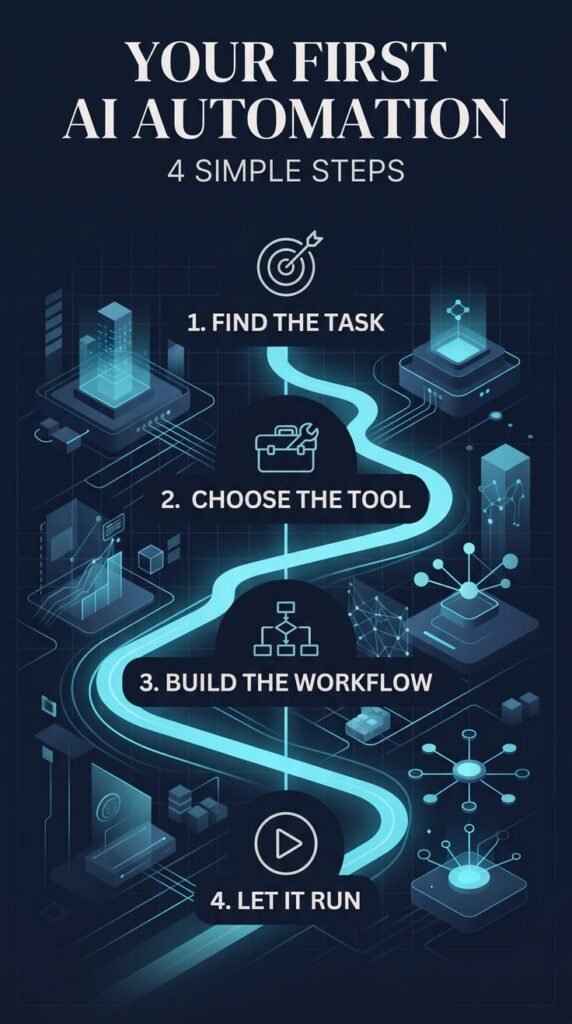
Creating your first AI automation does not have to be complicated. The best approach for a beginner is to start with one small repetitive task rather than trying to automate an entire business process.
A simple method is:
Identify Task → Choose Trigger → Define AI Step → Choose Action → Test → Monitor
Let’s use a customer inquiry as an example.
1. Identify a Repetitive Task
Start by asking:
“What task do I repeatedly do that takes time but follows a similar process?”
Good beginner examples include sorting emails, recording new leads, summarizing customer messages, organizing form submissions, preparing draft responses, and sending internal notifications.
Suppose a small business regularly receives customer inquiries through its website. Someone currently has to read each message, determine what the customer wants, record their details, and respond.
That is a potential automation opportunity.
2. Choose the Trigger
Next, determine what should start the workflow.
In our example:
Trigger: A customer submits the website contact form.
Other triggers could include receiving an email, adding a new spreadsheet row, receiving an order, uploading a document, or creating a new CRM lead.
Think of the trigger as the starting button for your automation.
3. Decide What AI Should Do
Now identify whether any part of the process actually benefits from AI.
Suppose the customer writes:
“I’m looking for a laptop for graphic design with 16GB RAM. My budget is around $800.”
AI could help extract or classify information such as:
Category: Laptop Sales
Purpose: Graphic Design
RAM: 16GB
Budget: Around $800
AI could also prepare a short summary or draft response.
The AI should have a specific job rather than simply being added because it is available.
4. Choose the Automated Actions
After AI processes the information, decide what should happen next.
For example:
Customer submits form
↓
AI analyzes inquiry
↓
Customer details added to CRM or spreadsheet
↓
Inquiry categorized as Sales
↓
Draft response prepared
↓
Business owner notified
Platforms such as Zapier or Make can help connect the applications involved in workflows like this.
5. Add Human Review Where Necessary
Not every AI-generated action should happen automatically.
For example, instead of immediately sending an AI-generated sales response:
AI Generates Response → Employee Reviews → Corrects if Necessary → Sends
This is particularly useful while testing a new workflow.
Human review becomes even more important when automation involves money, confidential information, customer complaints, employment, health, legal matters, security, or other consequential decisions.
6. Test the Automation
Never assume an automation works correctly simply because it has been created.
Test different situations.
For example, submit test messages such as:
“I want to buy a laptop.”
“My laptop isn’t turning on.”
“Where is my order?”
The workflow should ideally recognize that these represent different categories:
Sales • Technical Support • Order Support
Check whether information is being recorded correctly, notifications reach the right person, AI classifications make sense, and errors are handled appropriately.
7. Monitor and Improve
Automation isn’t necessarily something you configure once and forget.
Continue checking:
- Are tasks completing successfully?
- Is AI categorizing information correctly?
- Are important requests being missed?
- Are there unnecessary steps?
- Are users’ data handled appropriately?
- Is the automation actually saving time?
If something repeatedly goes wrong, modify the workflow.
A useful cycle is:
Build → Test → Monitor → Improve → Repeat
Your First Automation Should Be Simple
Beginners sometimes imagine an AI automation system that automatically handles marketing, sales, customer support, accounting, content creation, and administration all at once.
That is usually the wrong place to start.
Instead, automate one small process.
For example:
Customer Submits Form
AI Categorizes Inquiry
Details Added to CRM
Owner Notified
Human Takes Action
Once that workflow works reliably, you can consider adding another step.
The goal is not to build the most complicated automation possible. It is to create a simple workflow that solves a real problem and saves useful time.
What Tasks Should You Automate With AI?
Not every task needs AI automation. One of the most important skills for beginners is learning what should be automated and what should remain under human control.
A simple rule is:
Repetitive + Predictable + Time-Consuming + Low Risk = Good Automation Candidate
Before automating a task, ask whether it happens frequently, follows a similar process, consumes unnecessary time, and can be corrected easily if something goes wrong.
Good Tasks to Automate
Some tasks are naturally suited to automation because they involve repetitive steps.
Examples include:
- Sorting and categorizing emails
- Recording website form submissions
- Adding leads to a CRM
- Updating spreadsheets
- Creating routine notifications
- Summarizing documents
- Organizing customer inquiries
- Preparing draft responses
- Generating meeting summaries
- Scheduling approved content
- Moving information between applications
For example, imagine a business receives new leads through its website.
Instead of manually processing each one:
New Lead Arrives
AI Categorizes the Inquiry
Details Added to CRM
Salesperson Notified
Salesperson Reviews and Responds
The repetitive administrative work is automated, while the important customer interaction remains with a person.
Tasks That Need Human Oversight
Some processes can use AI assistance but shouldn’t necessarily be handed over completely to an automated system.
These may include decisions involving:
Money
Healthcare
Legal Matters
Employment
Security
Education
Sensitive Customer Information
For example, AI might help summarize job applications, but allowing an automated system to make final hiring decisions without appropriate safeguards and human oversight could create serious problems.
Similarly:
AI Drafts Customer Refund Response → Human Reviews → Refund Decision Made
may be more appropriate than:
AI Makes Refund Decision → Money Automatically Sent
The appropriate level of automation depends on the consequences of getting the decision wrong.
Avoid Automating a Bad Process
Automation doesn’t automatically fix an inefficient process.
Suppose a business has a complicated approval system involving unnecessary steps. Automating every step may simply make a bad process happen faster.
A better approach is:
Understand Process → Remove Unnecessary Steps → Simplify → Automate
Before building an automation, ask:
“Does this process actually need to exist in its current form?”
Sometimes simplifying the workflow provides more value than adding AI.
Start With Low-Risk, High-Value Tasks
Beginners should generally start with tasks where automation can save meaningful time but mistakes are relatively easy to identify and correct.
Think of tasks using two factors:
| Task | Automation Potential |
|---|---|
| Sorting incoming emails | High |
| Creating meeting summaries | High |
| Updating spreadsheets | High |
| Sending internal notifications | High |
| Preparing content drafts | High |
| Making major financial decisions | Low without strong oversight |
| Making hiring decisions | Low without strong oversight |
| Providing final medical decisions | Low without professional oversight |
A useful strategy is:
Start Small → Automate Repetition → Review Results → Improve → Expand Carefully
You don’t need to automate everything simply because technology makes automation possible.
The best AI automation solves a real problem, saves useful time, and keeps people involved wherever human judgment matters.
AI Automation vs Traditional Automation
Although traditional automation and AI automation are closely related, they are not the same. Understanding the difference can help beginners decide whether a task actually needs artificial intelligence.
What Is Traditional Automation?
Traditional automation follows predefined rules and instructions.
For example:
If a customer submits a form → Save the information to a spreadsheet → Send a confirmation email.
The system does not need to understand the customer’s message. It simply performs the actions it has been programmed to perform.
Traditional automation works particularly well for structured, predictable, repetitive tasks.
What Is AI Automation?
AI automation introduces artificial intelligence into one or more stages of an automated workflow.
Instead of simply moving information from one application to another, AI can help analyze, summarize, classify, extract, or generate information.
For example:
Customer Submits Form
↓
AI Analyzes the Message
↓
AI Identifies the Inquiry as Sales or Support
↓
Automation Routes It to the Appropriate Team
↓
Draft Response Prepared
↓
Human Reviews
The AI provides an additional capability inside the automation.
AI Automation vs Traditional Automation
| Traditional Automation | AI Automation |
|---|---|
| Follows predefined rules | Combines rules with AI capabilities |
| Best for predictable tasks | Useful with less-structured information |
| Often uses “If X, then Y” logic | Can analyze information before deciding the next predefined step |
| Moves or processes structured data | Can summarize, classify, extract, or generate content |
| Usually produces consistent predefined actions | AI outputs can vary and require checking |
| May not require AI | Uses an AI model as part of the workflow |
Simple Example
Imagine an online store receives customer emails.
Traditional automation:
If the subject contains “Order,” move the email to the Order Support folder.
This works when customers use predictable words.
An AI-powered workflow could instead analyze the meaning of messages such as:
“I bought something three days ago, but it hasn’t arrived yet.”
Even though the customer did not specifically write “order support,” AI may help classify the message as an order or delivery inquiry.
The automation can then route it appropriately.
Do You Always Need AI?
No.
This is one of the most important lessons for beginners.
If you simply need to:
Receive Form → Save Data → Send Notification
traditional automation may be enough.
Adding AI unnecessarily could introduce additional complexity, costs, privacy considerations, and potential errors.
Use AI when the workflow genuinely benefits from capabilities such as:
Understanding Text • Classification • Summarization • Information Extraction • Content Generation
A useful rule is:
Simple Rules → Traditional Automation
Tasks Requiring AI Analysis or Generation → Consider AI Automation
The best automation isn’t necessarily the one using the most advanced AI. It’s the one that solves the problem reliably with the least unnecessary complexity.
Risks and Limitations of AI Automation

AI automation can save time and improve productivity, but it is not perfect. Automated workflows can make mistakes, AI can generate inaccurate information, and poorly designed systems can create problems faster than manual processes.
Beginners should understand these limitations before automating important tasks. Automation also raises questions about privacy, bias, transparency, security, and accountability. Our guide to AI ethics, benefits, risks, and challenges explores these responsible AI issues in more detail.
1. AI Can Produce Incorrect Outputs
AI systems can sometimes generate information that sounds convincing but is inaccurate, incomplete, or misunderstood.
For example, an AI-powered customer support workflow might misunderstand a customer’s complaint and categorize it incorrectly.
That is why important workflows should follow a process such as:
AI Processes → Human Reviews → Information Verified → Action Taken
The higher the consequences of an error, the more important human review becomes.
2. Privacy and Data Protection
Automation often involves moving information between different applications.
That information could include:
- Customer names and email addresses
- Business documents
- Employee information
- Financial information
- Customer conversations
- Confidential company data
Before sending information to an AI service, understand what data is being processed, where it is going, who can access it, and how the service handles it.
Avoid putting passwords, authentication credentials, or unnecessary sensitive information into AI tools.
3. Automation Errors Can Scale Quickly
One manual mistake may affect one record.
A poorly configured automation could potentially repeat the same mistake across many records before anyone notices.
For example:
Incorrect Rule → Automation Runs 500 Times → 500 Incorrect Records
This is why testing is essential.
Start with a small amount of data and confirm that every step works correctly before allowing an automation to operate at a larger scale.
4. Security Risks
Connecting multiple applications often requires permissions to access emails, documents, spreadsheets, customer records, or other business systems.
Giving an automation platform more access than necessary can increase risk.
Good practices include using strong authentication, reviewing application permissions, limiting access where possible, removing unused integrations, and keeping accounts secure.
The basic principle is:
Give an Automation Only the Access It Actually Needs
5. Over-Automation
Just because something can be automated does not mean it should be automated.
Some activities benefit from genuine human interaction.
For example, automatically sending generic AI responses to every customer complaint could make customers feel ignored and may produce inappropriate responses.
Automation should support people rather than unnecessarily remove human judgment from situations where it adds value.
6. Costs Can Increase
Some automation platforms offer free plans, but more advanced workflows may involve subscription fees, usage limits, AI processing costs, or charges for additional integrations.
A workflow that runs thousands of times every month may therefore cost more than expected.
Before scaling an automation, consider:
Time Saved → Automation Cost → Business Value
An automation should ideally solve a problem that justifies its ongoing cost.
7. Automations Require Monitoring
An automation that works today may not always work perfectly.
Applications can change, integrations can fail, data formats can change, accounts can lose permissions, and AI behavior may not always match expectations.
Therefore:
Build → Test → Monitor → Fix → Improve
Regular monitoring helps identify problems before they become larger issues.
AI Automation Should Support Human Judgment
The goal of AI automation should not be to remove humans from every process.
A better approach is to determine what each side does best:
AI & Automation:
Repetitive tasks • Classification • Summarization • Data movement • Draft generation
Humans:
Judgment • Accountability • Relationships • Complex decisions • Verification • Creativity
The strongest workflows often combine both:
AI Automation + Human Oversight = More Reliable Workflow
Understanding these limitations allows beginners to use automation more carefully while still benefiting from the time and productivity it can provide.
Best Practices for AI Automation Beginners
AI automation works best when it is introduced carefully. Instead of trying to automate everything at once, beginners should focus on creating simple, reliable workflows that solve real problems.
Here are some important best practices.
1. Start With One Simple Task
Your first automation should solve one clear problem.
For example, instead of trying to automate your entire customer service department, start with:
Customer Submits Form → Details Saved → Owner Notified
Once that works correctly, you might add AI classification:
Customer Submits Form → AI Categorizes Inquiry → Details Saved → Owner Notified
Starting small makes problems easier to identify and fix.
2. Define the Goal Before Choosing a Tool
Don’t choose an automation platform simply because it is popular.
First ask:
What problem am I trying to solve?
For example:
Problem: Too much time spent sorting customer inquiries.
Goal: Automatically categorize inquiries into Sales, Support, Billing, and General Questions.
Then choose tools that can accomplish that specific task.
A useful process is:
Problem → Goal → Workflow → Tool
Not:
Tool → Find Something to Automate
3. Keep Workflows Simple
More steps don’t necessarily mean better automation.
A complicated workflow with many applications, conditions, and AI processes can become difficult to troubleshoot.
If this works:
New Lead → Record Details → Notify Salesperson
you may not need ten additional steps.
Build complexity only when it provides clear value.
4. Test Before Fully Automating
Always test your workflow using different examples.
If AI categorizes customer inquiries, test messages for:
Sales • Support • Complaints • Billing • General Questions
Also test unusual or incomplete messages.
You want to understand what happens when the workflow receives information you didn’t expect.
5. Keep Humans Involved
Human review is particularly valuable when an automation involves important decisions or AI-generated content.
For example:
AI Creates Draft → Human Reviews → Content Published
is generally safer than automatically publishing everything AI generates.
Human oversight can help catch inaccurate information, inappropriate responses, unusual situations, and automation failures.
6. Protect Sensitive Information
Be careful about what information moves through your automated workflows.
Before connecting an AI service to business data, understand what information the service receives and what permissions you’ve granted.
Avoid unnecessarily exposing:
Passwords • Financial Information • Private Customer Records • Authentication Credentials • Confidential Business Documents
Only give applications the access they genuinely need.
7. Monitor Your Automation
Don’t assume that because an automation worked yesterday, it will work forever.
Periodically check:
- Failed workflows
- Incorrect AI outputs
- Unexpected costs
- Missing information
- Integration problems
- Security permissions
- Customer complaints
Monitoring allows you to catch problems early.
8. Measure Whether It Actually Helps
Automation should produce measurable value.
Ask:
How much time did this task take before?
How much time does it take now?
How often does the automation fail?
How much does the automation cost?
Is the result actually better?
A useful formula is:
Value of Automation = Time Saved + Productivity Gained − Cost and Maintenance
You don’t need an exact financial calculation for every small workflow, but you should know whether the automation is genuinely useful.
A Simple AI Automation Strategy
For beginners, remember this process:
Identify → Simplify → Automate → Test → Review → Monitor → Improve
AI automation doesn’t need to begin with an advanced system.
Start with one repetitive task, create a simple workflow, test it carefully, and expand only when the automation proves useful.
That approach will help you build automation that saves time without creating unnecessary complexity.
Frequently Asked Questions About AI Automation
1. What is AI automation?
AI automation is the combination of artificial intelligence and automated workflows to perform or assist with tasks that would otherwise require manual work.
For example:
New Customer Inquiry → AI Categorizes Message → Details Recorded → Employee Notified
The automation manages the workflow, while AI can help with tasks such as classification, summarization, information extraction, or content generation.
2. Can beginners use AI automation?
Yes. Many automation platforms provide visual workflow builders and templates, meaning you don’t necessarily need advanced programming skills to get started.
Beginners should start with a simple task, such as:
Website Form → Spreadsheet → Notification
Once that works reliably, AI can be added where it provides a clear benefit.
3. Do I need coding skills for AI automation?
Not always.
No-code and low-code automation platforms allow users to connect applications and create workflows using visual interfaces.
However, programming knowledge can become useful when you want to build custom integrations, work with APIs, manipulate complex data, or create more advanced automation systems.
4. What is a simple example of AI automation?
Consider a business receiving customer emails.
Instead of manually sorting every message:
Email Arrives
AI Analyzes It
Inquiry Categorized
Information Recorded
Appropriate Employee Notified
The employee can then focus on responding to the customer rather than manually organizing the information.
5. What tasks can I automate with AI?
Common examples include:
- Email categorization
- Customer inquiry organization
- Document summarization
- Lead processing
- Meeting summaries
- Draft responses
- Content workflows
- Data extraction
- Routine notifications
- Customer feedback analysis
A good starting rule is:
Repetitive + Predictable + Time-Consuming + Low Risk = Good Automation Candidate
6. What should not be fully automated?
Be particularly careful with tasks involving significant consequences, such as financial decisions, healthcare, employment, legal matters, security, or sensitive customer situations.
AI can sometimes assist with these processes, but appropriate professional judgment, safeguards, verification, and human oversight may still be necessary.
7. Is AI automation expensive?
Not necessarily.
Many automation and AI platforms have entry-level options, trials, or usage-based pricing. However, costs can increase as workflows become more complex or run more frequently.
Before scaling, consider:
Cost of Automation vs Time Saved vs Business Value
The cheapest automation isn’t automatically the best—the goal is to create a workflow that provides worthwhile value.
8. Can small businesses benefit from AI automation?
Yes. Small businesses can use automation to reduce administrative work in areas such as lead management, customer inquiries, marketing workflows, reporting, email organization, and internal notifications.
For example:
New Lead → AI Categorizes → CRM Updated → Salesperson Notified
The salesperson can spend more time communicating with potential customers instead of manually entering information.
Final Thoughts
AI automation doesn’t have to mean building complicated robots or replacing entire teams. Continue building your AI skills by learning how to write effective AI prompts, exploring useful AI tools, and understanding how to use artificial intelligence responsibly.
At its simplest, it means using technology to handle appropriate repetitive tasks while artificial intelligence adds capabilities such as understanding, summarizing, classifying, extracting, or generating information.
The most important lesson for beginners is to start small.
Identify one repetitive task that consumes your time. Understand the process, simplify it, automate the predictable steps, and introduce AI only where it provides a genuine benefit.
Remember this workflow:
Identify → Simplify → Automate → Test → Review → Monitor → Improve
And when AI is involved:
AI Assistance + Automation + Human Judgment = Smarter Workflow
AI automation should not be about automating everything possible. It should be about saving time, improving productivity, and allowing people to concentrate on work where human creativity, relationships, accountability, and judgment matter most.
Start With One Task
Think about your daily work or business activities.
What is one task you repeat every day or every week?
It could be sorting emails, recording leads, updating a spreadsheet, organizing customer inquiries, summarizing documents, or preparing routine responses. If terms such as AI models, machine learning, generative AI, algorithms, and datasets are still unfamiliar, read our guide to the Top 24 AI Terms Every Beginner Should Know.
Choose one task, map out the steps, and determine whether automation could make the process easier.
Then start small:
One Task → One Workflow → Test It → Improve It → Expand
As you become comfortable with simple automation, you can gradually explore more advanced AI-powered workflows.
Continue exploring BuildSmartAfri for beginner-friendly guides on artificial intelligence, AI tools, prompt engineering, online business, and practical digital skills.
Disclaimer
This article is provided for educational and informational purposes only. AI and automation tools can produce errors, and their features, pricing, integrations, privacy practices, and availability may change over time.
Always review the security and privacy requirements of any platform before connecting business or personal data. Important decisions involving financial, legal, healthcare, employment, security, or other high-impact matters may require appropriate human or professional oversight.
Test automated workflows carefully before using them with important data or business processes.