
Introduction
How to Build an AI-Powered Business: A Beginner’s Guide. Artificial intelligence is changing how businesses operate, market their products, communicate with customers, analyze information, and manage everyday tasks. If you’re completely new to the technology, start with our beginner-friendly guide explaining what artificial intelligence is and how AI works.
But building an AI-powered business does not necessarily mean creating your own artificial intelligence model, hiring a team of AI engineers, or replacing employees with machines.
For many businesses, it simply means using AI strategically to save time, improve productivity, automate repetitive work, support employees, and serve customers more efficiently.
For example, imagine a small online business that receives customer inquiries every day. The owner manually reads each message, records customer information, prepares responses, creates social media posts, writes product descriptions, and follows up with potential customers.
With the right AI tools and automation, parts of that process could become:
Customer Submits Inquiry
AI Categorizes the Message
Customer Information Is Recorded
Follow-Up Draft Is Prepared
Business Owner Is Notified
Human Reviews and Responds
AI can also assist the same business with marketing ideas, content drafts, customer-support information, research, document summaries, and routine administrative work.

The goal isn’t to automate everything.
A successful AI-powered business uses technology where it provides genuine value while keeping people involved in strategy, creativity, relationships, verification, and important decisions.
This guide will explain how beginners and small-business owners can start building an AI-powered business step by step.
What Is an AI-Powered Business?
An AI-powered business is a business that integrates artificial intelligence into appropriate parts of its operations to improve how work is performed.
AI might support areas such as:
- Marketing
- Sales
- Customer service
- Content creation
- Research
- Data analysis
- Administration
- Workflow automation
The business itself does not have to sell an AI product.
For example, a laptop store could use AI to create marketing drafts, organize customer inquiries, analyze customer feedback, prepare product descriptions, and support lead-management workflows.
A restaurant might use AI for marketing ideas and customer-feedback analysis.
A digital agency might use AI for research, content drafts, reports, and workflow automation.
All three can become more AI-powered without becoming AI companies.
Traditional Business vs AI-Powered Business
Consider customer inquiries.
A traditional manual process might be:
Customer Inquiry → Employee Reads Message → Records Details → Categorizes Lead → Prepares Response → Follows Up
An AI-assisted process might be:
Customer Inquiry → Automation Captures Details → AI Categorizes/Summarizes → Information Organized → Draft Prepared → Human Reviews → Customer Receives Response
The important difference is not simply the presence of AI.
The AI-powered business has identified specific processes where AI can reduce repetitive work or assist people in completing tasks more efficiently.
AI Should Solve Business Problems
One of the biggest mistakes a beginner can make is choosing an AI tool first and then trying to find something to do with it. If you want to understand this process in more detail, read our guide to AI automation for beginners to learn how AI can work with automated workflows.
A better approach is:
Business Problem → Desired Result → AI Use Case → Tool → Test → Measure
Suppose a business owner says:
“I spend two hours every day organizing customer inquiries.”
That is a business problem.
The next question becomes:
“Can AI and automation reduce the time required while maintaining good customer service?”
Now there is a clear reason to explore AI.
The same approach can be applied to other problems:
Too much time creating content → AI-assisted content workflow
Slow customer responses → AI-assisted support workflow
Manual lead processing → AI-powered lead automation
Large amounts of customer feedback → AI-assisted summarization and analysis
Repetitive administrative tasks → Workflow automation
The central idea is simple:
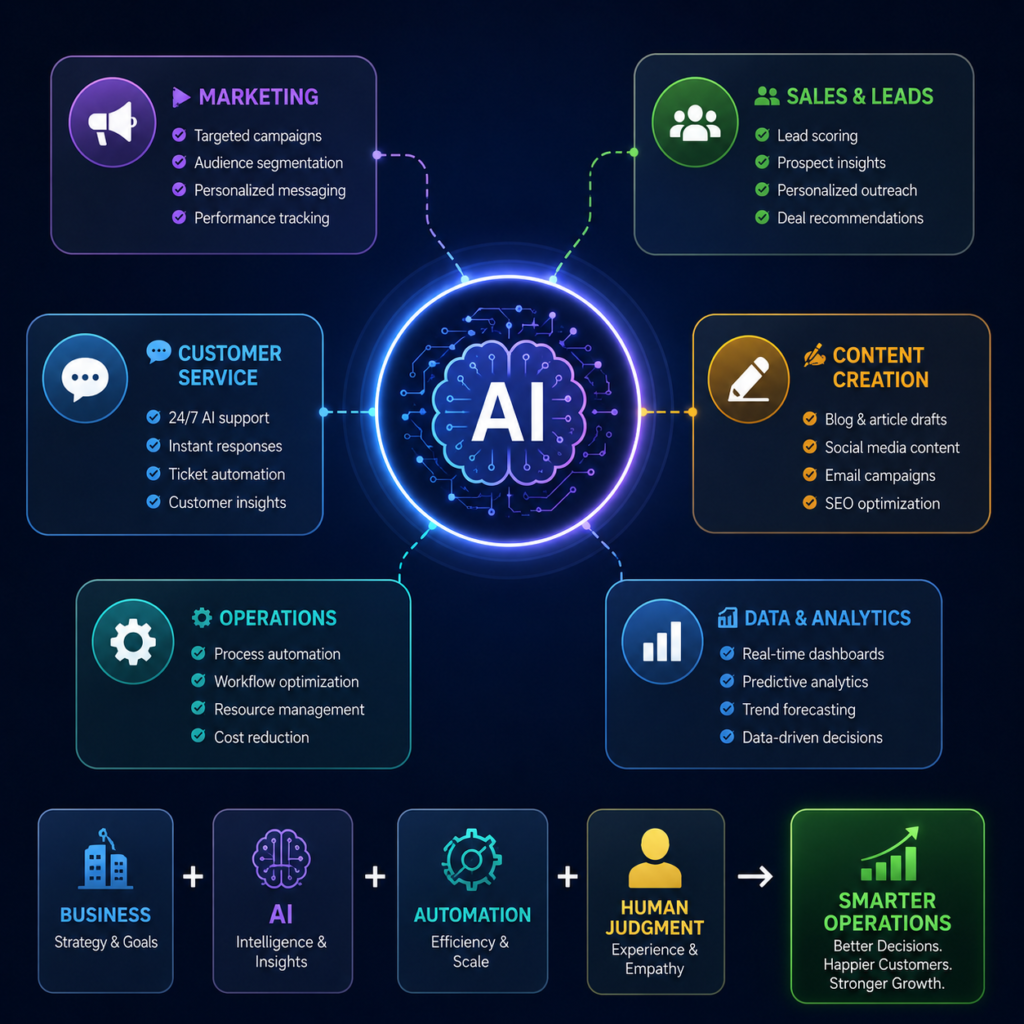
Business + Useful AI + Automation + Human Judgment = AI-Powered Business
AI should not become the business strategy itself. It should be a tool that helps the business execute its strategy more effectively.
Choose a Business Problem AI Can Help Solve
Before adding AI to a business, the first step is to identify a real business problem.
AI should not be introduced simply because it is popular. It should help solve a specific problem, reduce repetitive work, improve productivity, or make an existing process more efficient.
A useful approach is:
Problem → Desired Result → AI Solution → Test → Measure
For example, imagine a small business receives many customer inquiries every day.
The owner might currently:
Read Message → Identify Customer Need → Record Details → Prepare Response → Follow Up
If this process consumes several hours every week, AI and automation could help with some of the repetitive steps.
1. Look for Repetitive Tasks
Start by identifying tasks you perform repeatedly.
Common examples include:
- Answering similar customer questions
- Writing product descriptions
- Creating social media drafts
- Organizing customer inquiries
- Summarizing documents
- Recording new leads
- Preparing routine emails
- Updating spreadsheets
- Creating reports
- Researching content ideas
These tasks don’t automatically need AI, but they are good places to investigate.
A simple rule is:
Repetitive + Time-Consuming + Clearly Defined = Potential AI Opportunity
2. Identify Where Your Business Loses Time
Ask yourself:
“What activities take up too much of my time every week?”
For example, a business owner might spend:
2 hours creating social media content
3 hours processing customer inquiries
2 hours preparing reports
3 hours following up with leads
That is 10 hours of work.
If AI and automation can responsibly reduce some of that manual effort, the owner can spend more time on activities such as selling, customer relationships, strategy, and business growth.
The goal isn’t necessarily to eliminate the task. It is to make the process more efficient.
3. Identify Customer Problems
AI can also help improve customer experiences.
Suppose customers frequently complain about slow responses.
Instead of immediately deciding, “I need an AI chatbot,” first define the actual problem:
Problem: Customers wait too long for basic information.
Then consider possible solutions.
For simple questions:
Customer Question → Approved Information Retrieved → Quick Response
For more complicated situations:
Customer Question → AI Helps Categorize → Employee Notified → Human Responds
This creates a better balance between automation and human customer service.
4. Look for Bottlenecks
A bottleneck is a part of a business process that slows everything else down.
For example:
Website Visitor → Contact Form → Owner Manually Reviews Lead → Details Entered Into Spreadsheet → Follow-Up
If manually processing each lead delays follow-ups, that step may be a bottleneck.
A more efficient workflow could be:
Contact Form Submitted
AI Categorizes Lead
Details Recorded Automatically
Salesperson Notified
Human Follows Up
AI is not replacing the salesperson. It is reducing the administrative work before the salesperson speaks with the potential customer.
Match the Problem With the Right AI Capability
Once you identify a problem, determine what AI could realistically help with.
| Business Problem | Possible AI Use |
|---|---|
| Too much time writing | Drafting and editing assistance |
| Large number of inquiries | Classification and summarization |
| Slow lead processing | AI-assisted workflow automation |
| Too much customer feedback | Summarization and pattern identification |
| Difficulty creating content ideas | Brainstorming and research assistance |
| Long documents | Summaries and information extraction |
| Repetitive customer questions | AI-assisted customer support |
Not every problem requires AI.
For example:
New Form Submission → Add Row to Spreadsheet
may only require traditional automation.
But:
New Form Submission → Understand Customer Request → Categorize Lead → Create Summary
may benefit from AI.
Prioritize High-Value, Low-Risk Opportunities
Beginners should generally start with tasks that are useful, repetitive, and relatively low risk.
A good first project could be:
Automatically organize new customer inquiries and notify the appropriate employee.
A poor first project would be trying to automate every major business decision at once.
Use this approach:
Start Small → Solve One Problem → Test → Measure Results → Improve → Expand
Once the first AI use case provides measurable value, you can gradually identify other parts of the business where AI may help.
Identify Where AI Fits Into Your Business
Once you have identified the problems you want to solve, the next step is deciding where AI can provide the most value.
You do not need AI in every department. Start with areas where it can save time, reduce repetitive work, or help employees complete tasks more efficiently.
Here are some of the most practical areas.
1. Marketing
AI can assist businesses with many parts of digital marketing.
For example, it can help with:
- Marketing campaign ideas
- Social media post drafts
- Email marketing drafts
- Audience research
- Advertising concepts
- SEO content ideas
- Product descriptions
A simple workflow might be:
Marketing Goal → AI Generates Ideas → Human Edits → Content Published → Results Measured
AI can speed up the creative process, but businesses should still review claims, facts, tone, and brand messaging before publishing.
2. Sales and Lead Management
AI can help sales teams spend less time organizing information and more time communicating with potential customers.
For example:
Customer Submits Form
AI Analyzes Inquiry
Lead Categorized
CRM Updated
Salesperson Notified
Human Follows Up
AI could also summarize customer inquiries or prepare draft follow-up messages.
The salesperson remains responsible for building the relationship and making appropriate decisions.
3. Customer Service
Businesses often receive similar questions repeatedly.
Examples include:
“What are your opening hours?”
“Do you deliver?”
“Is this product available?”
“How can I track my order?”
AI-powered systems can help customers find approved information quickly or categorize incoming requests.
A useful model is:
Simple Question → Automated Assistance
Complex/Sensitive Problem → Human Support
This allows automation to handle appropriate repetitive inquiries without removing human support when customers genuinely need it.
4. Content Creation
AI can support businesses that regularly create:
Blog Posts • Social Media Content • Emails • Product Descriptions • Video Scripts • Advertisements
For example:
Topic → AI Creates Draft → Human Edits → Facts Verified → Publish
The goal should not be to publish everything AI generates automatically.
Human editing helps maintain accuracy, originality, brand voice, and quality.
5. Business Operations
AI becomes particularly powerful when combined with workflow automation.
For example:
Customer Form Submitted
AI Summarizes Request
Customer Added to CRM
Task Created
Employee Notified
This can reduce the manual work required to move information between different business systems.
6. Research and Data Analysis
Businesses generate information from sales, customers, surveys, reports, and marketing campaigns.
AI can help summarize or organize appropriate data to make it easier for people to analyze.
For example:
500 Customer Reviews → AI Analysis → Common Themes Identified → Human Reviews Findings → Business Takes Action
A business might discover that customers repeatedly mention delivery delays, pricing concerns, or a particular product feature.
AI can help surface patterns, but important conclusions should still be checked against the underlying data.
7. Administration
Administrative work is another area where AI and automation can save time.
AI may assist with:
- Meeting summaries
- Routine email drafts
- Document summaries
- Internal knowledge searches
- Task organization
- Report drafts
- Information extraction
For example:
Meeting → Transcript → AI Summary → Action Items → Team Reviews
This allows employees to spend less time preparing routine documentation.
Build an AI-Powered Business Gradually
You don’t need to introduce AI into marketing, sales, customer service, operations, and administration at the same time.
Start with one area that has a clear problem.
For example:
Month 1: Improve customer inquiry management
Month 2: Automate lead organization
Month 3: Improve content workflow
Month 4: Analyze results and expand where useful
The exact timeline will vary, but the principle remains the same:
Start Small → Prove Value → Improve → Expand
A truly AI-powered business isn’t one using the largest number of AI tools. It is one that uses AI strategically in the right places to improve real business processes.
Choose the Right AI Tools for Your Business
Once you know where AI can help, the next step is choosing the right tools. You do not need dozens of AI subscriptions to build an AI-powered business. Businesses exploring practical ways to adopt artificial intelligence can also explore OpenAI’s resources on AI for business, which cover AI deployment and business use cases. Not sure which platform to start with? Explore our guide to the best AI tools for small businesses for practical options across marketing, productivity, automation, and customer service.
A better strategy is:
Business Need → Choose Tool → Test → Measure Results → Keep or Replace
Start with a small collection of tools that solve specific problems.
1. ChatGPT — Writing, Research and Business Assistance
ChatGPT can assist with tasks such as:
- Brainstorming business ideas
- Drafting emails
- Creating marketing content
- Summarizing information
- Preparing product descriptions
- Analyzing text
- Drafting customer responses
- Helping organize business plans
For example:
Business Goal → Give AI Context → Generate Draft → Human Reviews → Final Content
The quality of the result often depends on the quality of the instructions and information provided.
2. Canva AI — Marketing and Design
Canva provides AI-assisted features that can support visual content creation.
Businesses can use Canva for:
Social Media Graphics • Posters • Presentations • Marketing Materials • Videos • Advertisements
For a small business without a full-time designer, tools like this can make it easier to produce professional-looking marketing materials while still keeping human control over branding and final design choices.
3. Zapier — Business Automation
Zapier helps businesses connect applications and automate workflows.
For example:
Website Form Submitted
Customer Details Collected
AI Processes Inquiry
CRM or Spreadsheet Updated
Business Owner Notified
This is where AI becomes more than just a tool you manually open and use—it becomes part of a larger business process.
4. Make — Visual Workflow Automation
Make is another platform for connecting applications and creating automated workflows.
Its visual approach can help users understand how information moves between different systems.
For example:
New Lead → AI Analysis → CRM → Email → Notification
Businesses can start with simple workflows and gradually add more steps as their needs grow.
5. Gemini — AI-Assisted Productivity
Google Gemini can assist with writing, research, brainstorming, analysis, and other productivity tasks.
For businesses already using Google’s ecosystem, AI capabilities can also support work involving documents, email, spreadsheets, and other productivity activities, depending on the products and plans being used.
6. Grammarly — Business Writing
Grammarly can assist businesses with improving written communication.
It can be useful when preparing:
Emails • Reports • Marketing Copy • Customer Messages • Website Content
AI-generated content should still be reviewed for accuracy and whether it represents the business appropriately.
7. Notion AI — Knowledge and Productivity
Notion AI can help teams work with information stored in their workspace.
Businesses may use it for tasks involving:
- Internal documentation
- Project information
- Meeting notes
- Writing assistance
- Knowledge organization
- Summaries
This can be useful for businesses that want to organize information and make internal knowledge easier to work with.
Don’t Use Too Many AI Tools
One of the easiest mistakes when building an AI-powered business is subscribing to every new AI tool you discover.
You might end up paying for five different tools that perform similar tasks.
Instead, create a simple AI technology stack.
For example:
AI Assistant → ChatGPT or Gemini
Design → Canva
Automation → Zapier or Make
Writing Support → Grammarly
Knowledge Management → Notion
You may not even need all five.
The right tools depend on your business.
Focus on Return, Not the Number of Tools
Suppose an AI tool costs $20 per month but saves a business several hours of useful work each month.
That could potentially provide value.
But if another subscription costs $50 per month and is rarely used, it may simply be another expense.
Ask:
Does it save time?
Does it reduce repetitive work?
Does it improve an important process?
Does it help generate measurable business value?
The goal isn’t:
❌ More AI Tools = Better Business
It is:
✅ Right AI Tools + Right Processes + Human Judgment = Better Business
Once the tools are selected, the next step is where an AI-powered business becomes especially powerful: automating repetitive business processes.
Automate Repetitive Business Tasks With AI

One of the biggest advantages of building an AI-powered business is the ability to reduce repetitive manual work.
Many businesses spend hours every week copying information between systems, organizing customer inquiries, sending routine notifications, preparing follow-ups, and updating spreadsheets.
AI automation can help connect these activities into a smoother workflow.
The goal is simple:
Less Repetitive Work → More Time for Customers, Strategy and Growth
1. Start With Simple Repetitive Tasks
Before building complicated automations, identify tasks that happen regularly and follow a predictable process.
Good examples include:
- Recording website leads
- Organizing customer inquiries
- Sending internal notifications
- Updating spreadsheets
- Creating tasks for employees
- Summarizing documents
- Categorizing emails
- Preparing routine response drafts
- Organizing customer feedback
- Creating meeting summaries
For example, imagine a business receives leads through its website.
Without automation:
Customer Submits Form → Owner Checks Email → Copies Details → Updates Spreadsheet → Categorizes Lead → Writes Follow-Up → Contacts Customer
Doing this manually for one customer may not take long. But processing dozens or hundreds of leads can consume significant time.
2. Build an Automated Lead Workflow
The same process could be redesigned using AI and automation:
Customer Submits Form
Automation Triggered
AI Analyzes the Inquiry
Lead Categorized
CRM or Spreadsheet Updated
Follow-Up Draft Prepared
Business Owner Notified
Human Reviews and Responds
Notice that AI is only responsible for tasks where it provides value.
The automation handles moving information between systems, while AI can help understand, categorize, summarize, or draft content.
The human remains responsible for the final interaction.
3. Automate Customer Inquiry Management
Suppose an electronics store receives messages such as:
“I need a laptop for graphic design with at least 16GB RAM. My budget is around $800.”
Instead of manually extracting every detail, an AI-assisted workflow could organize the message into:
Product: Laptop
Purpose: Graphic design
RAM: 16GB or more
Budget: Around $800
Lead Type: Sales inquiry
The information could then be recorded in the business’s CRM or spreadsheet and sent to the appropriate salesperson.
This makes the workflow:
Customer Message → AI Extracts Information → Data Organized → Salesperson Notified
The salesperson can then focus on recommending suitable products rather than manually organizing the inquiry.
4. Automate Internal Notifications
Not every automation needs AI.
Sometimes a simple automation provides enough value.
For example:
New Order → Notify Sales Team
Payment Confirmed → Notify Accounts
New Support Request → Create Support Task
New Website Lead → Add to Spreadsheet
AI becomes useful when the information needs additional interpretation.
For example:
New Support Message → AI Determines Category → Correct Department Notified
This distinction is important.
Use Traditional Automation for Simple Rules
Use AI When the Workflow Benefits From Understanding, Classification, Extraction or Generation
Adding AI unnecessarily can make a workflow more expensive and complicated.
5. Connect Your Business Tools
AI automation becomes more powerful when different business applications can work together.
For example, a business might connect:
Website → Automation Platform → AI → CRM → Email → Team Notification
Instead of employees manually transferring information between these systems, the workflow handles suitable steps automatically.
Platforms such as Zapier and Make can help connect applications and build these types of workflows.
Keep Humans in Important Decisions
Automation does not mean removing humans from the business.
Some activities are better suited to AI and automation:
AI & Automation
- Categorizing information
- Summarizing documents
- Moving data
- Preparing drafts
- Sending routine notifications
- Extracting structured information
Other activities should generally retain meaningful human involvement:
Humans
- Building customer relationships
- Business strategy
- Negotiations
- Complex problem-solving
- Verifying important information
- Handling unusual customer situations
- Making consequential decisions
A strong AI-powered workflow therefore looks like:
Automation Handles Repetition → AI Assists With Information → Human Reviews Important Decisions
Start Small Before Scaling
Do not try to automate your entire business immediately.
Choose one workflow that consumes unnecessary time.
Build it, test it with different situations, check the results, and correct any problems before expanding.
Follow this cycle:
Identify → Simplify → Automate → Test → Monitor → Improve → Scale
Once the automation works reliably and provides measurable value, you can gradually automate other suitable processes.
This is how AI automation becomes part of a business not by replacing everything at once, but by improving one useful process at a time.
Use AI for Marketing and Content Creation
Marketing is one of the easiest areas for a small business to start using AI because businesses constantly need content, ideas, customer communication, and promotional materials. Businesses producing content regularly can also explore our AI tools for content creators to find tools for writing, graphics, video, and other creative tasks.
AI can speed up this work, but it should support the marketing process rather than completely control it.
1. Generate Marketing Ideas
Coming up with fresh marketing ideas regularly can be difficult.
AI can help brainstorm:
- Social media content ideas
- Blog topics
- Promotional campaigns
- Email campaign ideas
- Product launch concepts
- Video topics
- Advertising angles
- Seasonal promotions
For example, a laptop business could ask AI to generate marketing ideas specifically for students, gamers, office workers, graphic designers, or online buyers.
Instead of starting from a blank page, the business gets ideas that can then be evaluated and improved.
2. Create Content Drafts Faster
AI can also help prepare first drafts of:
Blog Posts • Emails • Social Posts • Product Descriptions • Video Scripts • Ad Copy
A business could follow this workflow:
Content Idea → AI Draft → Human Edit → Verify → Publish
The human edit and verification stages are important.
AI-generated content can contain incorrect information, weak claims, repetitive language, or content that does not properly represent the company’s brand.
The goal should therefore be to use AI to accelerate creation—not automatically publish everything it produces.
3. Repurpose Existing Content
Businesses do not always need to create something completely new.
Suppose you publish a detailed blog article.
AI could help turn that article into:
Blog Article
↓
Short Video Script
↓
Facebook Post
↓
TikTok Caption
↓
Instagram Post
↓
Email Newsletter
This is known as content repurposing.
One strong piece of content can therefore support several marketing channels instead of creating separate content from scratch for each platform.
4. Personalize Marketing
AI can also help businesses prepare different marketing messages for different customer groups.
Imagine a computer store selling the same laptop.
The marketing message for a university student might emphasize:
Portability • Battery Life • Affordability
For a graphic designer:
RAM • Processor • Display • Graphics Performance
For a business professional:
Reliability • Productivity • Security • Portability
The product may be the same, but customers care about different benefits.
AI can help marketers create drafts for these different audiences, while the business remains responsible for ensuring the information is accurate.
5. Create Marketing Graphics
AI-assisted design platforms such as Canva can help businesses produce:
- Social media graphics
- Promotional posters
- Presentations
- Advertisements
- Short videos
- Website graphics
This can be especially useful for small businesses that do not have a dedicated graphic-design team.
6. Automate Parts of the Marketing Workflow
AI becomes even more useful when combined with automation.
For example:
New Blog Article Published
↓
AI Creates Social Drafts
↓
Marketing Team Reviews Them
↓
Approved Posts Scheduled
↓
Performance Monitored
The important word is approved.
Businesses should be careful about allowing AI-generated marketing content to publish automatically without appropriate review, especially when it contains prices, product specifications, financial information, promotions, or other factual claims.
Keep Your Brand Human
AI can help businesses produce more content, but producing more content does not automatically produce better marketing.
Customers still respond to:
Trust • Personality • Useful Information • Good Service • Authentic Experiences
The strongest approach is:
Human Strategy + AI Assistance + Human Review = Better Marketing
Use AI to reduce repetitive creative work and accelerate drafts, while keeping your business’s voice, experience, values, and customer understanding at the center of your marketing.
Use AI to Improve Customer Service
Customer service can strongly influence whether people trust a business, return for another purchase, or recommend it to others. AI can help businesses respond faster and organize customer requests more efficiently without removing the human element.
The goal should be:
AI Handles Routine Support → Humans Handle Complex Customer Needs
1. Answer Frequently Asked Questions
Many businesses receive the same questions repeatedly:
- What are your opening hours?
- Do you offer delivery?
- How much does delivery cost?
- Is this product available?
- What payment methods do you accept?
- How can I track my order?
- What is your return policy?
An AI-powered assistant can help customers find answers based on approved business information.
A simple workflow could be:
Customer Asks a Question
AI Identifies the Request
Approved Business Information Retrieved
Customer Receives an Answer
This can provide faster assistance while reducing repetitive work for employees.
2. Categorize Customer Requests
Not every customer message is the same.
A business may receive:
Sales Inquiry • Technical Support • Complaint • Delivery Question • Refund Request • General Question
AI can help identify the type of request and route it appropriately.
For example:
Customer Message
AI Classifies Request
Technical Problem → Support Team
or:
Sales Question → Sales Team
This can reduce the time employees spend manually sorting messages.
3. Prepare Customer Response Drafts
AI can also help employees prepare responses.
Suppose a customer writes:
“I ordered my laptop three days ago but haven’t received it. Can you check?”
Instead of starting from scratch, AI could prepare a polite response draft for the employee.
The employee can then check the actual order information, correct the draft where necessary, and send the final response.
The workflow becomes:
Customer Message → AI Draft → Employee Checks Facts → Edit → Send
This can make support faster without allowing AI to invent information about orders, refunds, delivery dates, or company policies.
4. Analyze Customer Feedback
Customer reviews, surveys, emails, and support messages can contain valuable information about a business.
However, manually reviewing hundreds of responses can take considerable time.
AI can help summarize recurring themes.
For example:
500 Customer Reviews
AI Analyzes Feedback
Common Issues Identified
Team Reviews Findings
Business Makes Improvements
The analysis might reveal recurring comments about:
Delivery • Product Quality • Pricing • Customer Support • Website Experience
This can help business owners identify areas that deserve closer attention.
Know When a Human Should Take Over
AI should not handle every customer situation independently.
Human involvement becomes especially important when dealing with:
- Serious complaints
- Refund disputes
- Sensitive personal information
- Unusual account problems
- High-value customers or transactions
- Situations requiring negotiation
- Decisions with significant consequences
- Customers specifically requesting human assistance
A good customer-service system should therefore provide an easy path from AI assistance to human support.
Simple Request → AI Assistance
Complex or Sensitive Request → Human Support
Customers should not become trapped in an automated system when they genuinely need help from a person.
AI Should Improve the Customer Experience
The purpose of using AI in customer service is not simply to reduce the number of employees responding to customers.
The bigger opportunity is to create:
Faster Responses + Better Organization + Consistent Support + Human Help When Needed
Businesses should regularly review automated responses and customer feedback to make sure their AI systems are actually improving the experience.
When implemented carefully, AI can handle repetitive support work while allowing employees to spend more time on complex problems, valuable conversations, and stronger customer relationships.
Keep Humans in the Business
An AI-powered business should not mean a human-free business.
AI can perform many useful tasks quickly, but people remain essential for judgment, creativity, accountability, strategy, and building genuine customer relationships.
The most effective approach is usually:
AI Handles Suitable Tasks → Humans Review, Decide and Build Relationships
1. Let AI Handle Repetitive Work
AI and automation are particularly useful for repetitive activities such as:
- Categorizing customer inquiries
- Summarizing documents
- Extracting information
- Preparing first drafts
- Organizing leads
- Generating content ideas
- Creating meeting summaries
- Moving information between systems
- Preparing routine reports
For example:
Customer Inquiry → AI Categorizes → CRM Updated → Draft Prepared → Employee Reviews → Customer Receives Response
The technology reduces administrative work while the employee remains responsible for the customer interaction.
2. Keep Humans in Important Decisions
Some decisions require context and judgment that should not simply be handed over to an AI system.
Examples may include:
Major Financial Decisions
Hiring and Employment Decisions
Legal Matters
Security Decisions
Important Customer Disputes
Major Business Strategy
AI can sometimes provide information or assistance in these areas, but the final decision should involve appropriately qualified and accountable people.
Think of AI as a business assistant rather than the business owner.
3. Verify Important AI Outputs
AI systems can make mistakes.
They may generate incorrect facts, misunderstand customer requests, produce inappropriate recommendations, or confidently present inaccurate information.
Businesses should therefore establish a review process.
AI Generates → Human Reviews → Information Verified → Action Taken
The level of review should depend on the risk.
A social media caption may require a quick check.
A major financial, legal, employment, or security decision requires much stronger controls and appropriate expertise.
4. Protect Human Creativity
AI can generate ideas quickly, but businesses still need people who understand their customers, products, competitors, and goals.
For example, AI might generate 20 advertising ideas in seconds, but a marketer still needs to decide:
- Which idea fits the brand?
- Which message appeals to customers?
- Is the information accurate?
- Is the offer realistic?
- Does the campaign support the business objective?
AI increases the speed of idea generation. Humans provide the context and direction.
5. Preserve Customer Relationships
Customers do not always want to communicate with an automated system.
Sometimes they want someone who can understand a complicated situation, negotiate a solution, or simply listen to their concerns.
Businesses should make it easy for customers to reach human support when necessary.
A good model is:
Routine Request → AI Assistance
Complex Request → Human Support
This allows businesses to benefit from automation without sacrificing customer relationships.
Build a Human + AI Team
Instead of thinking:
❌ AI vs Humans
Businesses should think:
✅ AI + Humans
AI can provide speed, automation, summarization, analysis, and assistance.
Humans provide judgment, accountability, creativity, empathy, strategy, and relationships.
When these strengths are combined properly:
Human Expertise + AI Assistance + Automation = Stronger Business Operations
Building an AI-powered business is therefore not about removing people from every process. It is about allowing technology to handle suitable work so people can spend more time on the areas where human skills create the greatest value.
Protect Customer and Business Data
As a business becomes more AI-powered, it may process increasing amounts of information through AI tools and automated workflows. This makes privacy, security, and responsible data handling extremely important. For a deeper understanding of fairness, privacy, transparency, accountability, and human oversight, read our guide to AI ethics and responsible AI use.
Businesses should not send information to an AI system simply because it is convenient.
The basic principle should be:
Use AI Where Helpful → Share Only Necessary Data → Control Access → Monitor the System
1. Be Careful With Sensitive Information
AI tools may interact with information such as:
- Customer names and contact details
- Business documents
- Sales information
- Customer conversations
- Employee information
- Financial records
- Internal company data
- Account or transaction information
Before entering sensitive information into an AI service, businesses should understand how the service handles that data and whether its privacy and security practices are appropriate for the intended use.
Avoid unnecessarily exposing confidential information.
2. Give Automation Only the Access It Needs
Automations often require permission to access tools such as email, spreadsheets, cloud storage, websites, or CRM systems.
Do not give every automation access to everything.
For example, if an automation only needs to add website leads to a spreadsheet, it may not need access to unrelated business documents.
Follow the principle:
Minimum Necessary Access → Lower Security Risk
Businesses should also periodically review connected applications and remove permissions that are no longer needed.
3. Protect Customer Privacy
Customers may provide personal information when they:
Submit Forms • Make Purchases • Contact Support • Create Accounts • Subscribe to Emails
Businesses should clearly understand what information they collect, why they need it, where it is stored, and which systems can access it.
Adding AI does not remove the business’s responsibility to handle customer information appropriately.
4. Secure Your AI and Automation Accounts
AI-powered workflows can connect several important business systems.
For example:
Website → Automation Platform → AI Tool → CRM → Email
If one account is compromised, it could potentially affect other connected services.
Businesses should use appropriate security practices such as:
- Strong, unique passwords
- Multi-factor authentication where available
- Limited user permissions
- Regular access reviews
- Secure API keys and credentials
- Removing unused integrations
- Keeping software updated
Never expose passwords, API keys, or other secret credentials in public documents, prompts, or code repositories.
5. Verify AI-Generated Information
Data protection is not the only concern. Businesses also need to consider the accuracy of AI output.
AI can generate incorrect information.
For example, an AI system could potentially produce an incorrect:
Product Specification • Price • Customer Response • Summary • Recommendation • Policy Explanation
Important information should therefore be verified before action is taken.
A safer workflow is:
AI Processes Information → Human/System Checks → Approved Action
The more serious the potential consequences, the stronger the review process should be.
Build Responsible AI Into the Business
Privacy, security, fairness, transparency, accuracy, and human oversight should not be considered only after an AI system has been deployed.
They should be considered while designing the workflow.
For example:
What data does the AI need?
Who can access it?
What can the AI do automatically?
What requires human approval?
How will errors be detected?
How will the workflow be monitored?
Businesses interested in this area can also read our guide on AI Ethics Explained: Benefits, Risks, and Challenges to understand responsible AI use in greater detail.
Ultimately, a successful AI-powered business should not only be fast and automated. It should also be secure, responsible, reliable, and worthy of customer trust.
Measure Whether AI Is Actually Helping Your Business
Adding AI tools does not automatically make a business more productive or profitable. After introducing AI into your workflows, you need to measure whether it is actually producing useful results.
The goal is not simply to say:
“Our business uses AI.”
The better question is:
“What measurable improvement has AI created for our business?”
1. Measure Time Saved
Start by comparing how long a task took before and after introducing AI.
For example:
Before AI: Processing customer inquiries takes 10 hours per week.
After AI: AI and automation reduce the manual workload to 4 hours per week.
That means the business has potentially saved:
10 Hours − 4 Hours = 6 Hours Per Week
Those hours can be redirected toward sales, customer relationships, product development, or other valuable activities.
2. Measure Productivity
AI may also allow employees to complete more work within the same amount of time.
Track metrics such as:
- Customer inquiries processed
- Leads followed up
- Reports completed
- Content produced
- Documents processed
- Support requests handled
- Administrative hours reduced
However, quantity should not replace quality.
Producing 50 AI-generated articles is not an improvement if those articles are inaccurate or provide little value.
3. Measure Customer Experience
If you use AI for customer service, track whether the customer experience improves.
Useful measurements may include:
Response Time
Are customers receiving help faster?
Resolution Rate
Are customer problems actually being solved?
Customer Feedback
Are customers satisfied with the support?
Human Escalation
Can customers easily reach a person when AI cannot solve their problem?
AI should make customer service better not simply make it more automated.
4. Measure Sales and Leads
When AI is used in marketing or sales, businesses can examine whether it contributes to meaningful outcomes.
Track metrics such as:
Website Visitors → Leads → Qualified Leads → Customers → Revenue
For example, an AI-assisted lead workflow might allow a salesperson to respond to potential customers faster.
The business can then compare:
Before Automation: Average lead response = 5 hours
After Automation: Average lead response = 30 minutes
The next question is whether faster responses contribute to more successful sales.
5. Compare AI Costs With the Value Created
AI tools may involve subscription fees, automation charges, API costs, employee training, and maintenance.
Businesses should compare those costs with the benefits.
A simple way to think about it is:
AI Value = Time Saved + Productivity/Revenue Gains − AI Costs
Suppose a business spends $50 per month on AI and automation tools but saves many hours of valuable work and improves its lead-management process.
The investment may be worthwhile.
But paying for several AI subscriptions that employees rarely use creates unnecessary costs.
6. Review Accuracy and Errors
Efficiency is not enough.
Businesses should also monitor whether AI introduces mistakes.
Track problems such as:
- Incorrect customer responses
- Misclassified leads
- Inaccurate summaries
- Failed automations
- Duplicate records
- Incorrect marketing information
- Tasks requiring frequent manual correction
An automation that saves five hours but creates another five hours of correction work is not providing much value.
Use a Simple AI Performance Dashboard
A business does not need a complicated analytics system when starting.
You could monitor a few important metrics:
| Metric | What to Measure |
|---|---|
| Time Saved | Hours reduced through AI |
| Productivity | Tasks completed |
| Response Time | Speed of customer support |
| Leads | Leads processed or qualified |
| Sales | Conversions and revenue |
| AI Cost | Monthly tool expenses |
| Errors | Incorrect outputs or failed workflows |
Review these numbers regularly.
Improve What Works and Remove What Doesn’t
After collecting enough information, decide what to do with each AI system.
Working Well → Improve and Scale
Needs Improvement → Adjust and Test Again
No Real Value → Simplify or Remove
This prevents businesses from keeping AI tools simply because they are fashionable.
The strongest AI-powered businesses will focus on business results rather than the number of AI tools they use.
A useful cycle is:
Implement → Measure → Learn → Improve → Scale
Once you know how to measure AI’s value, the next step is avoiding the common mistakes businesses make when adopting AI.
Common Mistakes to Avoid When Building an AI-Powered Business
AI can improve productivity and reduce repetitive work, but poor implementation can also create unnecessary costs, errors, and complicated workflows.
Here are some common mistakes beginners should avoid.
1. Using AI Without a Clear Business Problem
One of the biggest mistakes is adopting AI simply because other businesses are using it.
Instead of asking:
“How can I use AI?”
Ask:
“What business problem am I trying to solve?”
Start with:
Problem → Goal → AI Use Case → Tool
For example:
Problem: Customer inquiries take too long to organize.
Goal: Reduce processing time.
AI Use Case: Categorize and summarize inquiries automatically.
Now the technology has a clear purpose.
2. Using Too Many AI Tools
It is easy to subscribe to several AI platforms because each promises to improve productivity.
But more tools can mean:
Higher Costs + More Accounts + More Training + More Complexity
You may discover that several tools perform similar functions.
Start with a small technology stack and expand only when there is a genuine business need.
Right Tools > More Tools
3. Automating Everything
Not every business process should be automated.
Automation works best for tasks that are:
Repetitive • Predictable • Time-Consuming • Clearly Defined
Humans should remain involved when tasks require judgment, creativity, negotiation, accountability, or sensitive decisions.
The goal is not:
❌ Automate Everything
It is:
✅ Automate the Right Things
4. Publishing AI Content Without Reviewing It
AI can quickly create blog drafts, emails, advertisements, product descriptions, and social media posts.
However, AI-generated information can be inaccurate.
Use:
AI Draft → Human Edit → Fact-Check → Publish
Pay particular attention to product specifications, prices, statistics, policies, financial information, and other factual claims.
5. Ignoring Privacy and Security
Connecting AI to business systems without considering data protection can create unnecessary risk.
Avoid giving tools access to information they do not need.
Businesses should consider:
- What information the AI receives
- Where information is stored
- Who has access
- Which applications are connected
- What permissions have been granted
- How credentials and API keys are protected
Follow the principle:
Only Give AI and Automation the Access They Need
6. Building Complicated Automations Too Early
A beginner may try to create a huge workflow involving ten applications, multiple AI models, dozens of conditions, and many automated actions.
When something fails, troubleshooting becomes difficult.
Start with something simple:
Website Form → Spreadsheet → Notification
Then, if useful, improve it:
Website Form → AI Categorization → CRM → Notification → Human Follow-Up
Start Simple → Test → Improve → Expand
7. Failing to Monitor AI Systems
An automation working correctly today does not guarantee it will always work correctly.
Applications change, integrations fail, business processes evolve, and AI outputs can still contain errors.
Businesses should periodically monitor:
Accuracy • Failed Workflows • Costs • Customer Feedback • Security • Business Results
AI systems require ongoing management.
8. Measuring Activity Instead of Business Results
Generating more content or creating more automations does not necessarily mean the business is improving.
Instead of measuring:
“We created 100 AI-generated posts.”
Measure:
“Did those posts increase useful traffic, leads, engagement, or sales?”
Instead of:
“We created 20 automations.”
Ask:
“How many hours did they save, and did they improve the process?”
Focus on outcomes:
Time Saved • Costs Reduced • Leads • Sales • Customer Experience • Productivity
Keep AI Simple and Business-Focused
A successful AI-powered business does not need the most advanced technology.
It needs technology that solves real problems.
Keep this principle in mind:
Identify Problem → Simplify Process → Apply AI → Test → Measure → Improve
Avoid chasing every new AI trend. Build gradually, keep humans involved, protect your data, and invest more in AI only when you can see genuine business value.
Simple Roadmap to Build an AI-Powered Business
Building an AI-powered business does not require transforming everything at once. The safest and most practical approach is to introduce AI gradually, measure the results, and expand only where it creates real value.
Follow this roadmap:
Identify a Business Problem
Choose an AI Use Case
Select the Right Tool
Test on a Small Scale
Automate Repetitive Steps
Keep Human Oversight
Measure Results
Improve and Scale
Start with one problem. For example, if processing customer inquiries takes too much time, improve that workflow first. Once it works reliably, you can move to another area such as marketing, customer support, content creation, or administration.
The objective is not to become dependent on AI. It is to build a business where technology helps people work faster, smarter, and more efficiently.
Frequently Asked Questions
What is an AI-powered business?
An AI-powered business uses artificial intelligence in appropriate parts of its operations to improve productivity, automate repetitive tasks, analyze information, assist employees, or improve customer experiences. If some of the terminology in this guide is unfamiliar, our essential AI terms for beginners glossary explains the most important concepts in simple language.
Can a small business use AI?
Yes. Small businesses can use existing AI tools for marketing, content creation, customer support, lead management, research, administration, and workflow automation without developing their own AI models.
Do I need programming skills to build an AI-powered business?
Not necessarily. Many modern AI and automation platforms provide no-code or low-code tools. However, technical knowledge can become useful when building more advanced integrations or custom systems.
What business tasks can AI automate?
AI can assist with tasks such as categorizing emails, summarizing documents, processing leads, preparing response drafts, analyzing feedback, creating content drafts, and extracting information.
Traditional automation can handle simpler tasks such as moving information between applications or sending notifications.
How much does it cost to use AI in business?
Costs vary depending on the tools, number of users, usage levels, integrations, and automation requirements. Beginners can start with a small number of tools and upgrade only when the business value justifies the additional cost.
Can AI completely run a business?
AI can automate and assist with many activities, but businesses still need human involvement for strategy, accountability, relationships, verification, creativity, and important decisions.
How should I start using AI in my business?
Start with one repetitive or time-consuming problem.
Use this approach:
Problem → Goal → AI Solution → Test → Measure → Improve
If the solution produces measurable value, gradually expand it.
Final Thoughts
Building an AI-powered business is not about using the newest AI tool available or automating every activity.
It is about identifying where technology can create real business value.
AI can help businesses create content, organize leads, improve customer support, analyze information, automate repetitive workflows, and reduce administrative work. But these benefits are strongest when AI is combined with clear business processes and human judgment.
Remember:
Business Problem + Right AI Tool + Automation + Human Judgment = AI-Powered Business
Start small.
Choose one business problem, test an AI-assisted solution, measure the results, and improve the workflow before expanding.
Over time, several small improvements can create a business that operates more efficiently while allowing people to focus on what humans do best: strategy, creativity, relationships, problem-solving, and decision-making.
Ready to Start Building Your AI-Powered Business?
Choose one repetitive task in your business today.
Don’t try to automate the entire company.
Start with:
One Problem → One AI Use Case → One Workflow → One Measurable Result
Once it works, improve it and move to the next opportunity.
You can also explore our guides on AI Automation for Beginners, Best AI Tools for Small Businesses, How to Write Effective AI Prompts, and AI Ethics Explained to continue building your AI and digital business skills.
Disclaimer
This article is provided for educational and informational purposes only.
AI tools, features, pricing, integrations, privacy practices, and availability can change over time. Businesses should evaluate AI services carefully before connecting them to sensitive customer or company information.
AI-generated outputs can also contain errors. Important financial, legal, employment, security, healthcare, or other consequential decisions should not rely solely on automated AI outputs and may require appropriate professional or human oversight.
Always test AI-powered workflows carefully, protect sensitive information, monitor their performance, and ensure they remain appropriate for your business.