

Artificial intelligence (AI) is changing how people work, learn, conduct business, and solve everyday problems. From chatbots and recommendation systems to fraud detection and medical image analysis, AI models are becoming an important part of modern technology.
The good news is that you do not need to be an AI expert to start building your own AI model. With basic Python knowledge, a suitable dataset, and the right tools, you can develop a simple machine-learning model and gradually progress to more advanced projects.
In this guide, you will learn how to build an AI model step by step, prepare data, choose an algorithm, train and evaluate your model, improve its performance, and prepare it for real-world use. You will also build a practical machine-learning project using Python.
Whether you are a student, aspiring developer, business owner, or technology enthusiast, this guide will help you understand the process of creating an AI model in 2026.
What Is an AI Model?
An AI model is a computer program that has learned patterns from data and uses those patterns to make predictions, classify information, generate content, or perform other tasks.
For example, an AI model can learn from historical house prices and use that information to estimate the price of a house it has never seen before.
Other examples include:
- An email spam detection model that identifies unwanted messages.
- A recommendation model that suggests products based on customer behavior.
- An image classification model that identifies objects in photographs.
- A fraud detection model that identifies unusual financial transactions.
- A language model that generates text and answers questions.
An AI model does not automatically understand the world like a human. Its performance depends on its training data, model design, evaluation process, and the conditions in which it is used.
How Does an AI Model Work?

Most traditional machine-learning projects follow a process involving data collection, data preparation, training, evaluation, and deployment.
1. Data collection
The first step is to gather information relevant to the problem you want to solve. Depending on your project, this information could include numbers, text, images, audio, or other data.
For example, a house-price prediction model may use historical house prices, property sizes, numbers of bedrooms, and locations.
2. Data preparation
Raw data is not always ready for training. It may contain missing values, duplicate records, incorrect entries, or inconsistent formats.
You must clean and organize the data before using it to train a model.
3. Model training
During training, a machine-learning algorithm learns patterns and relationships from the prepared dataset.
For example, a regression algorithm may learn how house size relates to house prices.
4. Model evaluation
After training, you test the model using data it did not learn from during training. This helps you determine whether the model can make useful predictions on new examples.
5. Deployment
Once the model performs adequately, you can integrate it into an application, website, business system, or API so other people or programs can use it.
The process can be summarized as:
Collect data → Prepare data → Train model → Evaluate model → Improve model → Deploy model.
Types of AI Models You Should Know
Before building an AI model, it is useful to understand the main approaches to machine learning.
1. Supervised learning
Supervised learning uses labeled examples. Each training example contains input information and the correct answer the model is expected to learn to predict.
For example, a house-price dataset might contain property sizes and their known selling prices.
Two common supervised-learning tasks are:
- Regression: Predicts numerical values, such as house prices, sales revenue, or temperatures.
- Classification: Predicts categories, such as spam or not spam, or whether a customer is likely to leave a service.
2. Unsupervised learning
Unsupervised learning identifies patterns or groups in data without requiring a known answer for every example.
For example, a business might use clustering to group customers according to their purchasing behavior.
3. Deep learning
Deep learning uses neural networks with multiple layers to learn complex patterns. It is widely used in image recognition, speech processing, language understanding, and many generative AI applications.
Deep learning can require more computing resources and data than simpler machine-learning approaches, although the requirements vary by project.
4. Generative AI
Generative AI models create new content, including text, images, audio, and code.
Examples include large language models and image-generation models. Building a large model from scratch is a substantial undertaking, so beginners often start by using an existing model or fine-tuning a suitable pretrained model.
Tools You Need to Build an AI Model
You can start building a simple AI model without buying an expensive computer or renting a powerful server.
Here are the tools you should consider.
Python
Python is a popular programming language for AI and machine learning because it has a large ecosystem of libraries and learning resources.
Official resource: https://docs.python.org/3/tutorial/
Google Colab
Google Colab allows you to write and run Python code in a browser. It is useful for beginners who do not want to install every development tool on their computer.
Website: https://colab.research.google.com/
Jupyter Notebook
Jupyter Notebook allows you to combine code, explanations, tables, and charts in one document.
Website: https://jupyter.org/
pandas
pandas helps you load, clean, organize, and analyze datasets.
Documentation: https://pandas.pydata.org/docs/
NumPy
NumPy provides tools for numerical calculations and working with arrays.
Documentation: https://numpy.org/doc/
scikit-learn
scikit-learn provides machine-learning algorithms and tools for splitting datasets, training models, making predictions, and evaluating results.
Documentation: https://scikit-learn.org/stable/
For the beginner project below, you will mainly use Python and scikit-learn.
Step 1: Choose a Problem to Solve
Before writing code, decide what you want your AI model to do.
A clear problem makes it easier to choose the appropriate data, algorithm, and evaluation method.
Possible beginner projects include:
- Predicting house prices.
- Classifying flowers based on measurements.
- Predicting sales from historical records.
- Detecting spam messages.
- Grouping customers by purchasing patterns.
In this tutorial, you will build a house-price prediction model.
The model will use information such as the size of a house and its number of bedrooms to estimate its price.
This is a regression problem because the output is a numerical value.
Step 2: Understand Your Dataset

A dataset is a collection of information used to analyze a problem or train a model.
For the house-price project, imagine you have records like these:
| House size (m²) | Bedrooms | Price (example currency units) |
|---|---|---|
| 50 | 1 | 80,000 |
| 75 | 2 | 120,000 |
| 100 | 3 | 160,000 |
| 125 | 3 | 190,000 |
| 150 | 4 | 240,000 |
These figures are illustrative rather than actual market prices.
In this table:
- House size is a feature.
- Bedrooms is another feature.
- Price is the target the model will learn to predict.
Features are the input variables used by a model. The target is the value or category the model is expected to predict.
The model learns relationships between the features and the target during training.
Real-world property prices also depend on factors such as location, property condition, land size, and market conditions. A model using only two features will therefore have important limitations.
Step 3: Prepare Your Python Environment
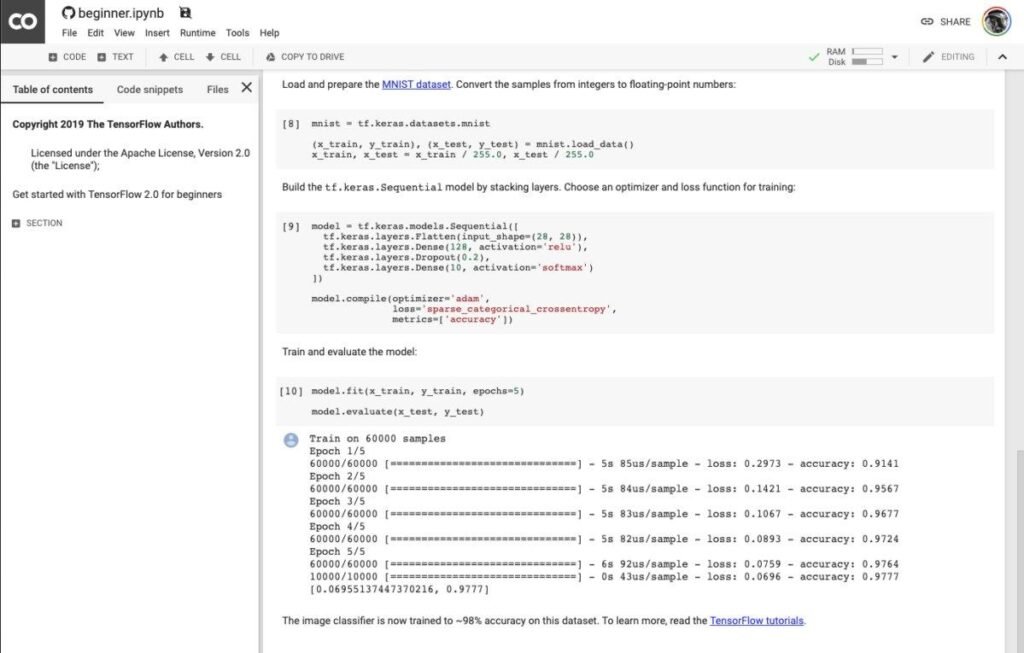
You can use Google Colab to follow this tutorial without installing Python locally.
- Visit https://colab.research.google.com/
- Sign in with your Google account.
- Create a new notebook.
- Add a code cell.
- Copy the Python code from the following sections into the notebook and run each cell in order.
If you prefer to work on your computer, install Python and use an editor such as Visual Studio Code.
For a beginner, Google Colab is often the simpler starting point.
Step 4: Create Your First Dataset
We will use a small example dataset to demonstrate the process. For the main training exercise, we will also use scikit-learn’s built-in diabetes dataset, which contains numerical measurements and a disease-progression target.
This dataset is useful for demonstrating regression, but it is not a house-price dataset. The model trained with it will predict a numerical disease-progression measure, not house prices. The example teaches the same training workflow without pretending that illustrative property prices are real market data.
Run the following code to import the necessary libraries and load the dataset.
from sklearn.datasets import load_diabetes
import pandas as pd

# Load a sample dataset
dataset = load_diabetes(as_frame=True)

# Store the input features in X
X = dataset.data

# Store the target values in y
y = dataset.target

# Display the first five rows
print(X.head())

# Display the first five target values
print(y.head())
Explanation of the code
load_diabetes()loads a sample dataset provided by scikit-learn.as_frame=Truereturns the data in a pandas-friendly format.Xcontains the input features.ycontains the target values.head()displays the first five rows or values.
The dataset is included with scikit-learn, so you do not need to download a separate data file for this demonstration.
Step 5: Split the Dataset into Training and Testing Data

You should not evaluate a model only on the examples it used during training. Doing so can make its performance look better than it really is on unfamiliar data.
Instead, divide the dataset into training and testing portions.
The training data is used to fit the model. The testing data is held back until evaluation.
Run this code:
from sklearn.model_selection import train_test_split

X_train, X_test, y_train, y_test = train_test_split(
    X,
    y,
    test_size=0.2,
    random_state=42
)

print("Training examples:", len(X_train))
print("Testing examples:", len(X_test))
What does this code mean?
Xcontains the input features.ycontains the target values.test_size=0.2reserves 20% of the examples for testing.random_state=42makes the random split reproducible.X_trainandy_trainare used to train the model.X_testandy_testare held back to evaluate it.
A separate validation set can also be useful when comparing models or tuning settings. For this introductory example, we will keep the workflow simple.
Step 6: Choose a Machine-Learning Algorithm
An algorithm is the method used to learn patterns from training data.
Different algorithms work well for different problems.
| Algorithm | Typical use |
|---|---|
| Linear regression | Predicting numerical values |
| Logistic regression | Classification |
| Decision tree | Classification or regression |
| Random forest | Classification or regression |
| K-means clustering | Discovering groups in data |
| Neural network | Learning complex patterns across many kinds of tasks |
For this demonstration, we will use linear regression.
Linear regression attempts to learn a mathematical relationship between input features and a numerical target.
It is a useful starting point because the code is simple and its predictions are relatively easy to interpret.
Step 7: Train Your First AI Model
Now you will train the model using the training data.
from sklearn.linear_model import LinearRegression

# Create the model
model = LinearRegression()

# Train the model
model.fit(X_train, y_train)

print("Model training completed!")
Explanation
The first line imports the linear regression algorithm.
model = LinearRegression() creates the model object.
model.fit(X_train, y_train) trains the model by learning relationships between the input features and the target values.
The message confirms that the code completed without an error. It does not, by itself, prove that the model makes accurate predictions.
This is an important distinction: training a model and building a useful model are not the same thing. You must evaluate its performance before deciding whether it is suitable for use.
Step 8: Make Predictions with Your AI Model
After training, you can ask the model to predict target values for examples it has not seen during training.
# Make predictions on the test data
predictions = model.predict(X_test)

# Display the first five predictions
print(predictions[:5])
The output will contain predicted numerical values.
The predictions are estimates generated from patterns learned during training. They will not necessarily match the correct values exactly.
For this example, the values represent predicted disease-progression measures from the sample dataset. They are not medical diagnoses or predictions of an individual’s future health.
You can compare the predictions with the actual target values:
comparison = pd.DataFrame({
    "Actual": y_test.iloc[:5].values,
    "Predicted": predictions[:5]
})

print(comparison)
This table helps you see how close the model’s predictions are to the observed values.
Step 9: Evaluate Your AI Model
A model can produce predictions and still perform poorly. Evaluation helps you measure how useful those predictions are.
For regression, common metrics include mean absolute error (MAE), mean squared error (MSE), and the coefficient of determination (R²).
Mean absolute error
MAE measures the average absolute difference between the model’s predictions and the actual values. Lower values generally indicate smaller prediction errors.
Mean squared error
MSE calculates the average of the squared prediction errors. Larger errors receive more weight because the errors are squared.
R² score
R² measures how well the model’s predictions account for variation in the target values relative to a baseline that predicts the target mean. Higher values generally indicate a better fit, but an R² value can be negative if the model performs worse than that baseline.
Use the following code to calculate the metrics:
from sklearn.metrics import (
    mean_absolute_error,
    mean_squared_error,
    r2_score
)

mae = mean_absolute_error(y_test, predictions)
mse = mean_squared_error(y_test, predictions)
r2 = r2_score(y_test, predictions)

print("Mean Absolute Error:", round(mae, 2))
print("Mean Squared Error:", round(mse, 2))
print("R² Score:", round(r2, 2))
The code prints the evaluation results for your test data. The exact numbers are produced when you run the notebook.
Do not judge a model using only one metric. Consider the problem, the scale of the target, the cost of errors, and how the model compares with a simple baseline.
Step 10: Improve Your AI Model
Your first model is a starting point. You may be able to improve it by changing the features, algorithm, training approach, or data quality.
1. Improve the quality of your data
Incorrect, duplicated, irrelevant, or unrepresentative data can reduce model performance.
Check for missing values, inconsistent formats, duplicate records, and errors before training.
2. Choose relevant features
Features should contain useful information for the problem you are solving.
For example, a real house-price model might benefit from location, property size, number of bedrooms, age of the building, and recent comparable sales.
Do not automatically include every available column. Irrelevant features can complicate a model without improving its predictions.
3. Try different algorithms
Compare linear regression with other suitable algorithms, such as decision trees or random forests.
Use the same evaluation approach so you can make a fair comparison.
4. Tune model settings
Many algorithms have settings that affect their behavior. Selecting suitable values for these settings is called hyperparameter tuning.
Use training and validation data or cross-validation to compare settings. Keep the final test data separate until you have finished selecting the model.
5. Check for overfitting
Overfitting occurs when a model learns details or noise in its training data that do not generalize well to new examples.
A model that performs extremely well on training data but poorly on test data may be overfitting.
To reduce overfitting, consider using more representative data, simpler models, regularization, or appropriate cross-validation.
Step 11: Visualize the Model’s Predictions
Charts can help you understand model performance more easily than numbers alone.
For a regression model, a useful chart compares actual values with predicted values. Points close to the diagonal line indicate predictions close to the observed values.
Run the following code in your notebook:
import matplotlib.pyplot as plt

plt.figure(figsize=(8, 6))

plt.scatter(
    y_test,
    predictions,
    alpha=0.7
)

# Draw a reference line
minimum = min(y_test.min(), predictions.min())
maximum = max(y_test.max(), predictions.max())

plt.plot(
    [minimum, maximum],
    [minimum, maximum],
    linestyle="--"
)

plt.xlabel("Actual values")
plt.ylabel("Predicted values")
plt.title("Actual vs Predicted Values")
plt.grid(True)
plt.tight_layout()
plt.show()
The scatter plot shows the actual values on the horizontal axis and the model’s predictions on the vertical axis.
The dashed line represents perfect predictions. Points near the line indicate closer predictions, while points farther away indicate larger errors.
This visualization is useful for exploring model performance, but it does not replace numerical evaluation.
Step 12: Save Your Trained AI Model
After training and evaluating a model, you may want to save it so you can reuse it without training it again.
Python’s joblib library can save many scikit-learn models.
import joblib

# Save the trained model
joblib.dump(model, "ai_model.joblib")

print("Model saved successfully!")
To load the model later:
import joblib

# Load the saved model
loaded_model = joblib.load("ai_model.joblib")

print("Model loaded successfully!")
Only load model files from trusted sources. Pickle-based formats, including formats commonly used by joblib, can execute code during loading.
If you are deploying a model, keep the model file and the exact feature preparation steps consistent. Your application must provide inputs in the same format and order the model expects.
Step 13: Deploy Your AI Model
Deployment means making a trained model available for practical use.
For example, you could build a website where a user enters information and receives a prediction. You could also create an API that lets another application send input data to the model and receive a response.
Common deployment options include:
- Streamlit: Build simple interactive data applications.
- FastAPI: Build APIs that other applications can call.
- Flask: Build lightweight Python web applications.
- Cloud hosting: Run your application on a suitable cloud platform.
Websites:
- Streamlit: https://docs.streamlit.io/
- FastAPI: https://fastapi.tiangolo.com/
- Flask: https://flask.palletsprojects.com/
A deployed model needs more than working prediction code. Consider input validation, authentication, access control, privacy, logging, dependency updates, monitoring, and the cost of running the service.
For sensitive applications, additional testing and expert review may be necessary before real users rely on its outputs.
Step 14: Common Mistakes to Avoid When Building AI Models
Beginners often encounter challenges that can be avoided with careful planning.
Using too little or poor-quality data
A model trained on limited or unrepresentative examples may not perform well on new data.
Training and testing on the same data
This can give an overly optimistic estimate of model performance. Keep evaluation data separate from training.
Choosing the wrong algorithm
An algorithm that works well for one problem may not suit another. Identify the type of prediction you need before selecting a model.
Ignoring data leakage
Data leakage occurs when information that would not legitimately be available at prediction time influences training or evaluation. It can make performance appear much better than it will be in practice.
Failing to consider bias and privacy
Data may contain unfair patterns or sensitive information. Collect only what is necessary, protect personal data, and assess whether the model’s outputs could unfairly affect people.
Deploying without monitoring
Real-world data and user behavior can change over time. Monitor performance and investigate when the model’s predictions become less reliable.
Step 15: Real-World Applications of AI Models
AI models can support many different industries.
Healthcare: Models can assist with research, medical image analysis, and other clinical support tasks. Medical applications require rigorous validation and appropriate professional oversight.
Finance: Models can help identify suspicious transactions, assess risks, and forecast trends.
Agriculture: Models can analyze crop images, weather data, and soil measurements to support agricultural decisions.
Education: Models can support learning recommendations, automated feedback, and educational content tools.
Retail and e-commerce: Models can recommend products, forecast demand, and help analyze customer behavior.
Cybersecurity: Models can help identify suspicious network activity, malware patterns, and potential security incidents.
The suitability of a model depends on its performance, the available data, the risks involved, and how its predictions will be used.
Step 16: How to Make Money with AI Models

Learning to build AI models can create opportunities to develop useful products and services. However, income is not guaranteed, and commercial success depends on solving a real problem. You can explore more of our articles on making money with artificial intelligence
Possible approaches include:
- Freelance machine-learning projects: Help businesses analyze data, automate suitable tasks, or develop prediction systems.
- AI-powered web applications: Build a product that uses a model to solve a specific customer problem.
- Business analytics services: Help organizations organize data, create forecasts, and understand patterns.
- Educational content: Publish tutorials, courses, or practical guides about AI development.
- Model integration: Integrate existing AI models into websites and business applications.
Start by identifying a problem people or businesses actually face. Build a small prototype, test it with realistic data, and gather feedback before investing heavily in a commercial product.
Once you understand how to train an AI model, you can explore more advanced applications by learning how to build an AI agent from scratch. AI agents can combine models with tools, instructions, and memory to complete tasks and automate workflows.
Learning AI can also create opportunities to develop useful digital services. Explore our guide on how to make money with artificial intelligence to discover practical ways to apply AI skills to projects and business ideas.
Frequently Asked Questions
1. Can I build an AI model as a beginner?
Yes. Start with a small supervised-learning project using Python and scikit-learn. Learn how to prepare data, train a model, evaluate its performance, and interpret its predictions before moving to more advanced projects. how to build an AI agent from scratch
2. Do I need to know Python to build an AI model?
Python is not the only option, but it is one of the most common languages for machine learning. Basic knowledge of variables, lists, functions, libraries, and data structures will make the process easier.
3. Is it free to build an AI model?
You can begin with free tools such as Google Colab, Python, and scikit-learn. More complex projects may require paid computing resources, specialized datasets, or commercial software.
4. How long does it take to build an AI model?
A simple demonstration can be completed in an afternoon. A reliable model for real-world use may take weeks or months, depending on data availability, problem complexity, testing, and deployment requirements.
5. Can I build an AI model without a powerful computer?
Yes. Many beginner machine-learning projects run on ordinary computers, and browser-based environments such as Google Colab provide access to hosted computing resources. Large deep-learning models may require more powerful hardware.
6. What is the difference between an AI model and an AI agent?
An AI model is the component that makes predictions, generates outputs, or learns patterns from data. An AI agent is a system that can use a model along with tools, instructions, and sometimes memory to work toward a goal.
For example, a language model may generate an answer, while an AI agent may use that model to plan steps, search information, and perform permitted actions.
Read our related tutorial on how to build an AI agent from scratch to understand how these systems work together.
7. Can I build an AI model from scratch?
Yes, but the phrase can mean different things. You can implement a learning algorithm yourself, train a model using an existing algorithm, or train a large neural network from random initial parameters. These approaches have very different levels of complexity and resource requirements.
For beginners, training a small model using a well-established library is a practical way to learn the full machine-learning process.
8. What is the best AI model for beginners?
There is no single best model for every task. Linear regression is a good starting point for numerical prediction, while decision trees and logistic regression are useful for many classification problems. The best choice depends on the data and the goal.
Final thought
Building an AI model is a practical way to understand how artificial intelligence works. By following the right steps, you can progress from a simple Python example to more advanced machine-learning applications.
Start by identifying a clear problem, collecting suitable data, preparing your features, selecting an appropriate algorithm, and training your first model. Then evaluate its performance, investigate its limitations, and improve it before considering deployment.
You do not need to begin with a complicated neural network or an expensive computer. A small, well-understood project can teach you the foundations you need to build more capable systems.
Your next step: Open Google Colab, run the example in this guide, and experiment with the code. Once you understand the basic workflow, try a project of your own.
If you found this guide useful, share it with someone learning AI, leave a comment about the model you want to build, and explore our other tutorials on artificial intelligence, Python programming, and technology. Read more about how to make money online
Disclaimer: This article is for educational purposes only. Model performance depends on data quality, design, and testing. Do not use an experimental model for high-stakes decisions without appropriate validation, safeguards, and expert oversight.